Welcome to our community

Be a part of something great, join today!

  • Hey all, just changed over the backend after 15 years I figured time to give it a bit of an update, its probably gonna be a bit weird for most of you and i am sure there is a few bugs to work out but it should kinda work the same as before... hopefully :)

Birger - EF232LensLibrary19x

Windows 7 64bit & Manual update of Birger Impero

Windows 7 64bit & Manual update of Birger Impero

Birger BEI won't update Impero through Windows as of Jan. 9, 2010. To update follow the .pdf that is available on the Birger site.

*****Please note the following important additions***********

7.
b) type sn<CR> to get your Impero serial number. Take the last 5 digits of the serial number and put it after the xe command in step #8.​


After reading the above your ready to go. Wait though, Windows 7 doesn't have HyperTerminal so what do you do?
Do what I did, Google.
This is what I found:
http://digitizor.com/2009/08/29/how-to-install-the-winxp-hyperterminal-client-on-windows-vista-or-windows-7-free/

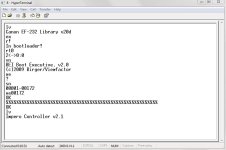
After you have HyperTerminal on Windows 7, open it up and name your connection whatever you want and select the "COM #" that corresponds to the one listed under your Bluetooth "Open Setting".
It will connect. Now disconnect-->File-->Properties-->Settings-->ASCII Setup-->check off, "Send line ends with line feeds", "Echo typed characters locally" and "Append line feeds to incoming line ends".-->OK-->OK

Now taking into account what I said at the top you are ready to follow the .pdf instructions from the Birger site on manually updating the Impero.
 

Attachments

  • hyp term screen.JPG
    hyp term screen.JPG
    64 KB · Views: 0
Hi, we've got few problems with our impero...
first we have noticed that it doesn't work with the wire, the impero is not recognize by the birger mount (sync and V-A leds are switched off).
Secondly when we use the remote without the wire, the advanced functions such as "limit knob" and "limit lens" do not work.
Does anyone have the same problems? And do you know where I can find good and clear instructions in order to use the Impero?
Thanks

Ben
 
--> Canon 85mm f/1.8 -- work, some image jump with faster focus changes. On nice smooth, slow focus pulls I haven't noticed any image shift.

--> Canon 20-35 f/2.8L -- mine won't work. Have to test it out on a Canon DSLR.
 
Anyone have the same issues as below:
(when I say, "try iris" or "try focus", I mean rotating the wheel)

Canon 16-35mm f/2.8L
  1. Power up Camera
  2. Power up Impero (bluetooth)(lithium-ion batteries, 12 hrs old)
  3. FN+CAL to get distance to read right
  4. Try focus=no go
  5. CAL
  6. try focus=no go
  7. CAL
  8. try focus=no go
  9. CAL
  10. try focus=no go
  11. CAL
  12. try focus=go

Select Iris
  1. try iris=no go
  2. CAL=go

Select F
  1. try focus=no go
  2. CAL
  3. try focus=no go
  4. CAL
  5. try focus=no go
  6. CAL
  7. try focus=no go
  8. Ten more times=no go
  9. FN+CAL
  10. try focus=no go
  11. CAL
  12. try focus=no go
  13. CAL
  14. try focus=go
 

Attachments

  • 63f451fb-67f2-4159-a3d6-5df06697fd8c.jpg
    63f451fb-67f2-4159-a3d6-5df06697fd8c.jpg
    60 KB · Views: 0
Any news on Birger function with Build 30? Anybody tried it yet?
 
Mine is working perfectly after the upgrade. No issues.
 
Really breathed a sigh of relief on this one.

Despite the past drama, I hope RED and Birger can continue to cooperate
enough in supporting those depending on this unbeatable system.
Yes the new build 30 really adds some useful features(MULTI & Color Science).
Thanks for what's been accomplished.

Brian Timmons
britim-media
 
Does everyone have birger/canon lens data visible in the viewfinder, I can't get it to show on build 21 any tips on why this might be. Also I've been starting up with the Birger power cable disconnected to the rear red gpio port to prevent record errrors, is this still required for build 30 ?
 
Any one else with a Birger on build 30 getting dropped frames when racking focus ? I have the lens data visible on the LCD. Recording to CF so it's not vibration.
 
I rolled back

I rolled back

Does everyone have birger/canon lens data visible in the viewfinder, I can't get it to show on build 21 any tips on why this might be. Also I've been starting up with the Birger power cable disconnected to the rear red gpio port to prevent record errrors, is this still required for build 30 ?

I upgraded all three of my cameras to build 21 and lost lens data so I rolled back. It now sounds like 30 offers lens data but there is some discussion regarding dropped frames. I keep you up to date if I upgrade to 30.
 
No problems whatsoever with build 30. Lens data, the works. I am shooting a lot of stuff right now with 70-200mm 2.8 L, 24-70mm 2.8 L and 50mm 1.2 L. They all run smooth like oil on the water. Getting some amazing city/nature footage. Can't think of a better FF-set up for these kind of docu shots. Wouldn't mind adding a M-X sensor though. That being said, I am not putting much faith in Canon's non-L-lenses. They usually work but their built quality don't really hold up for work out in the field.
 
Our Birger keeps dropping it's bluetooth connection with my 15" Macbook Pro. This is stopping me from updating the Impero firmware (I don't have a USB-Lemo). Anyone with thoughts?

TIA.
 
Any comments?

Anyone have the same issues as below:
(when I say, "try iris" or "try focus", I mean rotating the wheel)

Canon 16-35mm f/2.8L
  1. Power up Camera
  2. Power up Impero (bluetooth)(lithium-ion batteries, 12 hrs old)
  3. FN+CAL to get distance to read right
  4. Try focus=no go
  5. CAL
  6. try focus=no go
  7. CAL
  8. try focus=no go
  9. CAL
  10. try focus=no go
  11. CAL
  12. try focus=go

Select Iris
  1. try iris=no go
  2. CAL=go

Select F
  1. try focus=no go
  2. CAL
  3. try focus=no go
  4. CAL
  5. try focus=no go
  6. CAL
  7. try focus=no go
  8. Ten more times=no go
  9. FN+CAL
  10. try focus=no go
  11. CAL
  12. try focus=no go
  13. CAL
  14. try focus=go
 
Any comments?

Shawn, this could be a battery problem. In which temperature you discovered the symptoms?

I've found that rechargeable NiMH AAA-size batteries work best with the Impero unless it gets very cold. Then no batteries seem to work out. But this is not a major problem as the knob itself gets stucken in cold as well so in cold the Impero is like a convertible car.

Upgraded also to build 30. Lens data etc. work as it should.
 
Back
Top