Welcome to our community

Be a part of something great, join today!

  • Hey all, just changed over the backend after 15 years I figured time to give it a bit of an update, its probably gonna be a bit weird for most of you and i am sure there is a few bugs to work out but it should kinda work the same as before... hopefully :)

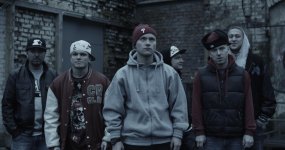
BIG PROBLEMS WITH PICTURE QUALITY.......

Your tint, ISO and color temperature were bouncing all around, but, all in the ballpark. Unless you are stylizing an aesthetic maybe stick to around 800 ISO. I tried to match a kind of hybrid grade from the examples you listed.
 

Attachments

  • posse.0000000.jpg
    posse.0000000.jpg
    92.4 KB · Views: 0
Heres a few variations. Will do proper grades when I get home on the workstation tonight. From Resolve:
8_1_1.4.3.jpg

7_1_1.4.5.jpg

7_1.4.1.jpg

2_1.1.2.jpg

1_1.1.1.jpg

23_1.1.6.jpg

20_1.4.12.jpg

22_1.3.3.jpg

19_1.4.11.jpg

18_1.4.10.jpg

17_1.4.9.jpg

16_1.1.5.jpg

15_1.2.5.jpg

14_1.4.8.jpg

13_1.4.7.jpg

12_1.2.4.jpg

11_1.1.4.jpg

10_1.2.3.jpg

9_1.4.6.jpg

6_1.3.2.jpg

5_1.3.1.jpg

3_1.2.2.jpg

4_1.2.1.jpg


Being a RAW camera, the picture quality has more to do with how you shoot it and expose it rather than an issue with the camera. The cleaner the original is (no clipping or crushing and good exposure) the more you can adjust it to match anything in post. If you shoot your images the same way as you did on the dslr, what do you expect to change? The only difference is the size of the picture at that point! Also, your lenses are really soft or maybe the focus was just off a bit.
 
OH COME ON GUYS EVERYBODY FROM YOU MADE IT SO AMAZING!!!!!! BUT HOW!??!?!! ONLY IN REDCINE?!?!!?
8_1_1.4.3.jpg

7_1_1.4.5.jpg

7_1.4.1.jpg

2_1.1.2.jpg

1_1.1.1.jpg

23_1.1.6.jpg

20_1.4.12.jpg

22_1.3.3.jpg

19_1.4.11.jpg

18_1.4.10.jpg

17_1.4.9.jpg

16_1.1.5.jpg

15_1.2.5.jpg

14_1.4.8.jpg

13_1.4.7.jpg

12_1.2.4.jpg

11_1.1.4.jpg

10_1.2.3.jpg

9_1.4.6.jpg

6_1.3.2.jpg

5_1.3.1.jpg

3_1.2.2.jpg

4_1.2.1.jpg


Being a RAW camera, the picture quality has more to do with how you shoot it and expose it rather than an issue with the camera. The cleaner the original is (no clipping or crushing and good exposure) the more you can adjust it to match anything in post. If you shoot your images the same way as you did on the dslr, what do you expect to change? The only difference is the size of the picture at that point! Also, your lenses are really soft or maybe the focus was just off a bit.[/QUOTE]
 
I didn't even open RCX. Used Davinci Resolve which has all the metadata RAW controls built in. You can download the free version here. You have to know how to color correct to get these results, plus Redcine X has no secondaries so your just making an overall correction.
 
I AM REALLY SURPRISED!!! OUR MATERIAL CAN LOOK SO GREAT!?!??! I COULDNT EVEN IMAGINE!
 
BUT HOW TO PUSH SUCH QUALITY!??

You have to learn how to color correct. It's not just a filter your drop on and then your done. It's about making sure everything is balanced before you even start doing color. You need to make sure your white balance, ISO, and color balance is correct first, or everything you do after that will be screwed up.
 
You have to learn how to color correct. It's not just a filter your drop on and then your done. It's about making sure everything is balanced before you even start doing color. You need to make sure your white balance, ISO, and color balance is correct first, or everything you do after that will be screwed up.

and how to make the picture quality so sharp ?!
 
I had to cheat on the skies and add a layer of blue gradient because the skies in your original shots were way blown out and overexposed. There was no way to recover them even being a RAW camera. The shots with the city in the background were way overexposed. Next time shoot at 800ISO and use ND filters to keep from clipping. That shot would look a lot better.
 
I had to cheat on the skies and add a layer of blue gradient because the skies in your original shots were way blown out and overexposed. There was no way to recover them even being a RAW camera.

your image is much sharper than mine))) so beautiful)))

maybe you can save a preset form me?
 
your image is much sharper than mine))) so beautiful)))

maybe you can save a preset form me?

there isn't a "preset." It also makes it look sharper because those are 4K images being viewed in such a small size on this site. I only used 3 points of sharpening in Resolve.
 
there isn't a "preset." It also makes it look sharper because those are 4K images being viewed in such a small size on this site. I only used 3 points of sharpening in Resolve.

but if in few steps first things i have to do now with my footage fo example from the roof?

change iso? exposure ? curves? how to get such shining look?
 
You have to shoot it properly first. Proper exposure in daylight/ sunlight usually at 800ISO (this prevents you from overexposing and blowing out the sky). Then you can do anything you want to it and get a bunch of different looks. In your shot there aren't even any clouds visible because it is so overexposed everything is just white. There is nothing you can do in those areas now. So you have to shoot it properly in the first place.

Watch some color correction tutorials on youtube so you get an idea of the coloring process. Then you will know what corrections to make and when. Like I said before, you have to have everything balanced before you begin coloring (ISO, White Balance, and Color Channels), then you can do whatever you want to it. Curves adds contrast, levels adjust exposure for lows, mids, and highs. I don't use curves much because it makes it look too digital to me. Your just going to have to learn the process cause every shot is different and you will never be making the same corrections.

I changed ISO to 320, which is the lowest you should ever shoot with, and I changed the white balance of your shot before I started. The rest is creative color correction.
 
You have to shoot it properly first. Proper exposure in daylight/ sunlight usually at 800ISO (this prevents you from overexposing and blowing out the sky). Then you can do anything you want to it and get a bunch of different looks. In your shot there aren't even any clouds visible because it is so overexposed everything is just white. There is nothing you can do in those areas now. So you have to shoot it properly in the first place.

Watch some color correction tutorials on youtube so you get an idea of the coloring process. Then you will know what corrections to make and when. Like I said before, you have to have everything balanced before you begin coloring (ISO, White Balance, and Color Channels), then you can do whatever you want to it. Curves adds contrast, levels adjust exposure for lows, mids, and highs. I don't use curves much because it makes it look too digital to me. Your just going to have to learn the process cause every shot is different and you will never be making the same corrections.

thnx very much!!!
 
thnx very much!!!

no problem, wish I could help more but it's one of those things where you have to understand color correction and what changes to make for each shot. What works color wise for one shot wont work for the next, so you just need to learn the basics.

On your first shot I changed ISO to 320, which is the lowest you should ever shoot with, and I changed the white balance of your shot before I started. The rest is creative color correction. No curves.
 
Great stuff.

Hi Matt. The guy with the Merc, is my shot... :)

50 mm Master (if I remember), but def on the day of mourning after the July 22th murders in Norway...
People were discussing everywhere.

But that's fine... :)
 
Back
Top