Welcome to our community

Be a part of something great, join today!

  • Hey all, just changed over the backend after 15 years I figured time to give it a bit of an update, its probably gonna be a bit weird for most of you and i am sure there is a few bugs to work out but it should kinda work the same as before... hopefully :)

Best Monitor for Color Grading?

Zeb B

Well-known member
Joined
Sep 30, 2011
Messages
4,933
Reaction score
1
Points
0
Location
In The Moment
I have the NEC PA271W currently but looking to upgrade for critical color grading via Resolve. Suggestions?
 
Lots of threads on this, try doing a search before you post. :)

Just kidding dude, I wanted an update for this question too. My last research yielded the "Flanders Scientific 24." $5000. It only uses 50 watts and can be used for on set monitoring as well with battery plate on back. I believe a RR only works HD SDI out for RCX, so you'll need a AJA KONA 3 CARD for resolve.

But why buy now? Wait a few months and get a 4k Red Ray for 10 grand. Might be out of your price range but we are so close to 4k monitors, why settled for 2k?
 
Last edited:
I have the NEC PA271W currently but looking to upgrade for critical color grading ...

Just curious: Have you tried using your NEC with their Spectraview calibration kit and their Multiprofiler software? I am kind of thinking about replacing my aging Dells with a NEC PA301W-BK 30" monitor, (with a Spectraview profiler kit and the Multiprofiler software that supposedly will allow the monitor to be profiled to Rec. 709), and also getting a Panasonic plasma, like a BT300 or VT50.

___________________________________
Scarlet X # 1859 “Bettie Page”
“… preparing to ‘whip’ the competition …”

Zeiss Lenses:

CY 21/2.8
ZF 28/2.0
CY 35-70/3.4
CY 50/1.4
ZF100/2.0

Nikon Lenses:
G 14-24/2.8
G 24-70/2.8
D 80-200/2.8

Tokina Lenses:

11-16/2.8
 
Blackmagic Decklink Extreme3D is running on 3 of my MacPros fine with it.
 
Just curious: Have you tried using your NEC with their Spectraview calibration kit and their Multiprofiler software? I am kind of thinking about replacing my aging Dells with a NEC PA301W-BK 30" monitor, (with a Spectraview profiler kit and the Multiprofiler software that supposedly will allow the monitor to be profiled to Rec. 709), and also getting a Panasonic plasma, like a BT300 or VT50.

I've been using the Spectraview II software with iOne Pro 2 hardware (not the dedicated NEC calibration hardware) to calibrate an NEC PA271W; I've been happy with the results even though the 271W is
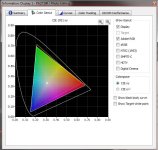
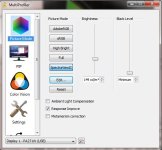
8 bit through the display port with a GTX680 GPU as opposed to the true 10 bit of the PA301 with a quadro card. I'm not sure my display can be profiled to Rec 709. I've seen reviews that said it could and reviews that said it couldn't. I've attached snips of the selectable Spectraview color gamuts and the MultiProfiler picture modes.

And you don't have to buy the complete Spectraview kit;
if you already have a compatible calibration sensor, or if you want a more flexible setup to calibrate printers as well, you can buy the Spectraview software separately.


Attachments

  • Spectraview_II_Gamuts.JPG
    Spectraview_II_Gamuts.JPG
    64.7 KB · Views: 0
  • MultiProfilerModes.JPG
    MultiProfilerModes.JPG
    44 KB · Views: 0
Just curious: Have you tried using your NEC with their Spectraview calibration kit and their Multiprofiler software? I am kind of thinking about replacing my aging Dells with a NEC PA301W-BK 30" monitor, (with a Spectraview profiler kit and the Multiprofiler software that supposedly will allow the monitor to be profiled to Rec. 709), and also getting a Panasonic plasma, like a BT300 or VT50.


I've got the 24" NEC and have used the Spectraview calibration. It performs quite well for the price. I use my NEC in conjunction with a Cine-tal and the NEC holds up better than expected.

As far as a higher end grading monitor... the Flanders are popular, as are Pany Plasmas. I'd suggest spending the minimum right now (as the real winners are the Sony OLED and Dolby both upwards of 25K) as we are likely to see "affordable" pro 4K monitors hitting in 6-12 months.
 
Sony PVM 1741 or 2541. I've been using the 2541 a lot lately, and I want to purchase one myself. I am however still concerned about burn in especially if you're working with cropped footage or wide aspect ratio, but I haven't heard one report about burn in yet despite what the manual says.
 
are there any 4k solutions for cc work at this time? Are there any HS SDI cards that do 4k real time monitoring?
 
are there any 4k solutions for cc work at this time? ...

Quite a few monitors were on display at NAB for RED's 4K competition. I particularly liked the Dolby monitor (about $40,000.00) and the EIZO (about $35,000.00). Now, just how long it will take for them to come down in price in another thing.

___________________________________
Scarlet X # 1859 “Bettie Page”
“… preparing to ‘whip’ the competition …”

Zeiss Lenses:

CY 21/2.8
ZF 28/2.0
CY 35-70/3.4
CY 50/1.4
ZF100/2.0

Nikon Lenses:
G 14-24/2.8
G 24-70/2.8
D 80-200/2.8

Tokina Lenses:

11-16/2.8
 
Lots of threads on this, try doing a search before you post. :)

Just kidding dude, I wanted an update for this question too. My last research yielded the "Flanders Scientific 24." $5000. It only uses 50 watts and can be used for on set monitoring as well with battery plate on back. I believe a RR only works HD SDI out for RCX, so you'll need a AJA KONA 3 CARD for resolve.

But why buy now? Wait a few months and get a 4k Red Ray for 10 grand. Might be out of your price range but we are so close to 4k monitors, why settled for 2k?

YES!!! I am also looking forward to the red projector. BTW, where can I read more information about RED Projector, can it support 60FPS or 48FPS 4K with 3D? If it does, does it have to be come out from red ray? As I know, DCI do not support 4K 3D 48FPS together, at least I do not know any interface support that.
 
I'm surprised that RED doesn't have a monitor solution for 4K...
 
I particularly liked the Dolby monitor (about $40,000.00) and the EIZO (about $35,000.00). Now, just how long it will take for them to come down in price in another thing.
From the time Dolby monitor had been released, the price has hardly changed. So, I wouldn't be holding my breath for that any time soon. When it comes to pricing, not every company operates like Red or Blackmagic:-)
 
I have the 24" model, and think its pretty good, but seems a little over saturated. Anyone else feel the same way? I've calibrated it, but still seems too vibrant, and I'm greyed out of the saturation control on the monitor.
 
Quite a few monitors were on display at NAB for RED's 4K competition. I particularly liked the Dolby monitor (about $40,000.00) and the EIZO (about $35,000.00).
Small correction: the Dolby PRM-4200 monitor cannot do 4K. (Also, I was told the price has gone down to $35,000.) It's just a straight 1920x1080 HD monitor. The 4200 can handle 12-bit color and it can also do up to 60fps, and is a very fine monitor. I currently know of no facility in LA that routinely color-corrects in 4K on 4K monitors; what I generally see being done is that they color-correct with 2K proxies, and then once that's approved, they apply the same corrections to 4K files and output those for final delivery.

Eventually, once computers get much faster and storage gets much, much faster, 4K will be more practical for post. At the moment, it's very time-consuming, especially for fast-delivering TV projects and feature projects.

My opinion is that almost all LCD flat panel displays, especially inexpensive computer displays, are completely unsuited for color correction because of their limited viewing angles, and the difficulty in calibrating them accurately for Rec709, XYZ, or P3 color space.
 
From the time Dolby monitor had been released, the price has hardly changed. So, I wouldn't be holding my breath for that any time soon. When it comes to pricing, not every company operates like Red or Blackmagic:-)

and the sony oled's seem to be picking up more steam than the dolby ever did. even the full bvm versions are almost half the price. OLEDS still have their issues, but man do they look good.

pvm 2541 owner. best bang for the buck imho after a good calibration. probably not gonna ever go back to lcd for critical color every again. oled or projector, that's it. and the entire pvm series is priced very aggressively. they are very close out of the box, but the reason they are so cheap is because of the quality control. they need a solid calibration out of the box, and a more often than the BVM series.
 
Back
Top