Welcome to our community

Be a part of something great, join today!

  • Hey all, just changed over the backend after 15 years I figured time to give it a bit of an update, its probably gonna be a bit weird for most of you and i am sure there is a few bugs to work out but it should kinda work the same as before... hopefully :)

Best CC tool in Premiere

Thundercross

Well-known member
Joined
Oct 27, 2007
Messages
53
Reaction score
0
Points
0
Okay soon I will have 4K in Premiere via Prospect. This is great. I was wondering about colour correction, it seems pointless to have all that colour information and throw it away right...

My question is with regards to Premieres built in Color Correction tools.

1) Is there any limit to the CC effects (fast color corrector and the 3 way color corrector) in PPRO, like 8bit or any limitation? Is it and should it be 32 bit.

2) If the native CC effects are 32 bit can I still use them and achieve good quality?

3) What other tools, like Synthetic Aperture, Colorista etc are there that I should look at?

I do not own AfterFX just so you know...

Thanks for you help. :w00t:
 
Color Finesse is AWESOME! I graded a 45 minute documentary on it on After Effects which was made for theather projection. I could not believe how sophisticated the looks were and how easy (3 wheel interface) the program is. They used to work well with Cineform but apparrently this is not so anymore, so I would call them directly and ask them about the limitations of working in Premiere with the Cineform codec at 4K. I myself am hoping this will work because it is the set up I wanted to implement when we start shooting RED.
 
Didn't work well in Premiere CS3, some incompatibility.

But the guys got it working in AE.

I believe that CF2 + the Magic Bullet Suite is, probably, all that one would need for the Adobe platform.

And a few other opensource projects too :).

I think that this Virtualdub\Avisynth thing has a great future in front of it.
 
I think that this Virtualdub\Avisynth thing has a great future in front of it.

Link? Or are you saying Color Finesse in conjunction with Virtual Dub will be a PC workflow solution? (Also wondering if one of the NAB RED surprises won't have to do with an out of the carton render solution, especially for the PC side of things...)
 
Thanks for all your feedback!

Didn't work well in Premiere CS3, some incompatibility.

What exactly did not work and how did it not work?

Anyone else have some answers to my first question of the technical usability of Premieres native CC tools, and if there are any limitations?

Thanks.
 
Slightly off topic, but there is a hidden 3-way CC tool in After Effects (default is 2-way I think), which becomes only visible when you bring in a Premiere project into AE with 3-way CC tool applied. It doesn't show up in the filters list and is not searchable for some reason. But once you extract it from a Pr project in AE, from there on you can cut/copy/paste the filter to any other AE projects and it stays visible.
 
Link? Or are you saying Color Finesse in conjunction with Virtual Dub will be a PC workflow solution? (Also wondering if one of the NAB RED surprises won't have to do with an out of the carton render solution, especially for the PC side of things...)

No, no, no. These are different things. Color Finesse is pro plugin for Adobe.

Avisynth and VirtualDub are free opensource tools, which can be used separately, and sometimes give very good results [given that they're practically for free].

http://www.virtualdub.org/

http://avisynth.org/mediawiki/Main_Page

So, my thought was that you could use these appz and be pretty happy [complete] in your post on a small budget.
 
Color Finesse works well in Windows Premiere Pro CS3. It works at 4K and is one of the few to support 32bit float pixel mode of Adobe (this it huge.) Color Finesse is a good choice. While Avisynth and VirtualDub are assume free tools they are effectively 8-bit for these operations.
 
Thanks Joofa, Karapetkov, and of course, David. All good to know.
 
Hi David, I'll look into Color Finesse then.

Can you comment on the CC effects (fast color corrector and the 3 way color corrector) in PPRO. Is there any limitation? Is it 32 bit?

Can I safely use them?

Thanks.
 
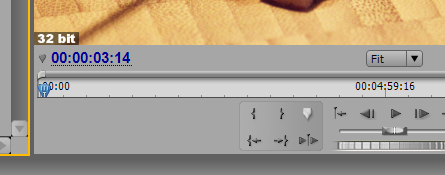
Most of Premiere's own color correction filters are 32-bit, except (strangely) for basic filters like Brightness & Contrast and Levels. In our 3.3 version of Prospect 2K/4K, out before NAB, we report the filter stacks bit-depth so users won't accidently clip or add 8-bit banding to their production. We optionally place this indicator in the bottom left of the program monitor
BitDepth32.png
.
 
Thanks you David! This is what I wanted to know. I only ever use 3 way and fast color corrector.

Essentially there is no loss of quality if I stack a few 32 bit CC effects on one another?

Good to know (or bad...?) that some effects are still 8 bit, is there a list or some sort of tab you guys are keeping as to what effects are still 8 bit in Premiere? There is no mention anywhere of what effects are what bit depth...??

And thanks for including the bit-depth in Prospect 2K/4K 3.3, I am going to purchase it very soon and look forward to it.

Thanks
 
Premiere doesn't report this anywhere that I know, and I could never remember which filters were 8-bit and which 32-bit. So add a 32-bit indicator ages ago for debugging, finally realizing, if I find this useful customers will to.
 
I have notice Premieres native CC effects like Fast Color Corrector and the 3 Way mess up the blacks....

They turn "bluish" in colour, is this right or am I blind or are my monitors messed up.

If I simply place a CC effect on a clip the blacks are no longer "black"...
 
That will depend whether you source is RGB, YUV or 32-bit etc. I have notice that the Fast Color Corrector, does take red super blacks (negative float) and crushes them into low positives, not great for a default behavior. No issue withthe three-way using float here.
 
Yes it appears the 3-way works fine, I just double checked. Source is mostly YUV.

Low positives???

I want some more control with the Cineform CC effects in Premiere... :whistling:
 
I wonder how Colorista compares to Color Finess, other than being less expensive, hehehe.
 
Back
Top