Christoffer Glans
Well-known member
So I did a quick test of shooting Avid MXF files both as primary codec and as proxies. I've found that there's a a few things lacking at this time that needs to be fixed.
First I noticed is that the 444 quality do not work in Avid MediaFiles as MXF media. The latest version of Avid quarantines the 444 file and it's only supported through AMA link, not native media.
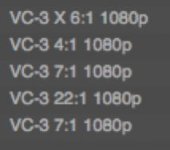
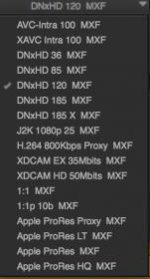
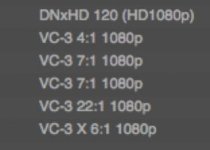
When I try to edit proxy files and then export an offline I cannot export a quicktime reference or a same as source. Traditionally, because Avid doesn't have a great export tool, you export a high quality reference or same as source file to code something else in say Adobe Media Encoder. With the proxy files from the Weapon you can't do either. The reference is black with white noise audio and the same as source file can't be rendered because the quality settings reference a quailty naming that isn't what same as source is using. I've got word that Avid themselves recommended using the "HQ" and "LT" naming for the file types but Avid Media Composer software works with the "DNxHD 36", "DNxHD 120" etc. -quality naming, meaning Avid prompts to re-encode them into say "DNxHD 120" which renders out a same as source file that is incompatible or unplayable. Only option is to code it into something else like re-encoded DNxHD, not re-wrap as a same as source file which means very long coding times.
Usually, when editing in Avid you will do online and grade in another software like Resolve. When exporting an offline video file as well as an EDL list, I put the EDL through Redcine-X and export a high quality DNxHR 444 file as a test. Importing this file as well as the offline file shows that the edit doesn't match between the offline and online. This makes proxy editing with MXF files not possible if going through Redcine-X (latest version). Looking at the timecode length of the Redcine-X rendered timeline and the offline from Avid shows that an additional 7 frames has been added, there are a total of 7 edits including the ending cut of the test timeline and when re-syncing the video tracks at the second cut, the next mismatch occurs at the next cut. This means Redcine-X adds one frame at each cut.
Redcine also gives this LOG about the EDL:
Resolve however seems to link correctly
The most important thing in my opinion right now is to either change the naming in camera to the native naming that Avid Media Composer use. I do not know why Avid prompted Red to use these names for the different codec qualities, but either Avid Media Composer needs to work with them during exports or Red needs to change the naming in the next firmware. As of now, exporting a timeline edited with proxy media from the Weapon will create very long render times for both offlines and online through Avid. It could add hours of unnecessary coding for the post production workflow, especially when working with feature films or episodic content.
First I noticed is that the 444 quality do not work in Avid MediaFiles as MXF media. The latest version of Avid quarantines the 444 file and it's only supported through AMA link, not native media.
When I try to edit proxy files and then export an offline I cannot export a quicktime reference or a same as source. Traditionally, because Avid doesn't have a great export tool, you export a high quality reference or same as source file to code something else in say Adobe Media Encoder. With the proxy files from the Weapon you can't do either. The reference is black with white noise audio and the same as source file can't be rendered because the quality settings reference a quailty naming that isn't what same as source is using. I've got word that Avid themselves recommended using the "HQ" and "LT" naming for the file types but Avid Media Composer software works with the "DNxHD 36", "DNxHD 120" etc. -quality naming, meaning Avid prompts to re-encode them into say "DNxHD 120" which renders out a same as source file that is incompatible or unplayable. Only option is to code it into something else like re-encoded DNxHD, not re-wrap as a same as source file which means very long coding times.
Usually, when editing in Avid you will do online and grade in another software like Resolve. When exporting an offline video file as well as an EDL list, I put the EDL through Redcine-X and export a high quality DNxHR 444 file as a test. Importing this file as well as the offline file shows that the edit doesn't match between the offline and online. This makes proxy editing with MXF files not possible if going through Redcine-X (latest version). Looking at the timecode length of the Redcine-X rendered timeline and the offline from Avid shows that an additional 7 frames has been added, there are a total of 7 edits including the ending cut of the test timeline and when re-syncing the video tracks at the second cut, the next mismatch occurs at the next cut. This means Redcine-X adds one frame at each cut.
Redcine also gives this LOG about the EDL:
EDL - only video edits supported 4
EDL - only video edits supported 5
EDL - only video edits supported 7
EDL - only video edits supported 8
EDL - only video edits supported 10
EDL - only video edits supported 11
EDL - only video edits supported 13
EDL - only video edits supported 14
EDL - only video edits supported 16
EDL - only video edits supported 17
EDL - only video edits supported 19
EDL - only video edits supported 20
EDL - only video edits supported 22
EDL - only video edits supported 23
Resolve however seems to link correctly
The most important thing in my opinion right now is to either change the naming in camera to the native naming that Avid Media Composer use. I do not know why Avid prompted Red to use these names for the different codec qualities, but either Avid Media Composer needs to work with them during exports or Red needs to change the naming in the next firmware. As of now, exporting a timeline edited with proxy media from the Weapon will create very long render times for both offlines and online through Avid. It could add hours of unnecessary coding for the post production workflow, especially when working with feature films or episodic content.