- Banned
- #541

Navigation
Install the app
How to install the app on iOS
Follow along with the video below to see how to install our site as a web app on your home screen.

Note: this_feature_currently_requires_accessing_site_using_safari
More options
Welcome to our community
Be a part of something great, join today!
You are using an out of date browser. It may not display this or other websites correctly.
You should upgrade or use an alternative browser.
You should upgrade or use an alternative browser.
Ask David Mullen ANYTHING
- Thread starter Tom Lowe
- Start date

David Mullen ASC
Moderator
I posted these shots before from "The Quiet", shot in HD on the F900:
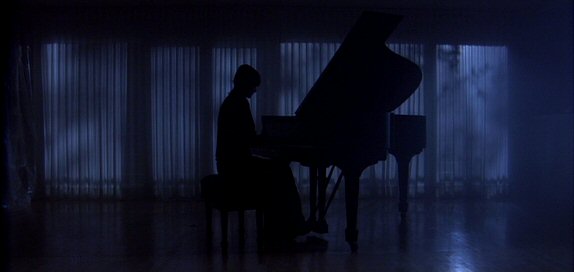
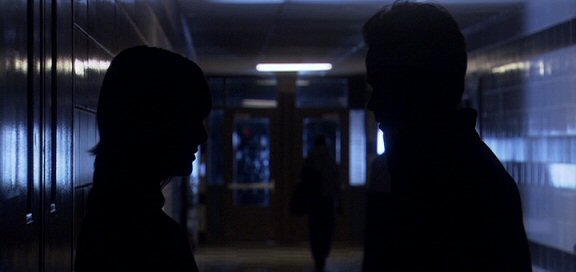
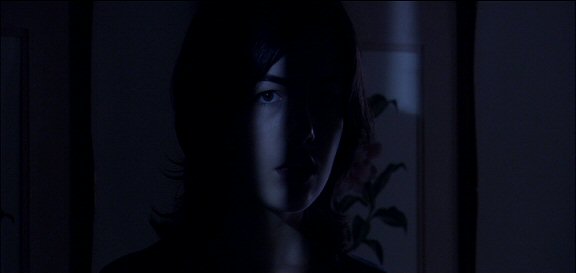
I had a little noise problems with a few dark blue-lit scenes visible in the 35mm film-out, but I could have avoided it if I had used a little more light and had not used +3db gain on some shots, in retrospect (I didn't see the noise on an HD monitor.) HDCAM has a particularly noisy blue channel.
There is no reason why dark & shadowy scenes in HD have to be noisy; noise is mainly due to underexposed footage being lightened in some way in post, or by boosting the gain in camera, or by lifting the shadows up. Just light the scenes in such a way that you are not "lifting" the shot in anyway, in camera or in post. Don't use Black Gamma (Stretch) to lower contrast in the shadows, don't use gain, don't underexpose too much. Then it should be fairly clean-looking in post, especially if you bring it down slightly in post, crush the blacks a little.
Of course, you may be referring to a particularly noisy HD camera like the HVX200...
RED isn't particular "better" for blacks -- blacks in digital color-correction is just a matter of where you want to set the blacks. You can't get blacker than "0". But RED might be less noisy in the shadows than whatever HD camera Zeke or Zak was thinking of using. Again, though, it's really a matter of exposure in terms of controlling noise.
I actually think digital cameras are well-suited for low-key shadowy photography -- it's high-key sunny stuff that can be the problem.
I had a little noise problems with a few dark blue-lit scenes visible in the 35mm film-out, but I could have avoided it if I had used a little more light and had not used +3db gain on some shots, in retrospect (I didn't see the noise on an HD monitor.) HDCAM has a particularly noisy blue channel.
There is no reason why dark & shadowy scenes in HD have to be noisy; noise is mainly due to underexposed footage being lightened in some way in post, or by boosting the gain in camera, or by lifting the shadows up. Just light the scenes in such a way that you are not "lifting" the shot in anyway, in camera or in post. Don't use Black Gamma (Stretch) to lower contrast in the shadows, don't use gain, don't underexpose too much. Then it should be fairly clean-looking in post, especially if you bring it down slightly in post, crush the blacks a little.
Of course, you may be referring to a particularly noisy HD camera like the HVX200...
RED isn't particular "better" for blacks -- blacks in digital color-correction is just a matter of where you want to set the blacks. You can't get blacker than "0". But RED might be less noisy in the shadows than whatever HD camera Zeke or Zak was thinking of using. Again, though, it's really a matter of exposure in terms of controlling noise.
I actually think digital cameras are well-suited for low-key shadowy photography -- it's high-key sunny stuff that can be the problem.
David Mullen ASC
Moderator
David, which equipment/gear do you own and bring to nearly every shoot other than your wits and skills?
I have an incident and a spot meter, that's about it.
I mean, I always carry a small high-powered flashlight in my kit as a prop if needed for a flashlight scene, in case the props person doesn't get one bright-enough. At home, I have a Chinese Lantern, a piece of foamcore, and a wooden diffusion frame of 216 that I drag around when I have to shoot a test or the occasional interview. I don't take them to my feature shoots usually since they have that stuff for me.
I have considered buying some filters, maybe diffusion, that I tend to use many times. I am also considering getting a LitePanels LED onboard light as an eyelight. They are making a really small, lightweight one that uses four AA batteries, that will be sold in January. Seems very simple to use and set-up into a camera.
I'm pretty hesistant to spend money...

Shawn Nelson
Well-known member
David,
What type of movie do you really want to do? A monster sized period epic (Gladiator'esque), Sci-Fi, ... etc?
What type of movie do you really want to do? A monster sized period epic (Gladiator'esque), Sci-Fi, ... etc?
Matthew Bennett
Well-known member
At home, I have a Chinese Lantern, a piece of foamcore, and a wooden diffusion frame....
I'm pretty hesistant to spend money...
Wow, what a monk! I picture you in a sparse room with your lantern, single piece of foamcore and wooden frame...
I don't understand.. between shoots, don't you get the urge to shoot things and experiment without direction? Or do you only get to shoot during a feature, and leave it at that, all the rest of the time spent 'theorizing'? Interesting way of life. How do you get creative in your down time?
David Mullen ASC
Moderator
Shooting a feature is pretty intensive work, so the couple of months until the next one comes along is a good time to do something other than shooting, like catching up on movies, going to equipment shows, ASC meetings, writing articles for magazines, travelling, reading books, etc. I appear on panel discussions, speak to students. I've been doing some writing for the next edition of the ASC Manual.
You need periods of activity and reflectivity, time to digest what you've learned on your last shoot. So going immediately from shoot to shoot doesn't appeal to me. That develops certain skills, of course, but you never have time to step back and re-evaluate.
As for having my own camera to run tests, that appeals to me, but since I generally shoot 35mm, buying a 35mm camera and shooting and posting tests with it on my own dime is not really in my budget. I save my testing for a particular production.
As for personal projects, I used to do that back before I became a professional cinematographer and someday I might go back to that between jobs.
You need periods of activity and reflectivity, time to digest what you've learned on your last shoot. So going immediately from shoot to shoot doesn't appeal to me. That develops certain skills, of course, but you never have time to step back and re-evaluate.
As for having my own camera to run tests, that appeals to me, but since I generally shoot 35mm, buying a 35mm camera and shooting and posting tests with it on my own dime is not really in my budget. I save my testing for a particular production.
As for personal projects, I used to do that back before I became a professional cinematographer and someday I might go back to that between jobs.
Phil Becque
Well-known member
'Jaws' question
'Jaws' question
Hi David,
I should start by saying that I don't know very much about photography, film cameras, or cine lenses. I've completed a few DV docs as a one man band, the last one won a couple of awards and was described as "mind alteringly cinematic" which I'll take as a huge compliment. Looks like I got something right by accident! Anyway.
There's a shot in 'Jaws' where Rod Schnieder is on the beach and he sees the great white shark for the first time attacking a child in the water. The camera seems to push in to his face quite rapidly going from a wide shot to an ECU. I hope you can remember the shot I mean? It's a pit of the stomach moment for the audience.
The question I have is: what do you have to do at the camera end to make this sort of shot work?
I can understand you need to dolly in quite rapidly - but what sort of lens would you imagine they used?
And how did they set that up and operate the camera controls to get that effect?
I'd like to try a shot like that one day, so any pointers you can give me about how to set up my RED (when I get it) would be deeply appreciated.
Many thanks, Phil
'Jaws' question
Hi David,
I should start by saying that I don't know very much about photography, film cameras, or cine lenses. I've completed a few DV docs as a one man band, the last one won a couple of awards and was described as "mind alteringly cinematic" which I'll take as a huge compliment. Looks like I got something right by accident! Anyway.
There's a shot in 'Jaws' where Rod Schnieder is on the beach and he sees the great white shark for the first time attacking a child in the water. The camera seems to push in to his face quite rapidly going from a wide shot to an ECU. I hope you can remember the shot I mean? It's a pit of the stomach moment for the audience.
The question I have is: what do you have to do at the camera end to make this sort of shot work?
I can understand you need to dolly in quite rapidly - but what sort of lens would you imagine they used?
And how did they set that up and operate the camera controls to get that effect?
I'd like to try a shot like that one day, so any pointers you can give me about how to set up my RED (when I get it) would be deeply appreciated.
Many thanks, Phil
Fergus Meiklejohn
Well-known member
- Joined
- Apr 28, 2007
- Messages
- 526
- Reaction score
- 0
- Points
- 0
hey Phil,
you do that by moving the camera and zooming in the opposite direction. This changes the background from "compressed" as you get with a telephoto lens (50mm upwards on a motion film camera, the RED1, or a cropped DSLR) to open with more depth of field in focus as you get with a wide angle lens, or vice versa..
You can try it with any video camera: choose an object in the frame, and walk towards it or away from it keeping the object the same size in the frame by using the zoom.
But then you probably know this all already..
"mind alteringly cinematic"!! Fantastic..
you do that by moving the camera and zooming in the opposite direction. This changes the background from "compressed" as you get with a telephoto lens (50mm upwards on a motion film camera, the RED1, or a cropped DSLR) to open with more depth of field in focus as you get with a wide angle lens, or vice versa..
You can try it with any video camera: choose an object in the frame, and walk towards it or away from it keeping the object the same size in the frame by using the zoom.
But then you probably know this all already..
"mind alteringly cinematic"!! Fantastic..

Tim Lüdin
Well-known member
- Joined
- Apr 27, 2007
- Messages
- 560
- Reaction score
- 0
- Points
- 16
- Location
- Basel, Switzerland
- Website
- www.timluedin.ch
It's called the vertigo effect. Hitchcock made this "visual effect" famous first used in his film Vertigo.
Spielberg once said, you should only use this effect 2 times in a movie. 1 zoom in, 2 zoom out. Otherwise it will loose its worth.
Jaws is a good example of doing it right.
Cheers
Tim
Spielberg once said, you should only use this effect 2 times in a movie. 1 zoom in, 2 zoom out. Otherwise it will loose its worth.
Jaws is a good example of doing it right.
Cheers
Tim
Phil Becque
Well-known member
hey Phil,
you do that by moving the camera and zooming in the opposite direction. This changes the background from "compressed" as you get with a telephoto lens (50mm upwards on a motion film camera, the RED1, or a cropped DSLR) to open with more depth of field in focus as you get with a wide angle lens, or vice versa..
You can try it with any video camera: choose an object in the frame, and walk towards it or away from it keeping the object the same size in the frame by using the zoom.
But then you probably know this all already..
"mind alteringly cinematic"!! Fantastic..
Hey Fergus -thanks for the info - no I didn't know that. Very helpful, what about the focus and aperture? I guess you have pull focus really well to get the desired effect? Would you normally keep the same aperture?
So for this effect you push in but zoom back to a wider shot? Have I got that right?
Yeah - I'm over the moon about the compliment - must have been the Art Beats time lapse stock footage - ooopps what a give away . . . . I did get a handful of nice shots in the project from my visits to Yosemite but that was more luck than judgement.
Cheers, Phil
Phil Becque
Well-known member
It's called the vertigo effect. Hitchcock made this "visual effect" famous first used in his film Vertigo.
Spielberg once said, you should only use this effect 2 times in a movie. 1 zoom in, 2 zoom out. Otherwise it will loose its worth.
Jaws is a good example of doing it right.
Cheers
Tim
Hi Tim, Ahh Hitchcock heh? Funny I don't remember that - I'll have to get Vertigo now and look out for it - top steer - thanks.
I'm not sure how this works dramatically in reverse though - zooming out?
Any thoughts or examples on that?
Cheers, Phil
Fergus Meiklejohn
Well-known member
- Joined
- Apr 28, 2007
- Messages
- 526
- Reaction score
- 0
- Points
- 0
Dramatically I think the idea is often that the compression/decompression of the background reflects the mental state of the character.
You have to pull focus, zoom and move the dolly in unison. So not an easy shot then..:whistling:
You have to pull focus, zoom and move the dolly in unison. So not an easy shot then..:whistling:
Stephen Webb
Well-known member
You'll see it pop up in Top Gear a lot too, as they tend to zoom in from the camera car whilst accelerating away rapidly (& vice versa).
Doing it slowly is cool. I seem to remember a shot in Ken Branagh's Hamlet that utilised this effect for a single shot lasting several minutes (and that was shot in 70mm too!)
Doing it slowly is cool. I seem to remember a shot in Ken Branagh's Hamlet that utilised this effect for a single shot lasting several minutes (and that was shot in 70mm too!)
Phil Becque
Well-known member
Dramatically I think the idea is often that the compression/decompression of the background reflects the mental state of the character.
You have to pull focus, zoom and move the dolly in unison. So not an easy shot then..:whistling:
Yeah - AND have your actor change their expression at the same time - ouch! I wonder how many takes that needs! But thanks I get the idea!
David Mullen ASC
Moderator
Yes, because the camera is moving towards or away from the subject, you have to follow focus. The tricky part, unless you set-up an elaborate motion-control rig as they did for "Quick and the Dead", is timing the speed of the zoom and dolly and getting them (the 1st AC or operator on the zoom motor and the dolly grip) to start and stop at the same time, unless you can just use the middle of the effect in editing. Requires a number of takes to get the timing right.
You are basically limited by the zoom range of the lens. The 18-50mm zoom on the RED would give you a shorter duration effect (unless you did it very slowly) compared to a 10:1 zoom.
Whether you dolly-in/zoom-out or the reverse just depends on whether you want to gradually go to a wide-angle close-up or a telephoto close-up. As you zoom out to a wide-angle while pushing in, the increasingly wide-angle perspective makes the background look like it is shrinking away from the subject.
Spielberg also did the effect in "E.T.", a high-angle hilltop view of the neighborhood.
"The Mission" did the effect when DeNiro after kills his brother and he stands looking down at the body, holding the sword.
"Good Fellas" used for the 2-shot of DeNiro and Liotta in the booth of the diner talking. I believe that Scorsese and Balhous used the effect in other movies too like "Color of Money."
Yes, Hitchcock did it first for "Vertigo", but for Jimmy Stewart's POV shots using a miniature. When Hitchcock was told it would cost thousands of dollars to build a bell tower interior miniature that the camera could crane up and down inside of while looking straight-down, Hitchcock them to turn the miniature on its side so the camera could run horizontally, which was cheaper.
You are basically limited by the zoom range of the lens. The 18-50mm zoom on the RED would give you a shorter duration effect (unless you did it very slowly) compared to a 10:1 zoom.
Whether you dolly-in/zoom-out or the reverse just depends on whether you want to gradually go to a wide-angle close-up or a telephoto close-up. As you zoom out to a wide-angle while pushing in, the increasingly wide-angle perspective makes the background look like it is shrinking away from the subject.
Spielberg also did the effect in "E.T.", a high-angle hilltop view of the neighborhood.
"The Mission" did the effect when DeNiro after kills his brother and he stands looking down at the body, holding the sword.
"Good Fellas" used for the 2-shot of DeNiro and Liotta in the booth of the diner talking. I believe that Scorsese and Balhous used the effect in other movies too like "Color of Money."
Yes, Hitchcock did it first for "Vertigo", but for Jimmy Stewart's POV shots using a miniature. When Hitchcock was told it would cost thousands of dollars to build a bell tower interior miniature that the camera could crane up and down inside of while looking straight-down, Hitchcock them to turn the miniature on its side so the camera could run horizontally, which was cheaper.
Phil Becque
Well-known member
You are basically limited by the zoom range of the lens. The 18-50mm zoom on the RED would give you a shorter duration effect (unless you did it very slowly) compared to a 10:1 zoom.
If I could hire 'any 35mm' zoom for this - and the subject is a persons face 12 feet away and you wanted to get to 4 feet and still have a clean ECU shot - would you have any recommendations?
Whether you dolly-in/zoom-out or the reverse just depends on whether you want to gradually go to a wide-angle close-up or a telephoto close-up.
Hmmm ?
As you zoom out to a wide-angle while pushing in, the increasingly wide-angle perspective makes the background look like it is shrinking away from the subject.
Ahh ha ! Yeah that's what I want - thanks!
Yes, Hitchcock did it first for "Vertigo", but for Jimmy Stewart's POV shots using a miniature. When Hitchcock was told it would cost thousands of dollars to build a bell tower interior miniature that the camera could crane up and down inside of while looking straight-down, Hitchcock them to turn the miniature on its side so the camera could run horizontally, which was cheaper.
Old Alf - he knew how to save a bob or two for his lunch! Ho ho!
Thanks David - very instructive - I tried just zooming in on one of my interview takes to emphasize something I knew was important - it only "sort of worked" - I hadn't thought about the subtulties at that point.
Cheers, Phil
David Mullen ASC
Moderator
All that matters is that you pick a zoom that focuses as closely as you will need and has the zoom range that you need.

Tonaci Tran
Well-known member
Hi David,
During a recent discussion with a DP, it seemed like he was more comfortable shooting film because when he established a certain look/feel/mood/tone on set with film it was more "permanent" in a sense. However, when shooting digitally in raw with a camera like RED..when the footage is handed over, there is some concern over how much more control to the image is given to the person working with the footage in post. How do you feel about this?
During a recent discussion with a DP, it seemed like he was more comfortable shooting film because when he established a certain look/feel/mood/tone on set with film it was more "permanent" in a sense. However, when shooting digitally in raw with a camera like RED..when the footage is handed over, there is some concern over how much more control to the image is given to the person working with the footage in post. How do you feel about this?
David Mullen ASC
Moderator
Well, it all depends on how the footage is handled in post. I would argue the opposite in some ways, in that when I shoot film or digital, I know the results I will get (and be even more confident with digital, since it is WYSIWYG), but whether the dailies will be accurate tends to be much more of a problem with film due to the amount of control that a telecine colorist has over the material.
At least when I shoot HD, I just hand a tape over for dubbing.
Now, that has been HDCAM shoots -- I haven't done a feature yet where I was shooting with a camera recording 10-bit LOG where I'd need dailies converted through a LUT.
I'd probably set-up a basic conversion for the dailies people to use to reduce variables.
This does bring up an issue regarding the ASA settings in RED that I need to discuss with RED team, because I feel they can give you misleading results when you convert the files. Not a real problem, per se, more of a conceptual or procedural issue.
I do have a general feeling in regards to skintones in digital -- that film tends to have a "default" skintone when you shoot and print it, whereas sometimes in digital color-correction, you are hunting around for whatever combination of shades makes up what you can all agree on is a "normal" fleshtone. Sometimes I feel like I'm making up some color called skintone, and a day later, I'd probably do it differently. That can be frustrating.
At least when I shoot HD, I just hand a tape over for dubbing.
Now, that has been HDCAM shoots -- I haven't done a feature yet where I was shooting with a camera recording 10-bit LOG where I'd need dailies converted through a LUT.
I'd probably set-up a basic conversion for the dailies people to use to reduce variables.
This does bring up an issue regarding the ASA settings in RED that I need to discuss with RED team, because I feel they can give you misleading results when you convert the files. Not a real problem, per se, more of a conceptual or procedural issue.
I do have a general feeling in regards to skintones in digital -- that film tends to have a "default" skintone when you shoot and print it, whereas sometimes in digital color-correction, you are hunting around for whatever combination of shades makes up what you can all agree on is a "normal" fleshtone. Sometimes I feel like I'm making up some color called skintone, and a day later, I'd probably do it differently. That can be frustrating.
Tim Lüdin
Well-known member
- Joined
- Apr 27, 2007
- Messages
- 560
- Reaction score
- 0
- Points
- 16
- Location
- Basel, Switzerland
- Website
- www.timluedin.ch
Hi Phil
It can help the storytelling in boht ways. Zoom in and zoom out. By zooming in you can pic a certain detail in the background that is important. Maybe a bad guy that hides some where. By zooming out you can show more of the whole location. Maybe theres a knight standing on a hill looking down on the battlefield.
By zoomin out and approaching the knight at the same time you can see more and more of the battlefield. The Knight in the foreground doesen't change but the battlefield gets bigger and bigger. Maybe the knight is scared of the big army, this vertigo effect could help showing that. Because suddenly the audience can see why he's so scared.
This works also the other way around. Maybe there is the knights biggest enemy on that field. By zooming in and moving back you can see that enemy
in the crowd sticking out.
I hope I could help you with that poor man's explenation. David could say it much better I guess.
Cheers
Tim
It can help the storytelling in boht ways. Zoom in and zoom out. By zooming in you can pic a certain detail in the background that is important. Maybe a bad guy that hides some where. By zooming out you can show more of the whole location. Maybe theres a knight standing on a hill looking down on the battlefield.
By zoomin out and approaching the knight at the same time you can see more and more of the battlefield. The Knight in the foreground doesen't change but the battlefield gets bigger and bigger. Maybe the knight is scared of the big army, this vertigo effect could help showing that. Because suddenly the audience can see why he's so scared.
This works also the other way around. Maybe there is the knights biggest enemy on that field. By zooming in and moving back you can see that enemy
in the crowd sticking out.
I hope I could help you with that poor man's explenation. David could say it much better I guess.
Cheers
Tim