Welcome to our community

Be a part of something great, join today!

  • Hey all, just changed over the backend after 15 years I figured time to give it a bit of an update, its probably gonna be a bit weird for most of you and i am sure there is a few bugs to work out but it should kinda work the same as before... hopefully :)

Ask David Mullen ANYTHING

the TV light dancing across his face

the TV light dancing across his face

Hi David,

Have you ever created the effect of a Television screen reflected onto the face of a person watching it from there living room? If so how did you create the look? I don't mean you actually see whats been projected on screen on the persons face but more the pulse of light as the picture changes.
 
We were shooting some explosions last week, and it occurred to me that I had no idea what the best thing to do for exposure is, especially at night.

Do you have any suggestions for how to expose for large dramatic explosions (say, a car or a building going up?)
 
Hi David,

Have you ever created the effect of a Television screen reflected onto the face of a person watching it from there living room? If so how did you create the look? I don't mean you actually see whats been projected on screen on the persons face but more the pulse of light as the picture changes.

If you are talking about the interactive lighting effect on faces looking at a television set, yes, I've done that many times. Generally the image doesn't flicker rhythmically, it shifts side to side (as a bright or dark object moves across the screen) and the brightness and color fluctuates as edits happen in the show playing on the TV set, so sometimes there are a series of fast cuts and then just a long cut.

Personally, I find the best method is to just wave my hands or a small flag (not big enough to cover the whole light though) randomly in front of a soft light simulating the glow of the TV set. Often I play it on the blue-ish side in a tungsten-lit setting since TV sets are closer to daylight-balance. I've also done it by putting two lamps through one frame of diffusion and then having the two lamps flicker or dim at different rates.
 
We were shooting some explosions last week, and it occurred to me that I had no idea what the best thing to do for exposure is, especially at night.

Do you have any suggestions for how to expose for large dramatic explosions (say, a car or a building going up?)

Depends on whether you need a correctly exposed scene before the explosion happens in the frame, in which case you generally light to the highest f-stop that is practical in order to stop down and hold more detail in the explosion.
 
thanks David this is exactly what i meant.

If you are talking about the interactive lighting effect on faces looking at a television set, yes, I've done that many times. Generally the image doesn't flicker rhythmically, it shifts side to side (as a bright or dark object moves across the screen) and the brightness and color fluctuates as edits happen in the show playing on the TV set, so sometimes there are a series of fast cuts and then just a long cut.

Personally, I find the best method is to just wave my hands or a small flag (not big enough to cover the whole light though) randomly in front of a soft light simulating the glow of the TV set. Often I play it on the blue-ish side in a tungsten-lit setting since TV sets are closer to daylight-balance. I've also done it by putting two lamps through one frame of diffusion and then having the two lamps flicker or dim at different rates.
 
I've had the electrics build a "covered wagon", which traditional is a bat strip with chicken wire and diffusion, but in my case, I have them use the outer fixture of a 4' 2-bank Kino as a base (the bendable barndoors with the plate on back) and put a row of lightbulbs in it, then put 216 on the barndoors.

The reason to use a bat strip or a covered wagon compared to a Kinoflo of the same shape is that it is tungsten and dimmable. The reason to use one instead of a paper lantern ball is that shape... a small, long rectangular shape can be tucked at the top of a wall just above frame and create a soft backlight or key, etc. - it's not always easy to hide a ball shape.

Thanks for the explanation! We are referring to the same light ;)
 
David, after a shoot last week I am wondering how you deal with a couple of different things.

1. Tiny Locations
Due to low budget, and even more so time constraint, some of the locations we had were smaller than small. On location in particular was a 1 bedroom apartment that while was nice for 1 person living in, was not so great for us to shoot in. I struggled getting lights in where I could mimic sunlight coming in due to being on the 3rd floor, and even when I could get them outside on the porch, the light was only a few feet away from the blinds and the shadow they made was so soft that it wasn't noticeable. Do you have any tips for lighting such a small scene in general terms (I know that the script/mood make a difference on lighting.) I realized after the shoot that wall spreaders like the matthpole need to be in my kit, but are there other things that you use to hide lights in small locations. How do you feel about practicals lighting scenes? I ended up using many of them as my light because I either could not put a unit where I needed to, or even better, they looked good.


2. Master Wide
This is kinda tied into the first question in many ways. I am struggling on my lighting at times on the master wide shot when either another wide or close starts to explore 180 to 360 degrees of the set (my last shoot we were aiming to explore our entire locations.) It's easy to set a key and match it in other shots when I know I am only shooting certain angles and can design the lighting around those angles. But on this shoot I ran into many times where my key light would be in the frame on certain angles, and especially when following a character in a tracking/moving shot. Ideally, I would put units high enough so I can frame them out in other shots, but I found that many times that wasn't an option. Do you do moving key lights any to make the shot "work" in each frame (moving the key light so it's more "perfect" for each actor.) Ideally, I was trying to light master so we didn't have to really change lighting as we moved through the scene, but it seemed like there was always a stand in the background. How different do you feel the lighting on actors can be compared to when you cut in for a close up?


I have some other questions, but they may morph on how these two questions are answered.
 
If I had a tiny room and with a window, and this was a day scene, then I'd light mostly through the window or try to use as much available light as possible through the window. After that, you can increase the ambience with a ceiling, floor, or wall bounce if necessary. If this was a night scene, then I'd use practicals to do most of the lighting. Yes, sometimes you can use wall spreaders or polecats, even hide stands with some set dressing, or put in fake vertical pipes or ceiling beams to hide rigs with. You can even hide a rig with a piece of card in front of the lens, blurred enough to blend into a flat wall or ceiling. John Seale once had a demo on one of the Kodak Lighting docs where he mounted a small light above a window and then put a piece of card painted the color of the walls in front of the camera lens that blocked out the view of the lamp and the card blended into the background, basically erasing the lamp to camera.

Whenever I have to shoot so wide as to see 90% of the room, then I have to rely on windows and/or practicals to do most of the lighting for me. Otherwise, there is often some small area that is off-camera to light from, though not often ideal. Yes, you can move the light if necessary and it's not obvious that you are moving the light during the shot.
 
If I had a tiny room and with a window, and this was a day scene, then I'd light mostly through the window or try to use as much available light as possible through the window. After that, you can increase the ambience with a ceiling, floor, or wall bounce if necessary. If this was a night scene, then I'd use practicals to do most of the lighting. Yes, sometimes you can use wall spreaders or polecats, even hide stands with some set dressing, or put in fake vertical pipes or ceiling beams to hide rigs with. You can even hide a rig with a piece of card in front of the lens, blurred enough to blend into a flat wall or ceiling. John Seale once had a demo on one of the Kodak Lighting docs where he mounted a small light above a window and then put a piece of card painted the color of the walls in front of the camera lens that blocked out the view of the lamp and the card blended into the background, basically erasing the lamp to camera.

Looking back I think some of my major issues with the apartment were framing. I should have talked the director into a wider opening frame to get a better feel for the apartment. We couldn't peer out any of the windows because it was night and on the 3rd story (sorry, no condors with 18k hmi's!) I think if I hadn't been sick all day and we were starting into hour 11 of a 16 1/2 day, I might have been thinking more clearly.

Do you ever use forced perspective cookies (like a cut out of a window) to make window shadows where there are no windows?

When bringing up levels on location, do you like to bounce into the ceiling or off something like an 8x8? I like how the ceiling spreads the light, but it also spreads the light with no control. Do you have a go to method you normally use to get a little bit of level?


Whenever I have to shoot so wide as to see 90% of the room, then I have to rely on windows and/or practicals to do most of the lighting for me. Otherwise, there is often some small area that is off-camera to light from, though not often ideal. Yes, you can move the light if necessary and it's not obvious that you are moving the light during the shot.

How do you deal with getting level from practicals without blowing out nasty highlights (shooting on Epic.) I was lighting mainly with 15 watt lamps to get light without blowing, but 15 watts doesn't light much.

Edit: Here's something else I noticed last night when watching the A-Team. There's a scene where the Hannibal character is in prison talking across a small table. On the wide shot, Hannibal is keyed from above. On the close up, he is keyed from under as you can see the bounce in his eye (still the same side.) Do you know why it doesn't seem odd on the cut, even though if you pay attention you notice it? Are there any tricks to when it will work and when it won't? I don't mind being daring, but I don't want to screw the director in the edit either.

Thanks,

Matthew
 
Last edited:
Do you ever use forced perspective cookies (like a cut out of a window) to make window shadows where there are no windows?

Yes, I'll use a gobo in a Source 4 Leko or flags in front of a fresnel to create a window shape, or hang some blinds as well in front of a fresnel with the lens removed to get a pattern.

When bringing up levels on location, do you like to bounce into the ceiling or off something like an 8x8? I like how the ceiling spreads the light, but it also spreads the light with no control. Do you have a go to method you normally use to get a little bit of level?

Since it's just for a low level of ambient fill, I'm usually fine with it going everywhere. If not, I might try flagging part of it with teaser skirts or large flags, etc. Otherwise, if I want more directional fill, I'm more like likely to start with a Chimera lamp with an eggcrate in front of it. As for whether I fill from high or low, I often like low fill, but it depends really on where the camera is and how it is moving, and whether I can get the fill under the front of the camera or behind and over the top of the camera. A camera on a dolly is like a large actor or piece of furniture and you have to get the light around it.

How do you deal with getting level from practicals without blowing out nasty highlights (shooting on Epic.) I was lighting mainly with 15 watt lamps to get light without blowing, but 15 watts doesn't light much.

Edit: Here's something else I noticed last night when watching the A-Team. There's a scene where the Hannibal character is in prison talking across a small table. On the wide shot, Hannibal is keyed from above. On the close up, he is keyed from under as you can see the bounce in his eye (still the same side.) Do you know why it doesn't seem odd on the cut, even though if you pay attention you notice it? Are there any tricks to when it will work and when it won't? I don't mind being daring, but I don't want to screw the director in the edit either.

It's more important to me that the practical is adding light to the room than it is in terms of how hot the lampshade is, I don't mind bright lampshades (look at Kubrick's "Eyes Wide Shut" for example, lots of hot lampshades since they are doing the lighting work.) Of course, using a wide latitude camera helps. Sometimes you can ND gel the side of the lampshade facing the camera, opposite the side lighting the actor. Sometimes even an ND grad filter on the camera can help if the hot area occupies one side of the frame.

Cheating is an art unto itself; the real question isn't whether to do it, but whether you are getting away with it. But sometimes you just have to screw continuity and make the actor look better in their close-up, if the alternative is a distractingly badly-lit close-up that matches the wide shot better.

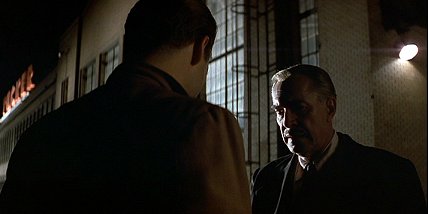
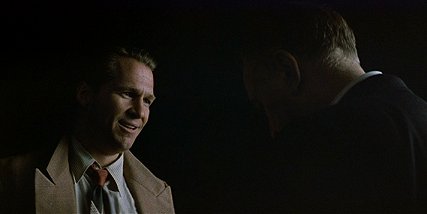
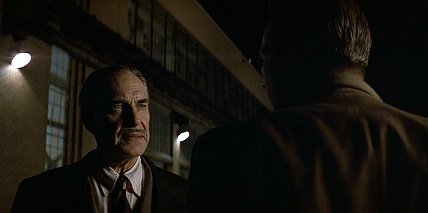
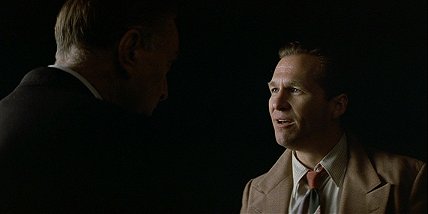
Here is a good example of how far you can cheat the lighting in a sequence, by Storaro for "Tucker":

Set-up #1 Martin Landau stands in some shadowy hard lighting:
tucker1.jpg


Set-up #2: reverse on Jeff Bridges, soft-lit
tucker2.jpg


Set-up #3: Landau steps forward into a new key light as camera tracks laterally past Bridges' back in f.g. to create a new screen direction. The shift in lighting and screen direction signals an emotional shift in the character:
tucker3.jpg


Set-up #4: reverse on Jeff Bridges matching new screen direction... the key light has been completely flipped compared to #2 to maintain the same 3/4 angle of light:
tucker4.jpg


Set-up #5: tighter close-up of Landau... his key light is softer and larger than it was in the looser shot:
tucker5.jpg


Personally, I think this is brilliant work for a simple dialogue scene outside at night.
 
Last edited:
Hi David. The other day I was interested in mentally separating the range of spot readings obtained at the lens into what is due to reflectance variation and what is due to incident light variation. So I sketched out the reasoning below. I was hoping you could pick holes in it and tell me if I am going in the right direction with this line of thought. When I did some tests I was particularly surprised that I could only get a max of 5 stops of range under even illumination using only subject reflectance.


There are two flavours that affect range of reflective readings at the lens:

  1. Variation of incident light across the scene
  2. Variation of subject reflectivity across the scene

In the real world, these two factors always interact to produce a variation of reflective readings at the lens, but one can separate them in one’s head and/or in carefully controlled test scenarios to introduce order into one’s way of thinking about exposure.

Factor 2 is unlikely to give you more than 5 stops of range. That is to say, a near-black object and a near-white object under the same even illumination are unlikely to differ more than 5 stops in reflective reading at the lens. Factor 1, on the other hand, can give you any range whatsoever, with no upper limit. That is to say, if you have two objects of identical reflectance in a scene, you could spot a light right on one of them, ensuring there was no spill on the other. You could increase the rating of the unit or the proximity of it to the subject, and with them, the difference in reflective reading between the two objects, with no theoretical limit.

An incident meter isolates factor 1 – it is reflectance-agnostic. A reflected light spot meter measures the conglomerate of factors 1 and 2. In practical on-set situations, the reflectance ‘swing’ from Zone V of a particular part of a subject is obtained by comparing the spot meter reading for it to the incident reading.

Thanks
Lorenzo
 
Not sure what your overall point is, but real-world subjects include more than matte-surfaces ranging from white to black, it includes self-illuminating objects like daylight windows, table lamps, neon signs, reflective surfaces like sunlight on water, etc. which are bound to exceed a 5-stop range. Not to mention, many times a space has more than a single source, and one source may be much more intense than another.

But your breakdown of the two factors that affect reflective readings is correct, which are the actual light levels hitting the object plus the reflectivity of the object and/or its degree of self-illumination.

Also, I'd say that matte surfaces are more likely to have a 11-stop range, not 5, as a basic 11-step chip chart demonstrates. It's hard to print a matte-surface chart with more steps than that.
 
Last edited:
Hey David, I have another question for you. This time I am wondering about exposing for dark scenes and how you approach such scenes. In this shoot I did two weeks ago, I had a bedroom scene that was meant to be very contrasty and dark. However, I am wondering if I possibly lit it too dark and now my image is too far under exposed. The image was beautiful on my monitor on set and on my computer, but I am now more worried about the fact that if you try to grade the scene a little brighter for situations where you aren't watching it in a dark room, or on a projector that's either not the best/not calibrated (very likely for this project) you will get quite a bit of noise.

So do you tend to light it a little brighter than you would want it in the final and then bring it down some in post or do you try and nail the exposure exactly how you like it? I am especially concerned about faces because I was aiming for dim, but not totally dark on the actors faces.

Here's a frame from one of the shots in the scene. To me, it looks beautiful, but I feel it might just get lost on any display that's not setup correctly.
dark.jpg
 
That's a tough call because part of learning to be a cinematographer is making firm choices that you learn from, not from covering your ass. You exposed a scene darkly for how you wanted it to look and it turned out the way you wanted it to, so you did the right thing. However, experienced cinematographers tend to get more conservative about exposure over time because we get asked once to often by producers, directors, studios, etc. to brighten things later, so we tend to want more information to work with in the color correction rather than play things right on the edge. And you are right that very dim images work better on large screens in dark viewing environments because the image is still the brightest and largest thing in front of the viewer, which is not the typical viewing experience on TV or the internet. On the other hand, you don't want to be boring and deliver middle-of-the-road images, so there is a fine line there between giving yourself some technical flexibility while still retaining some artistic integrity to the image. The main thing is that even if you expose more conservatively that dailies and other timed versions show everyone the intended darkened effect so others don't get used to a brighter version.

Actually I don't think it would be a problem to brighten the highlights in your image a tiny bit without causing noise problems -- it's really when you try to dig up details in the shadows that noise can be a problem. But with a little brightening of the highlights, the impression of a dark scene would be retained on a TV set, it just may look a bit contrastier.
 
Hello David,

Am I right that if shooting with the Epic-X (or any camera) at ISO 800
only 6 Foot Candles of light is needed for proper exposure,
given shooting at 24fps with a 1/48th shutter speed and the lens
set at f2. ?

6 fc seems like very little.
 
Hi Martin,

I am not David, but I believe I know the answer to this one. David, please correct me if I am mistaken, or if you have any other useful details to add. I'm sure you probably do!

The Set Lighting Technician's Handbook (Third Edition, Chapter 7, page 137) has a chart that shows the relationships between apertures and ISO values vs. foot-candles (assuming 1/50 shutter speed, or a 180 degree shutter angle). While your exact exposure combination is not listed in their example table, your math definitely appears to be correct.

As a rule of thumb, I like to start with the fact that (at 1/50th of a second shutter speed), f/2.8 at ISO 100 will yield a "proper" exposure with 100 foot-candles. From there, assuming we keep the same frame rate and shutter angle, it's a simple matter of shifting the aperture and ISO values around to come up with the number of foot-candles needed. Or to move the foot-candle number up and down and see how the amount of available light changes the exposure requirements. Basically, it's an algebra problem.

For example, if you start with f/2.8 @ ISO 100 = FC 100, but cut the light in half so you now only have 50 foot-candles, then you would end up with f/2 @ ISO 100 = FC 50, or f/2.8 @ ISO 200 = FC 50. Just keep going up or down until you get the combination that you need. Following this logic for your example, you will find that f/2 @ ISO 800 = FC 6.25, just as you expected.

Thanks,
-Nathan
 
Hi David,

I had a question about how you use optical filters as part of the process of creating a look for a film.

In other parts of this thread, the effects and optical properties of various specific filters have been discussed. However, I'm interested in the thought process that goes into deciding which filters, if any, should be used to help create a stylized look for a film.

For example, you decided to use comparatively heavier ProMist filters on Northfork, and lighter Glimmerglass filters on Akeelah and the Bee. I know that you came onto Big Love later in the game and had to stick with the established conventions, but do you think that project was best served with a cleaner less filtered look? If you are starting on a new film, what questions do you ask to arrive at an answer you are happy with?

Maybe I'm over thinking it, but I have a sneaking suspicion that there might be some abstract principles at work here that I'm not aware of.

Thanks,
-Nathan
 
Hi David,

I had a question about how you use optical filters as part of the process of creating a look for a film.

In other parts of this thread, the effects and optical properties of various specific filters have been discussed. However, I'm interested in the thought process that goes into deciding which filters, if any, should be used to help create a stylized look for a film.

For example, you decided to use comparatively heavier ProMist filters on Northfork, and lighter Glimmerglass filters on Akeelah and the Bee. I know that you came onto Big Love later in the game and had to stick with the established conventions, but do you think that project was best served with a cleaner less filtered look? If you are starting on a new film, what questions do you ask to arrive at an answer you are happy with?

Maybe I'm over thinking it, but I have a sneaking suspicion that there might be some abstract principles at work here that I'm not aware of.

Thanks,
-Nathan

The level of diffusion is all part of an equation that factors in the negative stock, the lenses, the post process, etc. because all those can affect whether the diffusion looks too heavy or not.

As for GlimmerGlass versus ProMist, I just like the fact that the jump from a #1 GlimmerGlass to a #2 GlimmerGlass is not as big as the jump between a #1/4 ProMist and a #1/2 ProMist. Otherwise the effect is similar, a GlimmerGlass creates a glow that is something between a ProMist and Black ProMist.

Later in Season Two of "Big Love" I started experimenting with more filtration, though in general the mandate was for a clean look. The original approach started by Jim Glennon was to use the older Cooke zoom and softer Expression 500T stock with no diffusion, but I felt that some actors needed a bit more softening in their close-ups so I used the lightest diffusion filter I could find, the #1/2 Black Diffusion-FX. Then Jim passed away and Bill Wages came onboard and used his own net filters, which were very light. I thought they made the actresses look great. It freed me up to try some other filters myself. I ended up alternating between either a #1 GlimmerGlass or the net or the Black Diffusion-FX. Sort of depended on the type of halation I wanted.

I generally approach a project thinking about whether any sort of filtration is needed or not, and if so, what type. It depends on whether I want a visible effect or an invisible effect, i.e. if I just need a diffusion filter now and then to soften a close-up in an otherwise sharp project -- or if I want a diffused effect for the image, glowing practicals and backlights, etc. Of course, one can go for such a look but keep it pretty subtle.
 
Yes, the old rule that 100 fc gives you an f/2.8 at 100 ASA is a good rule to remember.

Yes, 6 fc isn't much light...

Thank you David.

Given I plan on shooting at ISO 800 on my EPIC when I get it,
what sort of HMI would you suggest I use for creating a Blue Moonlight
type effect where the fixture is outside of the set/room at say 40 ft away?

I ask because I keep thinking that I need a very bright HMI, like a 4K etc.,
but now with only roughly 6 fc needed (I'm generalizing) I'm thinking
a 1.2K HMI would do it.

Also, is 40 ft away far enough to make the light falloff look natural?
 
Back
Top