Welcome to our community

Be a part of something great, join today!

  • Hey all, just changed over the backend after 15 years I figured time to give it a bit of an update, its probably gonna be a bit weird for most of you and i am sure there is a few bugs to work out but it should kinda work the same as before... hopefully :)

Ask David Mullen ANYTHING

Hi David

What are some of your favorite black-and-white films from the '40s and '50s that used filtration for what's commonly called "soft focus"? And what filters would you use to achieve that today, to retain as much contrast as possible?

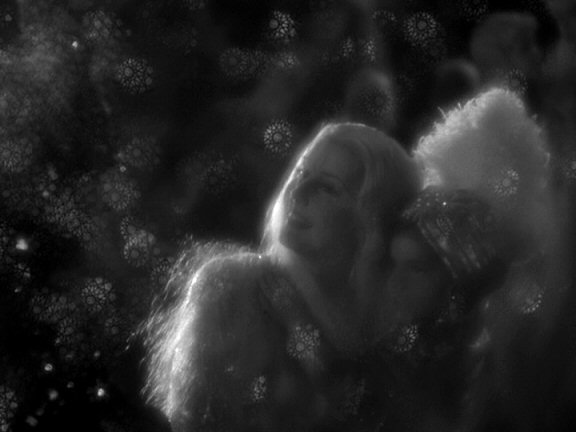
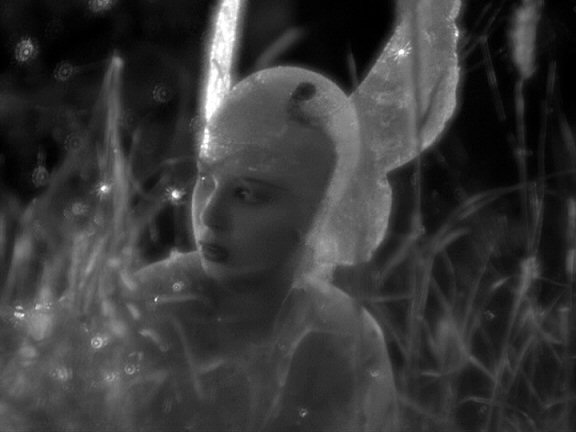
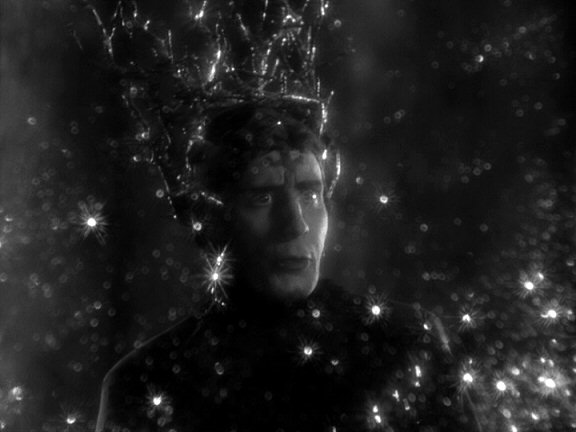
One of the most bizarre and fun movies for diffusion effects is "Midsummer Night's Dream" (1935), shot by Hal Mohr:
midsummer2.jpg


midsummer3.jpg


midsummer4.jpg


He did all sorts of strange things to soften the image, including hanging a scrim in front of the lens with sequins and glitter or something like that.

Back then, you had all sorts of diffusers, many homemade. Nets were probably the most common diffusion filter, but you also had Mitchells, Dutos, sort of frost filters, etc. You can still find many of these filters.

The Schneider Classic Soft is a good example of a modern filter commonly used based on old concepts.

They all lower contrast to some extent due to halation around bright areas; if you want subtle diffusing with no flare or contrast loss, then try Tiffen's Black Diffusion-FX. But you won't get the beautiful halation.

Modern designs like Diffusion-FX, Soft-FX, Classic Softs, etc. solve certain problems that older filters had, which is that they seem to throw the entire image slightly out of focus. I find that's a problem with Mitchells for example. True diffusion should be the overlay of a soft image over a sharp image, so the filter needs to allow some light rays to pass through unsoftened, hence the clear gaps in the pattern.

By the 1940's, sharper b&w photography was the trend and diffusion was used more sparingly, just on close-ups mainly. Other than exceptions like the fog-filtered scenes in "Vertigo".

You can see some jarringly-diffused shots in "Spartacus" -- like in the scene where Jean Simmons pours Kirk Douglas some water in the gladiator school -- this is razor-sharp Technirama (8-perf 35mm anamorphic) photography... Douglas is lit with hard light to make him look as rugged as possible, but she's shot through a net which makes her close-ups not match any of the surrounding shots.
 
The principles are the same for still photography, that longer shutter times increase exposure but also motion blur.

The difference though is that since 24 fps is a rather low frame rate to suggest or create the illusion of continuous motion, there is an issue with strobing, and some degree of motion blur helps soften that a little. Hence why stop motion animation or pixellation tends to look steppy, due to the lack of blur at 24 fps.

Our eyes have become used to the effect of the 180 degree shutter angle on a movie camera, which gives you 1/48th of a second at 24 fps. Shorter shutter angles create a very crisp motion with a lack of blur making the strobing more pronounced (i.e. "Gladiator" and "Saving Private Ryan".) Longer shutter angles tend to not be possible with film cameras (200 degrees on a Panaflex, maybe 210 or 220 max on a rare few) because the camera needs a dark period in order to advance the film to the next frame for exposure. But a digital camera can go as open as a 360 degree shutter, i.e. no shutter, so you get a full stop of exposure over 180 degrees but you also get twice the motion blur, which looks a bit smeary and video-ish since a film camera can't shoot at 24 fps with a 1/24th shutter time.

Running a movie camera at high speed means that with the 180 degree shutter, the shutter times are also shortened -- at 100 fps, your shutter speed is 1/200th. Hence why if you plan on slowing down normal-speed footage in post, it helps to use a shorter shutter time to at least get closer to the correct amount of motion blur as if you had actually overcranked the camera (you'll still see the effects, though, of having fewer motion samples to build the slow-motion effect.)
 
WOW! I would love to see that in Blu-Ray. How did he get the snow-flake looking stuff? Was that the type of glitter he put on the scrim?

Thank you for that motion blur post. It helped me put things in perspective as I am editing something I shot myself. I am beating myself up over the amount of motion blur I got. I found the tidbit about stop motion very interesting, and telling.
 
David Mullen you are an inspiration to many! As well as an articulate and precise artist. Thank you so much for your time and patience with this thread.


My Question:
What are the sharpest lenses you've worked with?
 
Thanks David.

Lots of old 35mm black and white films had the "halo" or Jean Harlow effect from halation in the film stock itself. Light would strike the emulsion, but also some would pass through the emulsion, hit the back of the base layer, then reflect back to the emulsion. Later stocks had an anti-halation layer added that some DP's would wash off before exposure to get the halo effect. Older cameras often had their pressure plates hollow and painted black (check out the Arri 2 series) to compensate, which could create focus problems.

I spent more than a few hours taking nets off the back of Panavision lenses, too.

Always funny to see close ups of female talent in shows like the original Star Trek TV series with diffusion, making them way too soft. On broadcast TV of the day, the jump between the lady and Shatner was okay, but now it's a campy chuckle.

I think it may be best to do your softening in post. David mentioned using Gaussian blur on one of his films. It's just more controllable, and you can do it in combination with a key to smooth skin, for example, but not hair.
 
I think it's fine to use camera filters if you are committed to creating an overall diffused look, because it beats processing every shot in post... but for just softening a face, I still recommend camera filters if only because you won't get to to do the softening pass until final color-correction, and you don't want the actress to look unattractive in the dailies. However, it's important to be subtle and use less than you think you need, because then you can add more softening in post.

However, if the director wants a generally crisp and sharp image, you can probably make a deal that any close-ups then look too sharp will be fixed later in post. Hopefully he'll back you up when producers or the studios comes after you when the lead actress is less than stunning in dailies...

I found the biggest problem with post softening is just the added time it adds, which is often tightly budgeted. So the post supervisor can flip out when you tell him that every shot in the movie needs a diffusion pass.

Also, if you are shooting film, the problem with digital diffusion sometimes is that it acts to degrain the image somewhat, making it too clean compared to the shots that weren't digitally diffused.

Another issue I had with doing a luminance key, diffusing that, and layering it back in, is that it increased the values in the brightest areas, causing them to clip faster. Of course I could control it by lowering the intensity of the layer I was adding, but then I lost some of the diffusion effect. If I had used a filter on the camera, I'd get the halation without the increase in luminance in the highlights.
 
I had that issue on one of the first things I ever graded. I couldn't realize what the heck was happening.

How about doing the luminance key, and adding curves or other method to bring them down in the original layer? If the same cut off point was used it should theoretically work. Right?
 
Yes, that should work, it just gets tricky because if you first add heavy knee compression to darken your highlights, it may be harder to pull a good luminance key off of the brightest highlights, so you can then diffuse that layer and add it back over the image. I don't know, it just sounds like it would make the whole process even slower.
 
I think I meant a chroma key for softening the leading lady's face only, perhaps combined with a garbage matte or roto layer. I sat at quite a few post effects demonstrations at the last NAB and was amazed at what is now possible. But as you say, David, asking for all this work in post when money and time is usually running out could make producers angry.

Which brings up another question, that is, turning in less than perfect footage sometimes. If the leading lady sees those dailies (or the leading man for that matter) and doesn't like what she sees, you may be in trouble no matter how many times you explain that softening and other work will take place in post. Now if they are hanging from wires in front of a green screen, they know that the wires are going to disappear and the green will be replaced by an intergalactic star field, but if their skin is too detailed and reveals too much, will they understand that this too will be dealt with in post?

Or, to take this further, what about using multiple cameras for certain scenes, knowing that at times, some cams will turn in less than useable footage - out of focus, poor framing - but those extra cams will, at times, get otherwise unobtainable shots that ARE useful? The danger of course is that the editor/director will decide that some of the lousy footage will make the cut.

I shot an action scene with three cams, shooting the rehearsals too, and some times we got orange traffic cones in the frame, and I could not seem to explain that some footage turned in would be bad to get good (although this was mostly only a problem with one less than able producer).
 
It happens all the time, the editor using bad footage in the cut.

I had problems timing a night exterior shot done on the RED because some B-camera had rolled on part of the location before the lighting had been turned on (maybe at the request of the director or someone) and the editor then liked the shot and used it, despite it being quite underexposed.

I've certainly had my share of soft, sloppy, long-lensed B-camera shots cut into a movie. Makes me cringe.

I did one movie in 35mm anamorphic 2.40 and the editor cut out most of the wide shots and used close-ups for the whole movie... and then told the director that he didn't shoot enough close-ups so he could cut out even more of the wider shots in the movie! Then he took a dozen shots or so and had them digitally zoomed into to make them tighter as well.
 
nds like tI did one movie in 35mm anamorphic 2.40 and the editor cut out most of the wide shots and used close-ups for the whole movie... and then told the director that he didn't shoot enough close-ups so he could cut out even more of the wider shots in the movie! Then he took a dozen shots or so and had them digitally zoomed into to make them tighter as well.

Hi David,

Sounds like the editor previously worked in television!

Stephen
 
Mr. Mullen,

What is the aspect ratio of academy 35mm film? Is it less than 1.33? If so, when did feature films begin using the 1.33 aspect ratio?
 
Thank you for that link. I checked it out but just wanted clarification.


Also, is the modern academy format used for anamorphic photography 22x16? Why is this Academy aperature shorter in heighth than Super35? I understand that super35 is physically wider because of the lack of optical audio, but I don't understand the height difference.

And reading the Wikipedia article, it seems as though there are TWO academy aperatures: Thomas Edison's (24mm by 18mm approximately) and 22x16. Now I understand that Edison's was a silent aperature, which explains the width difference, but I still don't understand the heighth difference..Did they just make the negative area smaller? if so, why?

Excuse my questions you don't have to answer if you don't want to. I just need some clarification.
 
David, in my understanding it is always the operator and not the gear that makes anything any good. With that said, do you still work with AE for grading? I am not trying to knock AE down, I see lots of fantastic stuff done on in every day I look around for it, but there seems to be this feeling floating around sometimes about AE being lesser than others... as if AE were stuck somewhere between Prosumer and Pro. The problem is that I have for the most part kept away from the VFX world. I understand how everything works and I know how to do quite a bit myself, but I don't have a good understanding of what is out there, rates, etc...

I am still trying to find out how AE would manage 4:4:4 2k files (with the latest hardware as of next winter) but I am quite convinced that if I mostly stuck to AE we could our post budget lower. There are a lot of talented AE people out there... large supply.

Also, we don't have lots of fancy VFX. I purposely kept them toned down in the script, my script. I sprinkled them with care on spots where they would matter most, and achieve the biggest effect.

There is however, at least one thing that we will have a local post house do for us. I have gotten a few quotes already. This is our main recurring VFX, which is seen in about 12 shots give or take a few. It is some serious particle animation stuff, but not as serious as the Sandman in Spiderman though. Still I need everything to blur into reality, and I don't see that happening within AE at all.

However, I have been looking into what you can do in AE, with lots of work and care. I am thinking that we may want to employ one AE wiz for the better part of a year. It may be a way to get both good quality and large quantity of motion tracking, sky replacement, good skin mattes, etc, etc... I know how to do all of these, so I could easily supervise it. And I should be able to hire someone with real talent.

This could all change still, but it seems my options will be: do less and use a post house, or hire someone dedicated to have next to me though post and get everything done with blood sweat and tears. Well... no blood or tears. More like talent and effort. :shifty:

I am trying to widen my view by asking, and I still have a lot more research I will do, but this is the way I see things now. From my point of view I believe the only missing piece to the puzzle would be a phenomenal DoP that could come in with fresh perspective. Someone good enough that I will have decided I could let myself fall backwards and let him catch me, long before post. He could come in with fresh eyes to maintain the visual thread through the movie, so on and so forth, everything else associated with not getting too close to the project... as it can happen in post.

Egh... sorry David. I rant when I need guidance. :nerd:
 
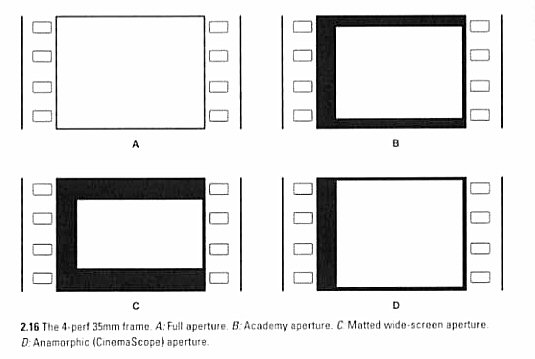
The Academy Aperture is not the same thing as the Edison / Silent / Full Aperture.

You also have to realize that Academy Aperture is really for projection, it's just that if you project Academy, you should compose for it -- whether or not the camera gate is Full Aperture or Academy Aperture.

Here's the rundown:

The original Silent Era 35mm format was 4-perforations tall, approx. 24mm x 18mm, or 1.33 : 1 (4x3). The picture pretty much used the whole negative area from the perf rows on each side, until they touched top & bottom with the next frame, with only a thin frame line in between. This is also called 4-perf 35mm Full Aperture. It is also what most 4-perf Super-35 cameras use.

Then sound came out in 1927 with "The Jazz Singer" using the Vitaphone process, where the projected image was synced up with a record player. But what ultimately proved to be more successful was sound-on-film, mainly the Fox Movietone process which put an optical soundtrack on the left side of the image. This trimmed the width of the projected image by 2mm, to hide the soundtrack, and the aspect ratio become less wide since the projection aperture was around 22mm x 18mm now -- about a 1.2 : 1 image. The center of the image was also shifted to the right because of the soundtrack on the left.

By 1932, this Movietone Aperture was looking too close to a square and there was a desire to make the image look more rectangular. The Motion Picture Academy suggested that movie projector gates be reduced in height, thus shortening the height in relation to the width, so the final image was approx. 22mm x 16mm, or 1.37 : 1.

I'm rounding off all of these numbers, you can get the exact dimensions online.

So cameras by this point had been modified so that the lens was shifted over to line-up with the new center of the frame, which was offset due to the soundtrack area. Now some also put in a smaller camera gate that was 1.37 Academy, but that wasn't strictly necessary since the projector gate would do the cropping to Academy.

You can imagine that the 1.37 Academy Aperture frame lies inside the slightly larger 1.33 Full Aperture frame, and is shifted to the right.

Here's a little illustration I made:

apertures3P.jpg


Most Hollywood movies were projected in 1.37 Academy from 1932 until 1953 when the Widescreen Revolution kicked off by Cinerama (1952) and then CinemaScope (1953) caused the studios to start cropping their Academy movies even further top & bottom to make them look widescreen, creating the modern "matted" widescreen formats like 1.85.
 
Roberto, your question is a bit too complicated to answer well in a post. Also, a post person like Mike Most could probably answer it better than me.

Both the tools and the person matter in the sense that not all tools are alike. But I can't comment on using AE to color-correct, I don't know its parameters, what it allows. But even when some cheaper software allows full correction capability at whatever resolution level you need, it may not do it easily and quickly enough in order to be as creative as you'd like.

The other problem is one of standards and delivery needs. Are you delivering a broadcast-ready 1080P 4:4:4 HD Rec 709 master? A 2K or 4K RGB 10-bit LOG master for film-out? Do you expect that your DYI color-correction to play accurately in a D.I. theater calibrated for a film-out? Or to play correctly for a broadcast HDTV monitor? A trained colorist would know all of these issues, have the right tools, scopes, etc. to make sure that they were delivering something that other post companies could work with.

But the other issue is color-correcting for efx shots, which is different than a final color-correction. Often you don't want to add any contrast or shift the image too far from the untimed non-efx footage because it may limit you in the final color-correction after the efx shots are cut into the footage.
 
But even when some cheaper software allows full correction capability at whatever resolution level you need, it may not do it easily and quickly enough in order to be as creative as you'd like.

Yes, I am glad you mentioned that. I am also deeply concerned with this. Slow work fuels the problem of becoming too close to the work and contributes towards blinding you.

The other problem is one of standards and delivery needs. Are you delivering a broadcast-ready 1080P 4:4:4 HD Rec 709 master? A 2K or 4K RGB 10-bit LOG master for film-out? Do you expect that your DYI color-correction to play accurately in a D.I. theater calibrated for a film-out? Or to play correctly for a broadcast HDTV monitor? A trained colorist would know all of these issues, have the right tools, scopes, etc. to make sure that they were delivering something that other post companies could work with.

But the other issue is color-correcting for efx shots, which is different than a final color-correction. Often you don't want to add any contrast or shift the image too far from the untimed non-efx footage because it may limit you in the final color-correction after the efx shots are cut into the footage.

I apologize for not touching on this. One of the side effects of ranting so much. I also will be figuring out how much we should allocate for a final grade at a post house! I got a few quotes a while back for that sort of work. Though we will also want to get some consulting prior as well, so that we don't fall to far from the tree and make the grader's job impossible like you mention.

I was thinking of something like this:

Once we finish the cut, we could get our grade decisions in there. We could then get each shot re-rendered out of the RAW files again, getting it close to what we decided we wanted. We would use the consulting and our best knowledge to keep it "milky" and not push it too far color wise. At this stage we would begin the VFX work. While that is getting done I could have the dialogue and sound design worked on. Then, once all of that is done we could put our grading decisions back on top of it and render it. We could then bring that to the post house/grader chosen, along with the ungraded version with VFXs. He could recreate what we have on our rendered movie off 4:4:4 2k files with nothing but VFX on top.
 
Back
Top