Welcome to our community

Be a part of something great, join today!

  • Hey all, just changed over the backend after 15 years I figured time to give it a bit of an update, its probably gonna be a bit weird for most of you and i am sure there is a few bugs to work out but it should kinda work the same as before... hopefully :)

Ask David Mullen ANYTHING

I think you know all the tricks...

Angle of the light, anti-reflection coatings, etc.

Usually for an actor who doesn't really wear glasses, you try and get both a pair of glasses with normal lenses but anti-reflection coated, and a set with flat lenses. With flat lenses, the reflection only happens in a specific angle, but then it's a big reflection.

I usually try to keep the light reflected in the glasses a little high so that even if there is a reflection, it might not cover the eyes, only appear in the top corner of the lens.

As you can see in these frames from "Akeelah and the Bee", I had to deal a lot with glasses:
http://www.davidmullenasc.com/page4/page7/page7.html
 
David,

Thanks once again for this thread.

I am wondering about lightmeters. Are there any you know of that measure color temperature as well as all the other standard features? I have found lightmeters that do one OR the other, but not both at the same time.

Do you have suggestions for which light meter(s) to purchase in general to go with the Red One? (both exposure, and color temp if I need to purchase 2 units)

Thanks,

-Thor
 
A color temp meter is a low priority -- I've shot plenty of features without one. Often you can make a pretty good guess as to how off-color a lamp is.

For years, I just owned a basic incident meter (a Minolta, later a Spectra). I used my still camera as a rough reflective meter for shooting sunsets and whatnot until I got a Minolta spot meter. There are incident-spot combo meters now, though since I own a spot meter anyway (and hardly use it) I don't really need to spend the extra money to get a combo meter. I still use my incident meter 99% of the time.

I don't own a color temp meter, though usually my gaffer carries one to check lights with now & then. I don't know of any color temp meters that double as a normal incident or reflective meter.
 
David, I have a "shooting coverage" question.

Do you have a general approach to shooting a scene, say, est. shot and then move in for singles, and then CUs and cutaways, etc., or do you strictly stay with the storyboard, or a combination ? Does there seem to be a common approach?
 
There is a "standard" coverage approach to dialogue scenes, which is a master, then mediums, overs, and singles, inserts, etc. But often you want to find ways of avoiding that approach unless it's the best way to handle the scene. It certainly works and gives the editor a lot of options, but it's not really adding any point of view to the scene; it's sort of generic. But sometimes it is the best way to approach a scene.

Most directors and DP's like to vary, shake-up, this standardized approach, mix it up a bit, cover the scene more distinctively with less coverage, more camera movement maybe... but still have some overlapping action to allow some variations in editing.

Even if you follow storyboards, you try and have some overlap in action to allow some variations in where you cut in the scene.

It's important to have some sense in advance as to how the scene will probably be cut. For one thing, you don't always have time to cover every possible angle in multiple screen sizes even if you wanted to.
 
Armageddon Look Question

Armageddon Look Question

Dear Mr. Mullen,
I was wondering if you could give any tips on getting the Armageddon out door look. The images links are below. In the second frame, I am guessing, that from the right side, it is a big HMI, diffused in some form, then bounce boards from the left. I could be way off.
Also, the colors appear to "jump" out more in this film. Do you know what kind of special lightning or filming process they used?

I know they shot in anamorphic, does shooting in anamorphic affect color rendition in anyway?
Thank you,
Paul
http://img86.imageshack.us/img86/1171/arm1zd9.jpg
http://img86.imageshack.us/img86/4813/arm2zj9.jpg
 
Anamorphic gives you a bigger negative area which reduces grain, but otherwise, the rich colors are probably just from slower film stock overexposed a little and printed down. In these shots, that's real sunlight overhead and probably a big white bounce for fill.

There were a few shots in the movie where they used a Color Enhancer filter (it looks to me) like then NASA lands a helicopter on the oil rig to pick-up Willis and Tyler. This filter (designed to make reds pop more) tends to give you rather sun-tanned looking faces, almost plum-colored, so it's a bit dangerous to use.

There were other day scenes where they used a big light to create a late afternoon / sunset effect, maybe a Dino.
 
My general rule is that when the key side of a Caucasian face is at normal exposure (which is not always common) then if the fill side is 2-stops under, it looks pretty well-lit, almost high-key. Three-stops under and there is shadow detail but it definitely looks dark in the shadows. Four-stops under and there is detail but it is barely there and runs the risk of going black.

So if I meter the fill side (which I rarely do, setting fill by eye), I'm usually looking at setting the fill at 2.5 to 3-stops under.

3 stops under equals to 6:1 right? I seemed to have read somewhere that this was an usual ratio in Blade Runner


Now the only time judging ratios by eye doesn't work is when using a high-contrast process like bleach-bypass or skip-bleach to film. There can be a tremendous drop-off in shadow detail with some of these processes, so you have to test, and then meter carefully on the set.

I guess in this case you would probably have to shoot it with a lower contrast right? Since the contrast is so boosted by the process. I wonder if there would be much difference if shooting digital for a bleach bypass effect?

Are contrast ratios used for background as well? I seem to remember hearing that somewhere. If so, you contrast it with the key light I would think?
 
Anamorphic gives you a bigger negative area which reduces grain, but otherwise, the rich colors are probably just from slower film stock overexposed a little and printed down. In these shots, that's real sunlight overhead and probably a big white bounce for fill.

There were a few shots in the movie where they used a Color Enhancer filter (it looks to me) like then NASA lands a helicopter on the oil rig to pick-up Willis and Tyler. This filter (designed to make reds pop more) tends to give you rather sun-tanned looking faces, almost plum-colored, so it's a bit dangerous to use.

There were other day scenes where they used a big light to create a late afternoon / sunset effect, maybe a Dino.

Thank you Mr. Mullen. I'll shoot some tests with the Kodak 50D, and the color enhancement filter.
 
David, can I also add another question? Do you feel filtration in HD should be done on camera (filters) or in post? I have heard both ways. I have heard you should shoot as clean as possible because if it's too sharp it's always easier to make it softer in post than to make it sharper. But I have also heard that post filters can add artifacts and that if you feel you need filtration you should use filters on the lens. What's your take?
 
superbowl ?
-A
 
David, can I also add another question? Do you feel filtration in HD should be done on camera (filters) or in post? I have heard both ways. I have heard you should shoot as clean as possible because if it's too sharp it's always easier to make it softer in post than to make it sharper. But I have also heard that post filters can add artifacts and that if you feel you need filtration you should use filters on the lens. What's your take?

There's no right or wrong answer. If you know what you're doing, you've shot tests of the filters, looked at them on the big screen (if this is intended for the big screen) and like the results, then why not use them if they give you the look you want? The trouble sometimes with leaving things for the final color-correction is that the editor and director will spend months sometimes looking at the footage during the editing phase without the look you intend... and they will get used to it, making it near impossible to convince them to add the look later. Plus there may be a political reason to make the lead actress look her best early on rather than at the end of post. Plus you may not be there at the end of post, or the place they decide to finish the project at may not be able to do diffusion effects.

On the flip side, you may decide that digital diffusion is closer to the look you want than optical diffusion (for one thing, with some digital diffusion techniques, blacks halate as much as whites, which doesn't happen with optical diffusion.) Plus you can control it better shot to shot, assuming you color-correct looking at an image that is the size of the final display format (it's hard otherwise to make good guesses as to the amount of sharpening or softening to add when looking at a smaller monitor for material intended to be seen on a big screen.)

Digital diffusion tricks may also tend to de-noise / de-grain the image, which may be a good thing if you want that.

I like lens diffusion but I tend to use a grade lighter than the filter strength I really like, just to be safe and not overdo it (it's always better to under-diffuse by accident than over-diffuse -- a shot with too little diffusion generally does not look like a mistake but a shot with too much is distracting.)
 
David, continuing on in the idea of on-set diffusion, what do you think of putting nets on the backside of a lens? I'm not actually sure what that looks like but I read about it.
 
What I also like about diffusion filters is the happy accidents you get, some uncontrollable flares and halations.

Nets are lovely, back or front. My only problem with nets is that you can't get them in evenly-spaced grades from barely-there to subtle. They tend to be heavier in effect than the lightest grade of glass diffusion.

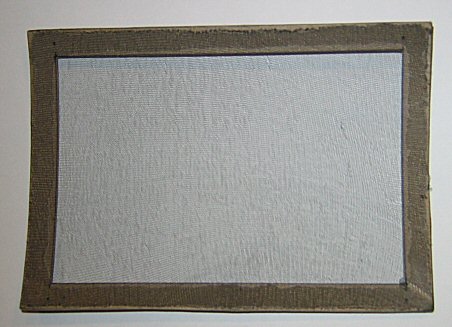
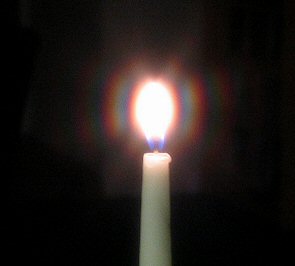
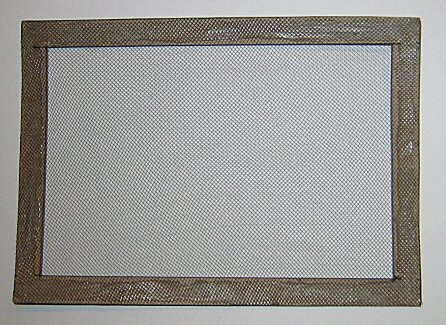
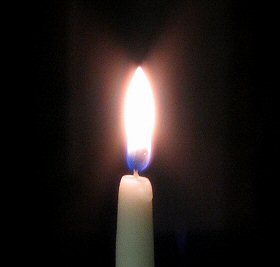
I made two net frames glued to a chipboard edge, of two different brands of ultra-sheer pantyhose -- here are photos of the filter and the effect on a candle flame:

net1.jpg


net4.jpg


net2.jpg


net5.jpg
 
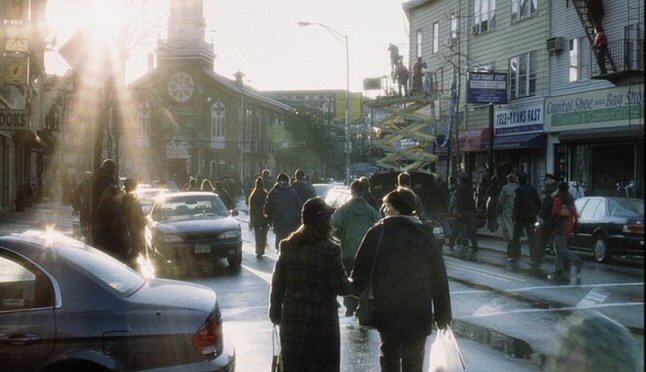
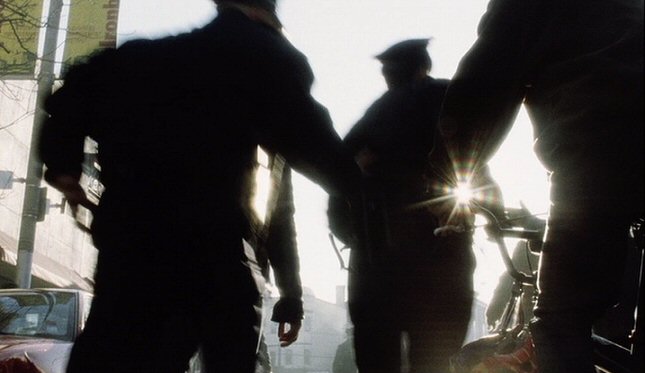
"War of the Worlds" is pretty heavily diffused at times. Here are some front-netted shots:

wotw1.jpg


wotw2.jpg


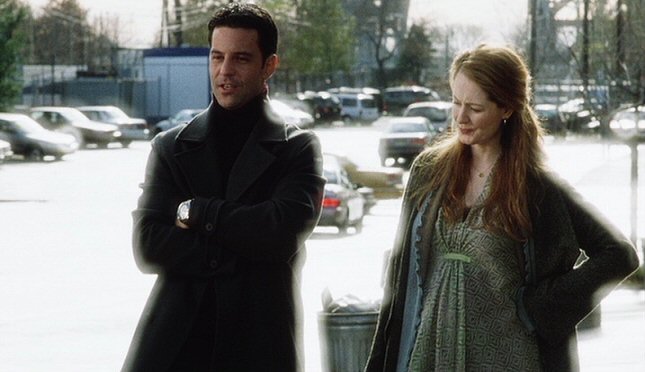
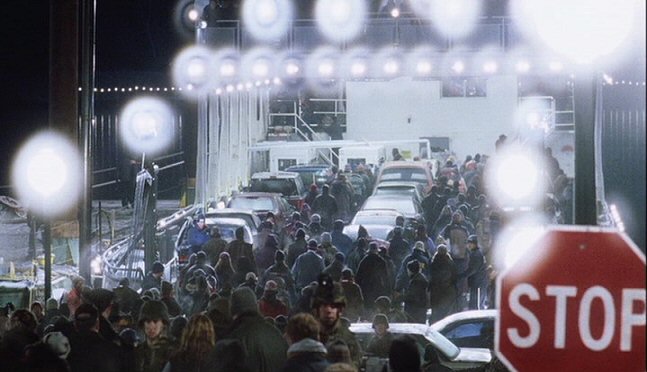
And these are some shots made with a Classic Soft filter (not the lightest):

wotw3.jpg


wotw5.jpg


Some good examples of rear-netted movies:
Excalibur, Lost Highway, From Hell, Snow Falling on Cedars
 
Some good examples of rear-netted movies:
Excalibur, Lost Highway, From Hell, Snow Falling on Cedars

Thank you David!

How can you tell, by looking at something, if it was front vs rear netted?
 
Back
Top