Welcome to our community

Be a part of something great, join today!

  • Hey all, just changed over the backend after 15 years I figured time to give it a bit of an update, its probably gonna be a bit weird for most of you and i am sure there is a few bugs to work out but it should kinda work the same as before... hopefully :)

Anyone use NanoFLASH as videoassist HD recorder

Spot on Costelloe!

Now anyone?

Thanks Eirik,

And I was feeling particularly disregarded tonight, well, it is in my part of the world!

ps I'm going SD/ Downconverter and a Comp monitor for PB using and old deck I've got hold of, but it has GREAT BUTTONS! Lights up, tactile, easy to use. Shit picture, but hey that shows just how good the camera actually is when you view it HD!
 
No time for downloading the files to a computer - the video assist system needs to playback immediately.

Looks like a nice device. I've been looking for a solution myself.

If you look carefully at this photo below where 4K realtime R3D scaled at HD 1080 runs DIRECTLY FROM RED DRIVE

to MBP/ROCKETcineX then from MBP/ROCKETcineX to Magma/RedRocket box and then to HP Dreamcolor monitor...

Magma_07.jpg

RED1 + Leica-R 60mm f/2.8 Macro + RED-Raid 320GB + RED Rocket™™™™™™™™™™ + Magma ExpressPro + HP DreamColor + MacBook Pro 17" + ROCKETcineX

Have you got it!!!!!!!!!!!
 
Sanjin,

With respect. Where I work we do not even have time to play back from camera. That is why we need seperate Vid Asst. We would not have time, excellent as your system is to dock the HD to another device, quite simply put. Large buttons, easily accessible, they want to see action not quality, immediately.
Quality immediately would be good though, so anyone with HD Asst ideas, big buttons, not a remote, and cheap!
 
Sanjin,

With respect. Where I work we do not even have time to play back from camera. That is why we need seperate Vid Asst. We would not have time, excellent as your system is to dock the HD to another device, quite simply put. Large buttons, easily accessible, they want to see action not quality, immediately.
Quality immediately would be good though, so anyone with HD Asst ideas, big buttons, not a remote, and cheap!

That´s what I like about the nanoFlash,
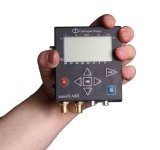
it´s seems very easy to use, clearly labeled buttons, RED record, BLUE stop, and ARROW to play, plus the up/down left/right center buttons to navigate menus... + it´s small + it uses CF cards, which can´t be bad! Not to mention - it is HD, and you can even upload the footage independent of what happens at the RED ONE for playing around - Also the director could (if he wants to) hold it and use it himself, suprised no other RED users have seen this yet.
 

Attachments

  • nanoFlash_in_Hand_s.jpg
    nanoFlash_in_Hand_s.jpg
    33.5 KB · Views: 0
Michael,

here is all IMMEDIATELY because you just to plug on your RED Drive and within
a two/three clicks at the ROCKETcineX app you fly realtime with your footage.

RED ROCKET is A GAME CHANGER in overall RED environment, workflow, etc,...

It's all about TO USE IT.

With a hope that third party software vendors are listening...
 
Sanjin, I think these products have different applications, RR will never replace a video assist for video village, not in it´s current form anyway! (in just the same way as nanoFlash can not do what RR does for R3D in post)

There is NO TIME to unmount a RED drive from camera, attach it to a computer in video village, and certainly way above their competence! And even if there was... the DP (DoP) needs to go on working. So what we want here is: a recording/playback unit that allows the crew around the RED ONE to continue working WHILE video village looks at and discusses takes in the background.

Of course that doesn´t mean the RR isn´t a terrific piece of equipment, it is just not made for what video village wants, or can handle.

This thread has been severely derailed, but I would LOVE to hear from anyone with experience from the NanoFlash!
 
HD Wireless (Cam Wave) to Ki Pro to Monitor with either SDI or Analog. If you don't mind cables, run tethered to the Ki Pro, it doesn't necessarily need to be on the camera. The drives have the right space and are cheap. Pro res is robust and 10bit. Also native for Final cut. The pricing is right too and the interface is relatively friendly. Run simple single channel wireless for audio or feed the camera and keep it embedded with SDI.
 
Sanjin, I think these products have different applications, RR will never replace a video assist for video village, not in it´s current form anyway! (in just the same way as nanoFlash can not do what RR does for R3D in post)

There is NO TIME to unmount a RED drive from camera, attach it to a computer in video village, and certainly way above their competence! And even if there was... the DP (DoP) needs to go on working. So what we want here is: a recording/playback unit that allows the crew around the RED ONE to continue working WHILE video village looks at and discusses takes in the background.

Of course that doesn´t mean the RR isn´t a terrific piece of equipment, it is just not made for what video village wants, or can handle.

This thread has been severely derailed, but I would LOVE to hear from anyone with experience from the NanoFlash!


You don need to unmount RED Drive from RED camera, you just unplug RED Drive cable from the cam and with long enough cable for FW 800,
FW 400 or USB 2.0 connect to MBP, then open ROCKETcineX, open folder, then choose your footage and that's it.
You can run realtime R3D (at 4K,2K or HD 1080p) that was not possible before using QT wrappers or whatever.
Only Scratch and then after that other R3D enabled big systems like a DVS Clipster, Quantel, FilmLight, Nucoda, DaVinci, Lustre, etc,...were able to play R3D realtime...

Now with RED Rocket™™™™™ an average RED User is able to play R3D very simple, easy, fast and effective as it is on his/her desktop or even a laptop...
 
I have a weekly show that we use 5 of the convergent design flash modules. We use the bigger ones. But we use them in a studio config though recording done in our mobile control room from the Sony 1500's.
 
:closed2ur0:

My clients and I want a BOX in the sense of a VHS player, play/pause/stop, not a computer setup, but in HD - I want to ELIMINATE all requests for a downconverter to SD, and offer a better product, but not an editor on set!

I appreciate all the answers but this is way derailed, please please please stick to topic!

I am kindly asking for experience with the "Convergent Design nanoFlash" or competing products, please!
 
Many VTR guys in LA have switched to a laptop based system on a cart. For HD VTR it is the standard but I guess you are looking for something other than VTR? I thought your question was is "Convergent NanoFlash" being used in the industry as HD VTR or are there other, better solutions out there. I must have misread your question.
 
I used to use the Playback Technologies Raptor 50 for playback on all the commercial productions I worked on. The SD set up was solid and easy to navigate. I can only assume that the HD System is a quality piece of gear. I have not done any research with the Nano Flash line of products, so this is by no means a comparison in terms of price or recording quality.

It is simply a box with buttons that records HD.

http://raptorddr.com/
 
Many VTR guys in LA have switched to a laptop based system on a cart. For HD VTR it is the standard but I guess you are looking for something other than VTR? I thought your question was is "Convergent NanoFlash" being used in the industry as HD VTR or are there other, better solutions out there. I must have misread your question.

Florian thank you for your inputs.

I am not even sure what I am asking, but I will try to explain:

Very often my clients ask me if I have a "downconverter", they ask this, because they often use (in my opinion) old fashioned hard drive based standard definition video assist recorders.

What I want to offer is a SIMPLE (in terms of operations and setup) alternativ but with the benefits of the signal that lies in the HD-SDI output of the RED, so that the next time, someone asks me for a downconverter I can reply: "Don´t worry about it, I got something better!".

And this needs to be as simple to set up and use as an old VHS deck, NO knowledge of FCP, RR, codecs, what have you, just PLUG and PLAY.

The product that I mentioned in the title: The NanoFlash seems to have all this, in a convenient little box, so easy even my mother could use it...

This is what I want to know more about, and I appreciate all feedback, but Red Rocket is not the answer, and neither is any computerbased system.

Thank you all for your inputs!

But please stick to topic.
 
If you are sold on the nanoFlash then buy it. It works, but I think there are quite a few members here trying to offer other solutions that you should consider too. We use FCP setups here and have tried nanoFlash as well. I prefer the I/O options from Ki Pro or AJA I/O box. It seems you entered this thread with your mind already made, so stick with what you believe fits your budget and workflow.
 
I've used both the AJA KiPro and Convergent Designs Nano in the last 2 weeks.
The AJA is a very nice unit and had no issues whatsoever...drawback is size but direct recording to ProRes is fantastic. Full size connectors is also a plus.

The Convergent unit is a fraction of the size and worked well as I have 10x8GB CF cards...but I did have it crash a few times. I'm not sure why...it seemed to freeze on recording and was unresponsive to pressing "stop". I had to reformat the CF cards twice to get the problem to disappear. Perhaps that is/will be fixed with a firmware update? At 100/LongGop/1080/23.98psf I was getting about 10min per card.

Based on my experience, a decision would be based on size and benefits of recording directly to ProRes vs CF cards (great if you have CFs for your RED).

Hope that helps.

Brian
 
Ki Pro or the new Raptor HD or the Datavideo HDR100 or the new Sony box that does the same.

Pricing is variable, you're looking at a few thousand any way you spin it. The Raptor has a great Windows UI for longform work (search by scene number to play back from weeks ago) but has a price to match.

Datavideo is probably the cheapest but it has a terrible interface and can only record 99 "tracks".

Desperately waiting for demo Ki Pro units to land here as we're looking to get one for the same reason.

The Nanoflash is just a bit small, in my opinion - too easy to lose it!
 
I used to use the Playback Technologies Raptor 50 for playback on all the commercial productions I worked on. The SD set up was solid and easy to navigate. I can only assume that the HD System is a quality piece of gear. I have not done any research with the Nano Flash line of products, so this is by no means a comparison in terms of price or recording quality.

It is simply a box with buttons that records HD.

http://raptorddr.com/

Thank you Dwain, this is the kind of product I am thinking of, in fact I believe it is an earlier raptor (SD) that producers here in Norway swear by, and makes them ask for downconverters all the time... which I want to get rid of.
 
I've used both the AJA KiPro and Convergent Designs Nano in the last 2 weeks.
The AJA is a very nice unit and had no issues whatsoever...drawback is size but direct recording to ProRes is fantastic. Full size connectors is also a plus.

The Convergent unit is a fraction of the size and worked well as I have 10x8GB CF cards...but I did have it crash a few times. I'm not sure why...it seemed to freeze on recording and was unresponsive to pressing "stop". I had to reformat the CF cards twice to get the problem to disappear. Perhaps that is/will be fixed with a firmware update? At 100/LongGop/1080/23.98psf I was getting about 10min per card.

Based on my experience, a decision would be based on size and benefits of recording directly to ProRes vs CF cards (great if you have CFs for your RED).

Hope that helps.

Brian

Thank you Brian, exactly the input I was looking for, very helpful!

Does the AJA KIpro accept embedded sound though HD-SDI from RED?
 
. It seems you entered this thread with your mind already made.

Not at all, if that were the case, I would not have made a thread - but an order on the nanoflash system!

I seek input, but I know the solution to my problems is similar products: the raptor, AjA products... and NOT computerbased stuff.

It needs to be easy to use, PLAY button, RECORD button, and so on...
 
Back
Top