Welcome to our community

Be a part of something great, join today!

  • Hey all, just changed over the backend after 15 years I figured time to give it a bit of an update, its probably gonna be a bit weird for most of you and i am sure there is a few bugs to work out but it should kinda work the same as before... hopefully :)

All Stills in Timeline

If I remember correctly they were going to implement a batch export of stills in a future version of RC-X Pro. Couldn't find the thread though.
 
If I remember correctly they were going to implement a batch export of stills in a future version of RC-X Pro. Couldn't find the thread though.

That would move me closer to the Epic as still camera concept. Until I can use Lightroom to work the single frame R3D images . . . the Epic remains the finest movie camera on the planet
 
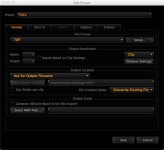
I'm doing this with an RCX export preset set up for TIFF file format, output resolution set to clip size, Full Debayer, ask for Output Location, then apply the export preset to the timeline.
Side note, once all the TIFFs are in a folder, I use the Cover Flow option in the OSX finder to cycle through them lightning fast by holding down the arrow keys.

TIFF_RCX_Export.jpg
 
I like to just scrub through a bunch of videos on a timeline and pull stills. Is there a way to export all of the stills from all the clips on the timeline?

Gavin,
You can setup an export preset (with whichever file format you want to export to); then in the frames tab enable "Export Stills Only" and save your export.
Load all your clips you want to the timeline, scrub through and pull the stills you want from each clip; then in the export tab set to export timeline (all clips) or (separate clips) and export. This should export all the stills you've pulled from the timeline.

Thanks.
Armen
 
Thanks Armen that'll work!

Now any way to *see* all the stills on the timeline regardless of what clip is under the scrub bar? I'm using timelines like 'bins'. When I start and stop rolling is kind of random.

Also another needed feature is rotation per-cut. I'm not going to start/stop rolling necessarily to go for a portrait shot. so if I could setup rotation settings per-cut I could just cut up a clip based on which half was portrait vs landscape.
I'm doing this with an RCX export preset set up for TIFF file format, output resolution set to clip size, Full Debayer, ask for Output Location, then apply the export preset to the timeline.
Side note, once all the TIFFs are in a folder, I use the Cover Flow option in the OSX finder to cycle through them lightning fast by holding down the arrow keys.

View attachment 25843

Output 72GB of TIFFs in order to pull 20-30 frames? Pass. Also you lose per-image RAW settings.
 
Output 72GB of TIFFs in order to pull 20-30 frames? Pass. Also you lose per-image RAW settings.

I use the TIFFs to quickly find the stills I like, then go back to RCX and pull the R3D Snapshots I want, open them in PS with full RAW capabilities. Delete the TIFFs later. BTW, you're welcome.
 
What Armen said.

I would really like to be able to group all stills from a bin of clips in a "Stills Bin." I still can't figure out how to batch apply a look to all my stills unless I apply it to the clips before I select the stills which is a bit of a pain if you want to apply a preset for your tiffs before exporting them to edit.
 
What Armen said.

I would really like to be able to group all stills from a bin of clips in a "Stills Bin." I still can't figure out how to batch apply a look to all my stills unless I apply it to the clips before I select the stills which is a bit of a pain if you want to apply a preset for your tiffs before exporting them to edit.

Tehban,
Currently in RCX it seems that a look preset can only be applied to still from clips in the timeline on a per clip basis. Send an email to redcinex at red dot com with a feature request of this option and it can get added to list of features to add. Thanks.

Armen
 
Thanks Armen that'll work!

Now any way to *see* all the stills on the timeline regardless of what clip is under the scrub bar? I'm using timelines like 'bins'. When I start and stop rolling is kind of random.

Gavin,
Stills are saved/viewed on a per clip basis. Send an email to redcinex at red dot com with a feature request of this option and it can get added to list of features to add. Thanks.

Armen
 
Tehban,
Currently in RCX it seems that a look preset can only be applied to still from clips in the timeline on a per clip basis. Send an email to redcinex at red dot com with a feature request of this option and it can get added to list of features to add. Thanks.

Armen

Thanks, just did :)
 
BTW, you're welcome.

The question was "Can you only output stills out of RCX"... and your non-answer was "Don't use RCX!" forgive me if I wasn't sufficiently appreciative for disregarding the question.

"How do you fix a 96 Corolla?"
"Buy a motorcycle! BTW You're welcome."
 
Back
Top