AJ Young
Active member
- Joined
- Aug 8, 2019
- Messages
- 33
- Reaction score
- 0
- Points
- 0
- Location
- Los Angeles, CA
- Website
- www.ajyoungdp.com
Since the industry shutdown all of my live action work, I decided to learn a new skill set and dived deep into the world of virtual production. I said it in college and still believe it today that narrative film will increasingly move towards virtual production. Big budget films already utilize a ton of CG environments and the Mandalorian showed us how incredible real time rendering on an LED wall can be.
As a primer, I found this doc from Epic games gives a fantastic intro to virtual production: https://cdn2.unrealengine.com/Unreal+Engine%2Fvpfieldguide%2FVP-Field-Guide-V1.2.02-5d28ccec9909ff626e42c619bcbe8ed2bf83138d.pdf
Matt Workman has been documenting his journey with indie virtual production on YouTube and it's becoming clear how easy it is for even the smallest of budgets to utilize real time rendering. I wouldn't be surprised to see sound stages or studios opening up that offer LED volumes and pre-made virtual sets at an affordable price for even micro budget features.
Here's what I did so far:
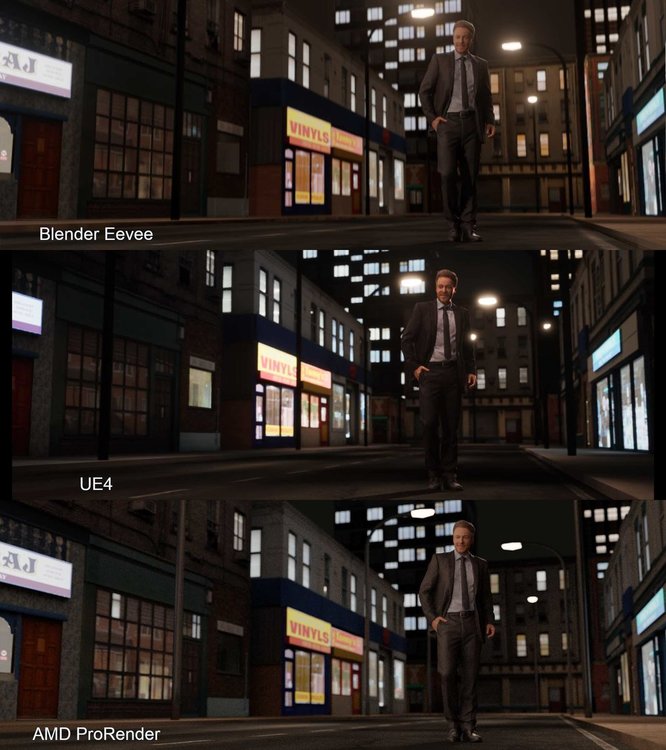
Attached are renders from three engines: Blender's Eevee, Unreal Engine 4, and AMD ProRender. (please excuse the heavy JPG compression, shoot me a DM for an uncompressed version)
I made the building meshes from scratch using textures from OpenGameArt.org and following Ian Hubert's lazy building tutorials. The man is a 3D photoscan from Render People. All of these assets were free.
Lighting wise, I was more focused on getting a realistic image over a stylized one. Personally, the scene is too bright and the emission materials on the buildings need more nuance.
My final thoughts:
Even though this is a group for Unreal, I'm astonished by Eevee, particularly how incredibly fast it is for running only on slow display GPU. (Again, Blender has no support for Apple Metal, so it defaults rendering to my Intel 630 GPU which is for displays)
The next iteration of Blender will be utilizing OpenXR. According to the Blender Foundation, they'll slowly be integrating VR functionality into Blender and version 2.83 will allow for viewing scenes in VR. With that in mind, I'm definitely going to experiment with virtual production inside Blender.
As for Metal support, I believe Blender will be moving from OpenCL/GL to Vulkan in the near future. From what I've found, it's easy to translate from Vulkan to Metal. (This part is a bit above my head as a DP, so I'll just have to wait or use a Windows machine)
Does anyone have any useful guides that have a streamlined process for moving things between Blender/UE4? I'm from live action and love how easy it is to bring footage from Premiere/FCPX to DaVinci and back via XML. Is there something similar or is .fbx the only way?
Correction:
After further research, I discovered that Eevee can only run on the GPU (according to Blender's documentation). Eevee is in fact running on my GPU on my laptop, but it is running on the display GPU (Intel UHD Graphics 630 1.5GB). My MacBook Pro has 2 GPU's, one for processing graphics and one processing displays.
Regardless, impressive.
As a primer, I found this doc from Epic games gives a fantastic intro to virtual production: https://cdn2.unrealengine.com/Unreal+Engine%2Fvpfieldguide%2FVP-Field-Guide-V1.2.02-5d28ccec9909ff626e42c619bcbe8ed2bf83138d.pdf
Matt Workman has been documenting his journey with indie virtual production on YouTube and it's becoming clear how easy it is for even the smallest of budgets to utilize real time rendering. I wouldn't be surprised to see sound stages or studios opening up that offer LED volumes and pre-made virtual sets at an affordable price for even micro budget features.
Here's what I did so far:
Attached are renders from three engines: Blender's Eevee, Unreal Engine 4, and AMD ProRender. (please excuse the heavy JPG compression, shoot me a DM for an uncompressed version)
I made the building meshes from scratch using textures from OpenGameArt.org and following Ian Hubert's lazy building tutorials. The man is a 3D photoscan from Render People. All of these assets were free.
Lighting wise, I was more focused on getting a realistic image over a stylized one. Personally, the scene is too bright and the emission materials on the buildings need more nuance.
- Blender's Eevee:
Honestly, I'm beyond impressed with Eevee. It's incredibly fast. For those who don't know, Eevee is Blender's real time render engine. It's what Blender uses for rendering the viewport, but it's also designed to be a rendering engine in its own right. Most of Eevee's shaders and lights seamlessly transfer over to Blender's Cycles (their PBR engine). - UE4:
After building and texturing the meshes in Blender, I imported them into UE4 via .fbx. There was a bit of a learning curve and manual adjustments for the materials, but ultimately I was able to rebuild the scene. The only hitch were the street lamps.
In Blender, I replicated the street lamps using an array modifier which duplicated the meshes and lights. The array modifier doesn't carry over the lights into UE4 via the .fbx, so I had to import a single street lamp and build a blueprint in UE4 that combined the mesh and light.
In the attached image, the street lamps aren't in the same place in UE4 because I was approximating. My next step is to find a streamlined way to import/export meshes, materials, camera, and lights between Blender and UE4. I believe some python is in order!
As expected, UE4 looks great! - AMD ProRender:
Blender's PBR engine, Cycles, is great. However, it only works with CUDA and OpenCL. I currently only have a late 2019 MacBook Pro 16". It's GPU is the AMD Radeon Pro 5500M 8GB. Newer Apple computers only use the Metal API, which Blender currently has no support for.
Luckily, AMD has their own render engine called ProRender. Needless today, the results are great and incredibly accurate. This engine isn't a real time. Render time for the AMD shot was 9 minutes. This render is definitely too bright and needs minutiae everywhere.
My final thoughts:
Even though this is a group for Unreal, I'm astonished by Eevee, particularly how incredibly fast it is for running only on slow display GPU. (Again, Blender has no support for Apple Metal, so it defaults rendering to my Intel 630 GPU which is for displays)
The next iteration of Blender will be utilizing OpenXR. According to the Blender Foundation, they'll slowly be integrating VR functionality into Blender and version 2.83 will allow for viewing scenes in VR. With that in mind, I'm definitely going to experiment with virtual production inside Blender.
As for Metal support, I believe Blender will be moving from OpenCL/GL to Vulkan in the near future. From what I've found, it's easy to translate from Vulkan to Metal. (This part is a bit above my head as a DP, so I'll just have to wait or use a Windows machine)
Does anyone have any useful guides that have a streamlined process for moving things between Blender/UE4? I'm from live action and love how easy it is to bring footage from Premiere/FCPX to DaVinci and back via XML. Is there something similar or is .fbx the only way?
Correction:
After further research, I discovered that Eevee can only run on the GPU (according to Blender's documentation). Eevee is in fact running on my GPU on my laptop, but it is running on the display GPU (Intel UHD Graphics 630 1.5GB). My MacBook Pro has 2 GPU's, one for processing graphics and one processing displays.
Regardless, impressive.
Last edited: