Welcome to our community

Be a part of something great, join today!

  • Hey all, just changed over the backend after 15 years I figured time to give it a bit of an update, its probably gonna be a bit weird for most of you and i am sure there is a few bugs to work out but it should kinda work the same as before... hopefully :)

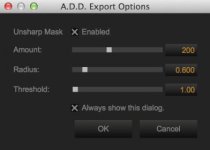
A.D.D Export Options

Nawaf Alsabhan

Well-known member
Joined
Nov 11, 2012
Messages
208
Reaction score
0
Points
0
Hello all,

Can someone please explain the A.D.D Export Options from Redcine-x?
I tried searching online, but couldn't find anything, and the Redcine-x manual that comes with the app (under Help menu) isn't up to date, it doesn't include anything about A.D.D or Dragon.

I got the latest Redcine Build 31 (31.34738)
 

Attachments

  • Screen Shot 2014-11-08 at 8.59.30 PM.jpg
    Screen Shot 2014-11-08 at 8.59.30 PM.jpg
    9.8 KB · Views: 0
A.D.D. (Advanced Dragon Debayer) is a post processing algorithm that looks at the current frame as well as the adjacent frames as well as a bit of special sauce to provide a very "clean" and rich image. It's very processor intensive for motion sequences, however, it's extremely useful for still applications.

I've used it here and there for motion work as well, but be prepared for those render times.
 
I really wonder if Adobe will get A.D.D. export, with GPU rendering. That would be SO useful.
 
A.D.D. (Advanced Dragon Debayer) is a post processing algorithm that looks at the current frame as well as the adjacent frames as well as a bit of special sauce to provide a very "clean" and rich image. It's very processor intensive for motion sequences, however, it's extremely useful for still applications.

I've used it here and there for motion work as well, but be prepared for those render times.
Does it automatically look at other frames? (adjacent frames)
Is there a setting to turn adjacent frames off? (if there is, should I?)

I use it to export stills, but I'm not sure of the options I get when I export, such as Unsharp mask? Amount? Radius? Threshold?
I did try changing the setting, but I didn't see any difference, what does it really do?
 
Does it automatically look at other frames? (adjacent frames)
Is there a setting to turn adjacent frames off? (if there is, should I?)

I use it to export stills, but I'm not sure of the options I get when I export, such as Unsharp mask? Amount? Radius? Threshold?
I did try changing the setting, but I didn't see any difference, what does it really do?

There's no underlying settings to be adjusted. The Unsharp Mask dialogue allows you to fine tune and/or sharpen the image. Try experimenting with different radius values with about 200 as the amount.

Unsharp Mask has been around for a while in a few software packages. Here's some info on it if it's new to you:

http://en.wikipedia.org/wiki/Unsharp_masking
 
do you keep the unsharp mask settings "as is" and turned on when you export your photos with A.D.D. like
phfx_redDragonDSMCprocess.jpg
 
Back
Top