Welcome to our community

Be a part of something great, join today!

  • Hey all, just changed over the backend after 15 years I figured time to give it a bit of an update, its probably gonna be a bit weird for most of you and i am sure there is a few bugs to work out but it should kinda work the same as before... hopefully :)

8k Editing Workstations Mobile & Desktop

prakash d

Well-known member
Joined
Dec 10, 2014
Messages
46
Reaction score
0
Points
0
I'm trying to buy a workstation (Desktop or Mobile) for Epic-W Editing on Premiere Pro.

I know that Desktop is better than Mobile. However I want to see what each offers.
Though we can use PROXY editing to be smooth and fast, I want to invest on a better system for higher resolution needs.

I found some high-end systems:
  • Lenovo P70 (Mobile) and P910 (Desktop)
  • HP ZBook 17 (Mobile) and HP Z840 (Desktop)
  • Dell, Asus etc.. have similar models.
  • Apple:
    • New Apple MacBook Pro claims 57% higher performance with Editing, yet the specs (RAM, GPU, CPU..) seems to be lower than other high-end workstations.


The confusion is: One company offers better GPU card, the other offers better CPU, and other offers better display etc..


Greatly appreciate any suggestions and I would like to know which is better as of current.
 
Last edited:
I can play 8k raw files in Redcine in realtime without buffering in 1/8 resolution on a MacBook Pro mid 2012 retina (nvidea). Got a mid 2014 with AMD as well which I haven't tested yet.
To play in 1/4 it needs buffering, but all in all it's similar to 6k. Also Jarred hinted at a Red Rocket for Thunderbolt3 which should make the new MacBook Pro a great mobile editing and DIT Station. I got one coming...
 
As Stefan writes. I think people are thinking about 8k in the wrong way. You don't need to edit in 8k you could very much edit in 1:8 resolution. Also you can grade in a much lower resolution and when all is done and you export into another format then you go full debater and 1:1 resolution and down sample to what ever you are masting for. Simply then it´s one render that only includes your final edit. Now if that takes a bit longer than it took to render 6k, does it really matter? Speed is always nice but if it take a bit of time to render it does not make much difference.
If you are rendering proxies just do it with 1/4 debayer or such then any laptop do it quite easily over night if not faster.
 
Thanks for the replies.
 
Last edited:
The HP ZBook 17 G3 should work to a point, but I'm iffy on the GPUs.
 
The one difference I saw is the GPU card: Gigabyte is using NVIDIA® GeForce® GTX 980M
The HP, Lenovo are using Quadro M5000 which makes the price difference.
 
I'm trying to buy a workstation (Desktop or Mobile) for Epic-W Editing on Premiere Pro.
I found some high-end systems:
  • Lenovo P70 (Mobile) and P910 (Desktop)
  • HP ZBook 17 (Mobile) and HP Z840 (Desktop)
  • Dell, Asus etc.. have similar models.
  • Apple:
    • New Apple MacBook Pro claims 57% higher performance with Editing, yet the specs (RAM, GPU, CPU..) seems to be lower than other high-end workstations.
The confusion is: One company offers better GPU card, the other offers better CPU, and other offers better display etc..


Greatly appreciate any suggestions and I would like to know which is better as of current.

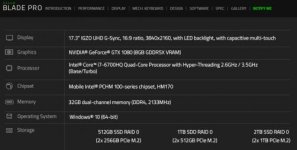
I'm currently considering getting the NEW Razer Blade Pro [not the old one] when it releases (next month I believe).
See: http://www.razerzone.com/gaming-systems/razer-blade-pro

It's basically a high end workstation in a 17" UHD laptop with an Apple Macbook build quality. It's just pretty expensive! It has USB 3.0 as well as Thunderbolt 3 [USB -C] Ports.

Take a look at these amazing specs
tech_spec_en.jpg
 

Attachments

  • Razer Blade Pro.jpg
    Razer Blade Pro.jpg
    20.1 KB · Views: 0
Do they have a dream color version? A year ago I noticed an editor had dream color (calibrated) HP laptop - if it is powerful enough that would be perfect for on set / travel work.
Any feedback?
 
color space of monitor? bits of usable dynamic range? calibrated?
Runs windows or also Linux?
 
RE: GIGABYTE
As I am slowly re-acquainting myself with windows after an underwhelming Apple announcement of `PRO´ notebooks, I am not yet in a position to give any qualified answers to your questions. But I found this rather profound review of this machine: http://www.tweaktown.com/reviews/7783/gigabyte-p37x-v5-gaming-notebook-review/index.html
Mind you, this laptop is not the latest model, but a good balance of specs and price. Compared to Razer Blade it costs about less than half.
 
I'm currently considering getting the NEW Razer Blade Pro [not the old one] when it releases (next month I believe).
See: http://www.razerzone.com/gaming-systems/razer-blade-pro

It's basically a high end workstation in a 17" UHD laptop with an Apple Macbook build quality. It's just pretty expensive! It has USB 3.0 as well as Thunderbolt 3 [USB -C] Ports.

Take a look at these amazing specs
tech_spec_en.jpg

I recently got a Razer Blade Stealth, which I believe has a similar monitor; I am impressed. It's built very solidly, and the monitor is gorgeous. I have that Pro model on my list for when I need to step it up and I have the income to justify it, but I'm also planning on getting a Razer Core + 1080 when I can afford them to juice up my Stealth... which can play 8K Red footage at 1/8th resolution, surprisingly.

I don't recommend their store because their customer service... well, take what you'd expect from Red, and expect the opposite from Razerzone. Too bad that, because the laptop rocks. And the 100% Adobe RGB screen is gorgeous. I haven't seen the other one in person yet, so I can't compare them though.
 
The one difference I saw is the GPU card: Gigabyte is using NVIDIA® GeForce® GTX 980M
The HP, Lenovo are using Quadro M5000 which makes the price difference.

Prakash, Which GPU is more ideal for an adobe/resolve workflow? GeForce or Quadro?
I am looking to dump my macpro asap and move to PC. It can't even handle 8k at 1/16th res with 128gb of RAM without choking up so Boxx or an HP z840 it is :) . Just so many options in the PC world.
 
From my research, GTX is much faster than Quadro because GTX are mainly used for gaming.
Gaming needs fast fps, so GTX is better. Editing pretty much is doing the same thing.
 
Back
Top