Welcome to our community

Be a part of something great, join today!

  • Hey all, just changed over the backend after 15 years I figured time to give it a bit of an update, its probably gonna be a bit weird for most of you and i am sure there is a few bugs to work out but it should kinda work the same as before... hopefully :)

6K HD plus 1920x1080 ProRes

Stephen Lovett

Well-known member
Joined
Dec 10, 2008
Messages
756
Reaction score
0
Points
16
Age
66
Location
Silicon Valley CA
Hi There,

I'm curious about something. I've got a project where the requirements are that I deliver a 1920x1080 ProRes file along with the raw file.

The editor wants both to be in the HD aspect ratio. OK so far so good.

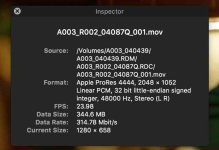
If I shoot in 5KHD, 4KHD etc. the ProRes files are indeed 1920, but when shooting in 6KHD the only option is 2048.

Why is that? This isn't a huge deal as I can shoot these projects at 5KHD, but it be nice to have the 6K raw file and a 1920 ProRes file without having to transcode.

Cheers,
 
Last edited:
Hi There,

I'm curious about something. I've got a project where the requirements are that I deliver a 1920x1080 ProRes file along with the raw file.

The editor wants both to be in the HD aspect ratio. OK so far so good.

If I shoot in 5KHD, 4KHD etc. the ProRes files are indeed 1920, but when shooting in 6K the only option is 2048.

Why is that? This isn't a huge deal as I can shoot these projects at 5KHD, but it be nice to have the 6K raw file and a 1920 ProRes file without having to transcode.

Cheers,

You are having a conflict of aspect ratios and formats. 6K FF is 1.94:1, 1920x1080 is 16x9 or 1.78:1. If shooting at 6K HD (or any of the HD formats with each given resolution) you will have a 16x9 aspect ratio as well and you're 1080p ProRes files will be correct.
 
Hi Phil,

Sorry for not being clear in my first post, but when 6K HD is selected the only quicktime resolution displayed in the 2K ProRes dialog is 2048.
 
just curious, if you shoot WS, what aspect is your prores quicktimes? 2:40? 2:66? or is it 1080 and letter boxed?
 
Hi Phil,

Sorry for not being clear in my first post, but when 6K HD is selected the only quicktime resolution displayed in the 2K ProRed dialog is 2048.

Hmmm. Let me boot up my camera. That doesn't sound normal.
 
So this is starting to look like a bug to me. The manual states that the ProRes would do what you would expect, namely that they keep the aspect ratio of the original R3D file.

But when I shot the same shot at 6K FF and another at 6KHD, both ProRes files have identical framing (the 6KFF equivalent) but in Cine-X you see the pillar box you'd expect on the 6K HD.
 
Hi Phil, I've got a Mg, so no 5.5K for me, but 5KFF and 5KHD work as you would expect. Full Frame is 2048x1040 and 5K HD is 1920x1080 and the framing and aspect ratio in the ProRes matches the R3D's
 
Hi Phil, I've got a Mg, so no 5.5K for me, but 5KFF and 5KHD work as you would expect. Full Frame is 2048x1040 and 5K HD is 1920x1080 and the framing and aspect ratio in the ProRes matches the R3D's

If you have a Weapon MG you have all of the half resolutions. When you change resolution/format click advanced and add 5.5K. It's just not there by default.

Side note:

6K HD = 5568x3132
5.5K HD = 5280x2960
 
This is what I found out as well. But shouldn't this be fixed in a firmware update? I don't like lowering the resolution to get the proxies right.
 
oh interesting. anyway to make it 2:40 or 2:66 in camera?

reason i ask is i might be shooting an anamorphic project on a weapon, that makes the 4:3 into 2:66, though we crop to 2:40 in post.
but i want to shoot a raven simultaneously with spherical zooms and want to give them the closest thing possible so there is not too much reformatting.
 
Also, as I noted in another thread, 5.5K HD is only 3%, not the presumed 10% less in H and V resolutions. Check the resolution numbers to verify. It is a total of 7% fewer pixels. Can be handy when you want to keep the REDCODE level one step lower than 6K HD allows.
 
Hi Stephen, can you please confirm what firmare version is your camera currently running on? If you can also save a camera log file and send it to us here would be great!
 
Back
Top