Welcome to our community

Be a part of something great, join today!

  • Hey all, just changed over the backend after 15 years I figured time to give it a bit of an update, its probably gonna be a bit weird for most of you and i am sure there is a few bugs to work out but it should kinda work the same as before... hopefully :)

5K Stills with Motion Blur?

steve green

Well-known member
Joined
Jan 27, 2012
Messages
1,048
Reaction score
1
Points
38
Location
Thousand Oaks, Ca
Hey everyone,
I'm on a shoot and the client want stills lifted from our shoot. It's cars and they want backgrounds blurred and foregrounds sharp. We're using the Russian Arm, I'm thinking frame summing or frame averaging.....is that going to give me sharp foregrounds, or because the camera is tracking the subject is everything going to be blurred? Any ideas on how to achieve this look?
As always, any help much appreciated.
 
ND and open up your lens. I wouldn't suggest messing with the shutter cause most likely your footage will be unusable with terrible looking motion smearing in the video. You can blur further in post.
 
ND and open up your lens. I wouldn't suggest messing with the shutter cause most likely your footage will be unusable with terrible looking motion smearing in the video. You can blur further in post.


So you're saying stay away from the frame summing and frame averaging? Too drastic?
 
He means to leave your shutter speed at 1/48 or angle at 180* and only use your aperture to achieve shallower DOF using ND filters as needed. Also, you can use windows in Resolve to further blur whatever you want. Good luck!
 
Open up the lens and/or use a long lens! If you can really track the car (keep it in the same spot in frame, then a 360º shutter will help give you the feeling of motion. Additionally, you can use a long lens (200mm+) to compress the foreground and background thus accentuating their relative speeds. If you want something extreme, go to under 12fps and 360º shutter.

In the end you should test it out, if you do a 360º shutter in 24fps then you can also shoot a couple HDR stops to have your second track at 1/48th for the video footage.

Hope this helps.
 
He means to leave your shutter speed at 1/48 or angle at 180* and only use your aperture to achieve shallower DOF using ND filters as needed. Also, you can use windows in Resolve to further blur whatever you want. Good luck!

Exactly. When you introduce motion you don't want to slow your shutter at all. I would never shoot 360 degrees for motion. You probably actually want to shoot around 1/96th if it's higher speed (If you want sharp details and less motion blur from the movement). Just use your aperture and focal length to control depth of field. Then use Resolve for the motion to further blur the background, and photoshop for the stills.
 
Hi Steve,

Can you explain the effect you're after in more detail? Or post an example? It sounds like the agency or client isn't explaining it properly. It's like the mythical "wide angle-telephoto" lens that art directors always seem to ask for!

I just finished a similar shoot last week using the Z-Crane car/arm and Omnicam stabilized head. When lifting a still frame, the effect you'll see shooting from the Arm/stabilized head will be somewhat like a traditional "rig" stills shot: The car will be sharp, but everything else will blur. And the foreground will actually be more blurred than the background.

-Fran
 
Hi Steve,

Can you explain the effect you're after in more detail? Or post an example? It sounds like the agency or client isn't explaining it properly. It's like the mythical "wide angle-telephoto" lens that art directors always seem to ask for!

I just finished a similar shoot last week using the Z-Crane car/arm and Omnicam stabilized head. When lifting a still frame, the effect you'll see shooting from the Arm/stabilized head will be somewhat like a traditional "rig" stills shot: The car will be sharp, but everything else will blur. And the foreground will actually be more blurred than the background.

-Fran

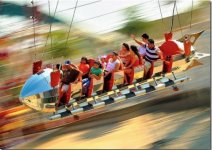
This is what they're after with the stills.
 

Attachments

  • Motion Blur.jpg
    Motion Blur.jpg
    38.4 KB · Views: 0
Steve,

RE: the amusement park ride photo you posted. That's pretty standard panning/tracking motion blur--everything streaking (foreground and background) and the subject is sharp.

Depending on the speed of the photo/camera vehicle, I believe you'll get that type of effect straight out of the camera with a 1/48th shutter speed and 180-degree shutter, but I generally use a still camera mounted next to the video camera because I need a lot more resolution than i can get from the video. So I'd say you should do a test run and view some frames before you totally commit.

Typically, I set the still camera at 100-200 ASA with ND filtration selected to keep a stop of around f5.6 to f11 (it's usually an ND 0.9/minus 3 stops in bright sun).

The most pleasing motion seems to be with the shutter speed around 1/15th to 1/30th sec range, but if you're moving fast enough (maybe 40-60MPH) you'll get some nice motion blur on the ground and the background with 1/48th sec from the motion camera. And if the camera is close to the ground or foreground elements like guardrails, the motion blurring will be greater on those. That frame you posted of the amusement park ride look to me like it's maybe down closer to 1/8th or even 1/4 second, though. If you have the time try to use some longer shutter speeds to mix it up.

Hope this help and have a good shoot.

-Fran
 
Shot a ton of footage like that at Sanoma raceway a month ago. 120-200m lens + 1/48th shutter from about 50-60 feet away will give you plenty of motion blur for the background if you track the subject. Holding the car dead steady in frame though will be a challenge, get a good operator and plan on most frames being unusable for stills due to imperfect tracking.

Alternately if you just want stills you can always just shoot with a fast shutter and apply a directional blur in post. It would give you a lot more flexibility but take a lot more work for the touch-up artist. On the up side though every frame would have the subject sharp. On the down-side motion would look really bad.
 
A couple of other thoughts.

If it's possible, try to dedicate a run at each location just to "stills". You'll want to lock in on the car and track as carefully as you can. This makes for boring video, but it will make your percentage of sharp "stills" a lot higher. I think you'll be surprised at the percentage of useable frames. It would also allow you to adjust the camera settings to achieve a longer shutter speed than the typical 1/48th, which will give you more motion streaking--something closer to the photo you referenced.
 
i dont shot a lot of motion, but i have used jibs on tracking vehicles for stills a few times a while back.

these shots i used a security camera mounted to my viewfinder to monitor, and used a jimmy jib and remote head to point the camera.

this shot-
http://paulrossjones.com/#/automobiles/automobiles/10/

and this shot-
http://paulrossjones.com/#/automobiles/automobiles/1/

i just looked these up in file data, and they were both shots at 60th of a sec. i remember getting a hit rate of one sharp shot every 4-6 shots. this doesnt sound like much, but when you shoot at 5fps like i did and keep the camera running, i got a lot of usable shots. its like the shots are sharp with the vibration is at the top of bottom of its movements.

so i think you will get something usable - especially if you are on the road with gyros. i was on the beach, its not at all smooth.

one thing to watch though, 5k isnt a lot of res from a red, i compared with canon stills and the red files are very soft. i know the number pixels are similar, but the files out of the canon are better. this is from my own tests. car hots need a certain amount of sharpness imo. so keep the car large in frame, and try not to crop too much.

paul
 
If you over crank by lets say a factor of 4 and then you shoot 360 shutter you got the possiblity to composite between 360 shutter and down to 90 deg shutter by compounding 4 frames together for background and using one frame for forground... however if your forground has to much movement then it will not look good. So basically you need to have the camera moving with the speed of the object to make the effect and if you get that right then it should look like your reference allready. So the above would only be a way to enhance that a bit. As if your forground moves to much in camera and you keep it to sharp then it will studder.

Edit... sorry just realized you asked for stills...


Then the above would work, and you can get even further by doing over crank with HDRx. But still try to keep your shar psubject looked in frame. to get the swosh of the background but not the foregorund.
 
Equipped with all this info, I'm going to do some testing and viewing.....i'll report back with results.
 
Can you use the HDR function but with a tighter shutter on the b-stream? (I haven't actually checked if you can do this because it hasn't been necessary for work )

Yes. I almost always shoot HDRx if I intend to pull stills from the footage. The secondary "X track" has a much faster exposure time, depending on how many stops over you select for compensation. This track can be used for blur reduction. In this case, I would recommend shooting with the intention of tracking the subject to create the effect. If it's repetitive subject matter, then do some more shots with faster shutter speed to keep it all sharp, give yourself options in post. The down-side to the HDRx for blur reduction is the exposures are sequential and there is always some temporal variance. It works great on moderate motion, but can be unusable on faster motion. Best thing to do is test and see if it will work for your application.
 
Getting the perfect shot on Epic has been always a combination of HFR or HDRx never both as HDRx cuts in half the FR, and I never shoot anything then the full Raw capacity, never lower quality to have Higher FR, but what has been key is the correct exposure with shooting almost always at 45degrees not 180, then I reshoot for Video capture at 180degrees if needed, but I found that for critical picture perfect shot, as I used to get with DSLR's and MF medium, I need to shoot a take or two for Frame Pulling, and a take or two for Motion, while many times I have done both in one shot, several times I excelled in doing one for one shot and expose, and control the Shutter Angle and speed.

This guys were moving so fast you have no idea, well actually you should since a F1 Pit Stop needs to be seconds and GO!!


919562_306222392841517_1362745659_o.jpg
 
Yes. I almost always shoot HDRx if I intend to pull stills from the footage. The secondary "X track" has a much faster exposure time, depending on how many stops over you select for compensation. This track can be used for blur reduction. In this case, I would recommend shooting with the intention of tracking the subject to create the effect. If it's repetitive subject matter, then do some more shots with faster shutter speed to keep it all sharp, give yourself options in post. The down-side to the HDRx for blur reduction is the exposures are sequential and there is always some temporal variance. It works great on moderate motion, but can be unusable on faster motion. Best thing to do is test and see if it will work for your application.

the trick with high framerate / 360 shutter as I mentiond above gives you the option to choose amount of motion blur in post. and also more important it's actually giving you a better motion blur that is not so on/off as the regular motion blur. For example shooting 94fps 360. Then you can go down to a shutter speed of about 1/100 = to 90deg but you can also merge frame 1,2,3 and 4 and do that where for example frame 3 is prominent and frame 2 and 4 is mixed in by 25 % and frame one by 12 % or such. Then you get more of a cosine curve kind of motion blur with 1/4th more trial than head. Kind of towards what the motion mount does compared to no motion mount that has a square motion blur curve...


And if you shoot HDRX for less motion blur you also get less exposure for you shapr image and your blurred image. So basically you get noise in your sharp layer... using high FR and 360 shutter together with post compound instead gives you same exposure trough out and adjustable motion blur... for example you can have the background made of compound 100 frames and have a second of exposure and the forground made out of one of these frames giving your foreground 1/100 of a second exposure.
 
Shooting high frame rates for still extraction is also an excellent tool. But it has its limitations too, just as the HDRX method does. 5KFF @ 96fps is one of my favorite modes to shoot. :) I don't often shoot it with a 360 shutter though, as that gives, obviously, a 1/96th second exposure. Even with using multiple frames to extrapolate and remove blur, it's an imperfect solution, sometimes I need a lot faster exposure time. Then again, there are some shots where a DSLR is still the superior tool. I'm hoping that Dragon will change some, or even all, of this.

I agree with Ketch on shooting faster shutter speeds, like 45°, or even faster... Much sharper images that way, but it depends on the results you're looking for and the subjects you are shooting. There are times when it's easier to use the multiple frames to add blur in post and combine for 24fps playback (hence why I like to shoot 96fps), than it is to go the other way with full 360 shutter and try to take blur out.
 
the trick with high framerate / 360 shutter as I mentiond above gives you the option to choose amount of motion blur in post. and also more important it's actually giving you a better motion blur that is not so on/off as the regular motion blur. For example shooting 94fps 360. Then you can go down to a shutter speed of about 1/100 = to 90deg but you can also merge frame 1,2,3 and 4 and do that where for example frame 3 is prominent and frame 2 and 4 is mixed in by 25 % and frame one by 12 % or such. Then you get more of a cosine curve kind of motion blur with 1/4th more trial than head. Kind of towards what the motion mount does compared to no motion mount that has a square motion blur curve...


And if you shoot HDRX for less motion blur you also get less exposure for you shapr image and your blurred image. So basically you get noise in your sharp layer... using high FR and 360 shutter together with post compound instead gives you same exposure trough out and adjustable motion blur... for example you can have the background made of compound 100 frames and have a second of exposure and the forground made out of one of these frames giving your foreground 1/100 of a second exposure.


I have tested many times trying to combine sharp exposures- ie frozen, with motion plates, but its not as easy as you think. the problem is the motion is all over the car, in the chrome, in the windows. its not as easy as overlaying a frozen and a frame with motion blur and painting in the areas. its a lot of work to paint in all the finer details and a bit hard to retouch to part where the different photos merge.

im not saying it cant be done, its a bit of complicated retouching work. but if the car is metallic like silver, or some finish that doesn't have a mirror finish, its easier and the motion doesn't show in the paintwork much.

paul
 
Back
Top