Welcome to our community

Be a part of something great, join today!

  • Hey all, just changed over the backend after 15 years I figured time to give it a bit of an update, its probably gonna be a bit weird for most of you and i am sure there is a few bugs to work out but it should kinda work the same as before... hopefully :)

5k Retina iMac

Today i did a little test... on the Imac

Spec's

2014 Imac 5k
4 GHz i7
32 GB 1600 MHz DDR3 ram
512 GB SSD
4GB AMD R9 M295X graphics card

(Test material on a 32 TB thunderbolt raid with 1000 MB/s Write and 700 MB/s Read )

Notes:
All test clips is 60 sek long.
Render out to full debayer Proress 422 HQ. In nativ Resolution
16 simultaneous frames and 24 GB ram in the settings ( tried 8 simultaneous frames and it made no differencs )

Epic
5k FF
Redcode 4:1
Render time 05:26

Epic
5k FF
Redcode 12:1
Render time 02:57

Dragon
6K WS
Redcode 10:1
Render time 04:35

Scarlet
4K WS
Redcode 7:1
Render time 03:03

-----------------

2 extra test's
Render to ProressHQ @ 1920 * 1080

Dragon
6k WS
Redcode 10:1
Rendertime: 03:20

Scarlet
4K WS
Redcode 8:1
Rendertime 01:33
 
Thanks a lot for posting the info very useful indeed. I'm just about to sell my maxxed out 2.5k iMac I bought in August and thinking about buying a 5k specced up the same as yours with an Akitio TB2 4 bay box of drives. A few questions though if you have the time to check - How does it handle playback of the 5k ProRes files is it stutter free when in full screen mode? Can the 4GB GPU handle payback in various frame rates such as 24 and 25p as well or does the image tear, can you adjust the refresh rates on the display settings to suit the region frame rates. Thanks again in advance.
 
I will do some testing tomorrow, but it is ok...... right now im driving a other 27"imac in target display mode + my FSI CM250 monitor and it is driving it with out any hiccups, with normal editing in premiere and fcpx... In resolve im happy with the render cash :-)
 

Attachments

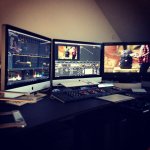
  • setup.jpg
    setup.jpg
    78.7 KB · Views: 0
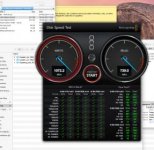
Acara thunderbolt raid... that is not the bottleneck.
It is the "small gfx card + a lot of pixel's to drive/move" i would think
 

Attachments

  • Screenshot 2014-11-20 17.26.55.jpg
    Screenshot 2014-11-20 17.26.55.jpg
    17.1 KB · Views: 0
Can playback 4k at speed correct? Given that your storage can sustain data rate?
 
What happened to your money?

My money is on both 5K iMac and 5K display to be announced before end of October and to start shipping in January...

:sifone: Peter
 
Debating on whether to spring for a maxed out 5K iMac or a 6-Core nMP with dual D-700s and 32gb of Ram.

Does anyone have thoughts on which would be a better performing system for the next 2 years? I mostly work with Premiere, After Effects, Photoshop, and Resolve. Either system would be connected to a Pegasus R6, and if I went with the nMP, it would be connected to a Thunderbolt Cinema Display.

Obviously the dual graphics cards in the nMP would be nice, but is it really THAT much better than the 5K iMac maxed out?
 
The Dual AMD GPU's will only help with Adobe on Render/export and that is Premiere and AME only. AE doesnt have GPU acceleration for much and what it does is Nvidia only. Davinci would make use of both. Overall the performance for Adobe wont be much different between the Imac and nMPro right now since they both have AMD GPU's. The 6 Core would help with R3D files but have less impact for Pro res and many other codecs since you cant control the clock speed.
 
What happened to your money?

I took it and bought an order of Cronuts at the new Dunkin Donuts near my house. 5K panels roll out next year from several sources and there will be a wave of 5K monitors in the usual 24-31 inch range.
 
The dual GPU in the mac pro are based on older chipsets, and the CPU is end of life. Get a new iMac if you need something now or wait for the V2 update of the mac pro which will have a newer gen CPU and the newer GPU. I have 4 x 5K iMac coming and no plans to upgrade my 4 mac pro cheese graters till the trash can has better hardware.

I plan to connect 4 x 5K iMacs for AE network renders over thunderbolt bridge. With 4GHZ CPU and 32GB ram they are by far the best bang for the buck in AE. If you want a good HD resolve solution throw a Titan Black in a cheese grater and you will get great performace. You could get a mac pro 5,1 with titan, GT120, BM card, raid card, and an iMac 5K for less than a fully configured nMP.
 
Well the Quad Core with 32GB of ram desktop platform are the best render nodes for AE when distributing the render for the cost. However they are far more limited for working in AE. Use them as render nodes only and they are definitely a cheaper solution overall and far more expandable than blade servers for the price.
 
How are they limited? Multi CPU rendering doesn't work with Element and quite frankly it has never been very solid with many plugins. I have a feeling the 5K iMac will be great to work in AE.
 
Back
Top