Mark A R
Well-known member
**ALSO POSTED AT BLACKMAGIC FORUM**
I'm new at grading and am still in learning/test mode. I seem to have a workflow problem here and could use some advice.
I have edited a few 4k R3D's in a 1080p timeline projects in Premiere Pro CC. I read somewhere that the workflow to follow is to untick "Default scale to frame size" in Preferences, then use scale under Motion settings to shrink the R3D to fit the 1080p frame. My scale ends up at 46.9 and I know that I have up to a scale of 100 for re-framing before I would start to lose quality by zooming in past the 4k full frame. I then export an XML and import into Davinci Resolve.
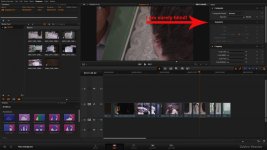
That all worked fine for a few projects imported into Resolve 9. I'm now playing with one in Resolve 10 and the clips are showing in the viewer at about 25% of the full frame.
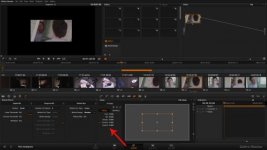
The Edit Sizing zoom shows as 0.469 and if I reset it to 1.000 it will be full frame, but if I try to reframe in there, I have no idea when I am exceeding the full frame quality and am just increasing pixel size? Plus I would prefer to do my edit/re-frame in PP.
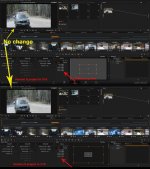
The super weird thing is, if I open a version 9 project in version 10, it looks like it did in 9. The image is full frame. The Edit Sizing zoom shows as 0.469 but any change I make to it does nothing to the actual frame and it always shows as a full frame in the viewer, even though the yellow bounding box in the Edit sizing panel changes.
I’m hoping someone can point out where I’m going wrong
I'm new at grading and am still in learning/test mode. I seem to have a workflow problem here and could use some advice.
I have edited a few 4k R3D's in a 1080p timeline projects in Premiere Pro CC. I read somewhere that the workflow to follow is to untick "Default scale to frame size" in Preferences, then use scale under Motion settings to shrink the R3D to fit the 1080p frame. My scale ends up at 46.9 and I know that I have up to a scale of 100 for re-framing before I would start to lose quality by zooming in past the 4k full frame. I then export an XML and import into Davinci Resolve.
That all worked fine for a few projects imported into Resolve 9. I'm now playing with one in Resolve 10 and the clips are showing in the viewer at about 25% of the full frame.
The Edit Sizing zoom shows as 0.469 and if I reset it to 1.000 it will be full frame, but if I try to reframe in there, I have no idea when I am exceeding the full frame quality and am just increasing pixel size? Plus I would prefer to do my edit/re-frame in PP.
The super weird thing is, if I open a version 9 project in version 10, it looks like it did in 9. The image is full frame. The Edit Sizing zoom shows as 0.469 but any change I make to it does nothing to the actual frame and it always shows as a full frame in the viewer, even though the yellow bounding box in the Edit sizing panel changes.
I’m hoping someone can point out where I’m going wrong