Welcome to our community

Be a part of something great, join today!

  • Hey all, just changed over the backend after 15 years I figured time to give it a bit of an update, its probably gonna be a bit weird for most of you and i am sure there is a few bugs to work out but it should kinda work the same as before... hopefully :)

1st 1,2,3...

Jannard

Red Leader
Joined
Dec 28, 2006
Messages
8,248
Reaction score
7
Points
0
OK. Let's hear it. I want to know your 1,2,3 for getting exposure right. I'm curious how many do it differently (or the same).

Step up.

1.

2.

3.

Jim
 
1. Light meter; I always check ratios for a base. Many say set the meter to 250 but I have tested and found 320 to be a comfortable setting.

2. Set stop then look at the histogram to make sure all is well.

3. False color to double check.

Once the process is second nature then it only takes a few moments to go through all the steps. In the end, I'm confident the lens is at the stop it needs to be to get the image I want.

~Spencer Meffert
 
Even for the 5D2, I like to shoot a 1 1/2 stops below the brightest part of the scene. I've been shooting like that on ocean scenes lately. Like this shot of JAWS Maui the other day..

1. meter brightest part of given scene
2. expose 1 - 2 stops under that
3. shoot and bring mids and shadow up in edit

This was shot at a 1 1/2 to 2 stops under and still blew some of the whitewash out, guess that's what happens with 40ft waves ! http://vimeo.com/8050122

I haven't had the pleasure of getting my hands on a RED yet but cannot wait. I've been quietly following the progress of your company since it was on Dvxuser.com.. I am so impressed by the amount of progress you guys have made in the last few years.. Really amazing.
I'd assume I'd expose in a similar fashion for the RED or Scarlet cams but won't know for sure till I get one ! Much Mahalo's Jim !
 
Last edited:
If we are implying that we are shooting 24p @ 1/48 and that the lighting is already set and metered for a particular T* stop:

1) I choose my Aperture Value to match, since I would have set up the lighting for it to begin with.

2) I choose my ISO also accordingly to the lighting that was set up for it.

3) I check my Histogram adjust and shot away.


or

when not controlling light and shooting with what ever is there and have no light meter:

1) I set the aperture for the desire DOF trying to shoot as fast as possible without compromising the look I wish to achieve

2) I set the ISO for bringing in off light in to the sensor again with out compromising the image quality

3) I check the histogram, adjust and shoot away

But I must say that I love to experiment with light, Aperture values, ISO, shutter speed and FPS, as each changes everything changes, and exposure even so one can be very creative with, there is in my opinion always the absolute need to check the histogram as to be sure to collect in off information in your channels as to be able to end up with not only your footage but the IQ needed to play well in post, some things can be manufactured well in post, but some can't and if you don't have the info there to begin with you will never get it.
 
In doors set for an ASA of 250 sometimes 200
Out doors shooting for an ASA of 320 sometimes 250

Histogram most of the time for exposure taking in as much information as i can without clipping. Checking for false color to make sure im not over exposed on anything i want to preserve.

Most of the time its possible for me to take sample test clips into REDCINE and or REDAlert and check for good exposure and if shooting in tungsten I pay extra attention to the darks to look for noise.

For DP's that like to shoot dark exposure because he feels it looks best and wants to capture that way.
I take him to my DIT station and show him what we are getting and what we can do to improve the shot.
That often times gets him to open up the iris.

Then I do my best to Transcode the files to a 1 light color grade he is happy with, I prefer to bring it down a touch in post than fight to bring it up.

I make it clear i need that information or to open up the lens to achieve a better neg.
 
FOR THE SCENE:
1. ACCEPTABLE NOISE FLOOR - You want this to be consistent shot-to-shot so figure this out first for the whole scene. For greenscreen & FX, you don't want important details too dark & too close to the noise floor. So expose to the right - around ISO 250 on RED ONE. For drama / location work, more visible grain in the end product is OK - eg shoot at ISO 500 if you don't have enough light. If you plan on doing heavy noise reduction in post, then you can shoot with a higher ISO.

2. PROTECT HIGHLIGHTS - How much clipping of highlights is okay? If you have a high-contrast scene, bump the ISO up a notch or expose a little to the left (planning to bring up the midtones in post) to protect your highlights. Use histogram, raw mode, etc to check.

FOR THE SHOT:
3. TWEAK F-STOP - If there's light to spare, set this creatively using ND filters - since shutter speed is usually not flexible (between 1/40 - 1/60 for us, unless we're doing greenscreen & adding motion blur in post).

Obviously there's some juggling & back-and-forth of 1,2 & 3.

Of course we watch for highlights clipping unexpectedly or things getting too dark on a shot-by-shot basis - and adjust for that by tweaking the lighting (if we can), the f-stop, or repositioning the actors. As a last resort, we expose a little to the left or right, knowing we're going to push or pull the midtones of the shot to match the others in post. We generally set the ISO per scene when we're doing initial lighting for the wides and leave it after that. You don't want the noise floor to jump around when going from shot to shot.

Also, I do noise reduction in post on 75% of my footage which maybe explains why I'm okay with ISO 640 etc. In-camera NR is a big reason why other HD cameras seem so noise-free. Film scans often go through a lot of NR. Don't shoot yourself in the foot by not considering it for your RED projects.

ONE SUGGESTION: I'd love an easy visual interface for switching between a set of custom curves / LUTs. It's too difficult right now on RED ONE.

In post I always reset the ISO back to 320 and do a nice S-curve (the shape of the curve depends on where I want to bring midtones to simulate a particular ISO). I don't particularly like setting ISO on RED to 500 because when I'm there it shows clipping when there isn't. But since I can't easily load different curves or LUTs, changing ISO is what we go with - since it gives me the closest approximation of the final image that'll result in post and it's something understood by most DPs and operators.

How about this: since RED ONE is really 320 (and any other setting is just an exposure push in one direction or the other), why not combine ASA ISO & curves?

EG:
choosecurve1.jpg

(curve preview changes on monitor as you select different ones)

or if you can do multiple LUT/curve previews, this would be cool:
choosecurve2.jpg


Histogram would stay RAW, of course.

It says "SELECT CURVE" instead of "SELECT LUT" because that might be confusing (if it's just a basic set of tone curves to approximate different film ASAs, not a whole 3D LUT film print simulation thing).

Bruce Allen
www.boacinema.com
 
When possible i shoot at 250 knowing i can throw a curve in in post. My main complaint about shooting 320 is it shows things as clipping that really are not. I would love to see all the highlight detail in the monitor at 320 and 500 without having to switch to raw. Custom curve?
 
1. For narrative, light meters and cameras to ASA 320. Trust instincts. ALL monitors are 'video taps' for framing, etc., not critical exposure. "About three stops up and down."
2. For run-and gun, false color with pink on skin, staying as close to 320 as possible if you want it to be "clean."
3. We prefer REDspace for color and REC709 for gamma in post as REC709 seems to yield the most highlight detail in video finish.

Main rule- trust your eyes- don't put too much faith on any monitors as grading usually reveals MORE detail than on set. Aim for skin tones, and use the Force for the rest...
 
Haven't personally shot with Red One yet.. worked around several now (I'm a vfx'r).

Whatever the flavor of pro video I've shot -- I expose like shooting transparency film*.

1. find the TRUE ISO by testing (Macbeth chart or like kind, and also with studio and outdoor lighting setups if possible)

2. protect the highlights (like Bruce mentions above), except I'd go with changing my filter pack before modifying the gain/ISO setting. If I need to change my T-stop anyway.. I'd do that first. But even better: if I have lighting control.. I'd go with my best ISO, least amount of filters, optimum(read: creatively and best sharpness) T-Stop and light the scene for it. My ideal is to get the best video signal possible(within the scene/mood of a shot) so that there is as much color and tonal range as possible to work with in post with the least amount of noise. Which leads me to #3....

3. check picture on a calibrated waveform and vectorscope when possible (any pro drama productions I've been on we had the scopes during shooting, but on run-and-gun guerrilla video.. never... but checked at end of day/post as-soon-as-possible)

...my $0.02

~s
(still have the render of the gloss pink Epic on my computer!)

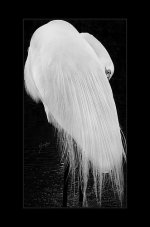
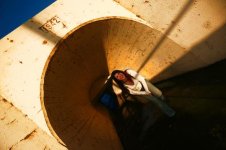
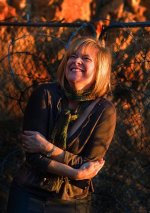
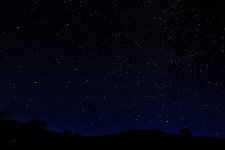
* I say this, knowing RAW capture is different than shooting video. I'm not a robot, I think "standard methodology" is a great place to start but I'd rather test out any gear I've not shot before, especially if I can in the lighting environment(studio vs. field.. types of lights, contrast ratios) I plan on working in. The mood, style, speed of the production(read: time for lighting) may factor in but ultimately I'm going to make sure the most important imagery of the scene is what is properly exposed... for me I care less about shadows, more about the main subject. Here are some recent images I've shot DSLR.. transparency-style. Not fine art, but I did not expose these like I would a negative. Yes, pp in Photoshop. In the case of the tunnel shot I had all highlight detail but chose to punch it. In the case of the barbed wire, I should have been even more mindful the highlights for the exposure, less of the shadow detail. The stars..are just a whole 'nother deal. :)

I do what works for me...
 

Attachments

  • Great_Egret_sm.jpg
    Great_Egret_sm.jpg
    52 KB · Views: 0
  • Kori_bigsmile-hrdrsmRedUser.jpg
    Kori_bigsmile-hrdrsmRedUser.jpg
    26.3 KB · Views: 0
  • Dawn_5906-FBReduser.jpg
    Dawn_5906-FBReduser.jpg
    34 KB · Views: 0
  • syv_starssmRedUser.jpg
    syv_starssmRedUser.jpg
    94.3 KB · Views: 0
Last edited:
1. Set ISO 320 (everage contrast) or to 400 (high contrast)
2. Switch to RAW metering
3. Expose to the right just before traffic lights go on

you forgot 4.

4. Enjoy it :rofl:
 
I will admit that I never use a light meter or False Color. This is my unsophisticated method:

1. Pick an F-stop (or acceptable F-stop range)
2. Look at monitor and adjust contrast ratios to taste.
3. Use zebra stripes to catch any unwanted clipping.

People are saying to not trust the monitor, but in my experience, if I'm satisfied with what I see in the monitor, then I'll be really happy with what I can do in post.
 
BEFORE ADDRESSING JIM'S QUESTION, IT IS CRITICAL TO UNDERSTAND 2 THINGS FIRST.

A. RED ONE is NOT a VIDEO CAMERA but a RAW IMAGE CAMERA! There is no onboard processing baking in a look, INSTEAD processing happens AFTER you expose. THINK FILM NEGATIVE.

B. THERE ARE 4 STEPS to VIRTUALLY ASSURE GREAT (not just good) BUT GREAT LOOKING RED FOOTAGE, EVERY SINGLE TIME
1. EXPOSURE (What Jim just asked)
2. DEBAYERING (What Graeme's magic does)
3. PROCESSING (CABOOSE EFFECT= Need to know delivery format BEFORE processing to determine optimal workflow i.e is it for FILM OUT? HDTV? etc.
4. COLOR GRADING - (Determining how you want it to finally "Look") EDIT: THe better you do with first 3, the more CHOICES you have here :)

BACK TO JIMS QUESTION REGARDING STEP 1. PROPER EXPOSURE.

The name of the game is a THICK negative. (read: Its all about the Histogram)

HOW TO EXPOSE GREAT RED FOOTAGE IN 3 REPEATABLE STEPS:
(Sorry Jim, its 5 or the curriculum needs to be altered at REDUCATION) ;) BUT SINCE YOU ASKED FOR 3. HERE GOES.

1. ALWAYS Leave at Iso 320. ALWAYS. DONT EFFIN TOUCH ISO. EVER.
(Only possible exception is ISO 250 for Tungsten) USE DAYLIGHT BALANCED LIGHTING WHENEVER POSSIBLE.. or LOTS AND LOTS OF TUNGSTEN.

2. ALWAYS MONITOR HISTOGRAM IN RAW/REDLOG when setting exposure. : The GOAL is to populate the sensor (i.e. Histogram) as much as possible. THICK NEGATIVE. REDLOG Histogram is more accurate representation of the sensor than REDSPACE.

HINT:.BEST exposure is just short of clipping (no stop lights) This is because the Mysterium sensor is strong in the shadows and you can (usually) pull it back up in post with little noise.
REMEMBER: The Difference between RED and a video camera is you are setting the white and black point so you can PROCESS it later.

3 ALWAYS Shoot a Color Chart and/or the very least, an 18% GREY CARD on EVERY lighting set up. (in the light) as you will save time and money in post.

3A. For advanced users... FALSE COLOR and ZEBRAS can help you "fine tune" the Historgram if you want to push the envelope on certain shots
 
Last edited:
I want to know your 1,2,3 for getting exposure right.

  1. Choose the appropriate aperture, depending on the need of DOF for a particular scene. This is the creative decision which determines other settings of the camera (like ISO, and also the amount of light required).

  2. With the camera at its base or 'lowest noise' ISO, check histogram to see that none of the channels are clipping, unless that is desired.

  3. If the histogram and scene looks underexposed, add more light or increase ISO (depending on budget and feasibility) to get the correct exposure. Adding light to the scene is preferred since 'high ISO' noisy footage is scary, but increasing ISO by pressing a few buttons is so much cheaper.

Action!
 
1. In controlled environment: RAWview and histogram, ETR, false colour skintone pink.

2. Run'n Gun: RedSpace, 320 ASA, Zebra - working like with an ENG system

3. Processing: Camera RGB, Rec709, 250 ASA, 5.000K

Using a lightmeter helps for setting up light. In False Colour pink skintones match approx. 160 ASA on the lightmeter, hence setting the lightmeter to 160 ASA makes sense. Working with the RedOne like with 35mm does not work. Relying solely on the lightmeter will lead to unwanted results in either directions (under and over exposure).

Hans
 
Just look at my Monitor

Just look at my Monitor

That's it folks, after 20 years of shooting commercials and owning every light meter, grey/color chart and coral filter, I just get a nice fat negative by looking at the monitor.

I work with the best editorial staff in Northern CA and all I need to do is just get a nice properly exposed image, I wish I could show off and act super technical but that is about it. With 35mm, I just take my Pentax spot on the actors face for my F stop and check the scene for extremes and adjust. With the FF35, Red, 7D, SI; I just expose to the monitor.

Pretty simple.
 
1 Looking at the histogram. (little mountain sitting pretty on the left side, no where near the right side)
2 Flipping back and forth between view modes RAW-rec709-redspace.
3 Know you camera (settings, behavior, noise, etc)
 
some things can be manufactured well in post, but some can't and if you don't have the info there to begin with you will never get it.

Ketch. totally agree on being creative, but you hit it the point here in your own response in regards to Jim's question for 1,2,3 EXPOSURE RULES.

my answer was directed at the LEGION of soon to be SCARLET FIXED users who will be snaggin that camera because its at the same price point as HVX-200 or Sony EX-1... and simply because its 3K, it therefore "must be better"...

If the ASC/PGA doesnt get how to expose a RED, how concerned must RED be when the masses treat this like a Point and Shoot video camera?

(Bob Gilles apparently accepted, Id bet most dont even realize that this is not a point and shoot VIDEO camera where "what u see is necessarily what you get."

REDUCATION FOLKS. IVE TWO DECADES EXPERIENCE WITH MANY CAMERAS AND LEARNED A TON (and the class paid for itself already)

3 PAGES and STILL NO SIMILAR ANSWERS. OH BROTHER.

Michael Cioni, Steve Freebairn? WHERE ARE YOU???
 
Last edited:
1) Set camera to 320 ASA (ext) or 250 (int), REDspace. Light to the right of the RGB histogram and always check I'm not overexposing the sensor by making sure the traffic lights aren't on. Sometimes I use the spot meter to check that skintones are in the 50-60s and always use it for chromakeying.

2) Check highlights in RAW and false color

3) Make sure export / workflow is optimal
 
1) Set camera to 320 ASA (ext) or 250 (int), REDspace. Light to the right of the RGB histogram and always check I'm not overexposing the sensor by making sure the traffic lights aren't on. Sometimes I use the spot meter to check that skintones are in the 50-60s and always use it for chromakeying.

2) Check highlights in RAW and false color

3) Make sure export / workflow is optimal

Hi Tony (Bill Giles) - We just learned at Reducation that you cant always trust Redspace for monitoring as its an approximation because its applying a LOOK. RAW monitoring will give you the most accurate histogram.

Moreover, we found we could push what appears clipped in REDSPACE, by switching to RAW (what the sensor sees) and you almost always have " a little more" room to push highlights.

EDIT: I DONT SPEAK FOR RED, but it APPEARS REDSPACE was designed with BUILT-IN Clipping protection in an attempt to idiot proof the camera. "So with RED ONE, what you see, is not necessarily what you are getting."

HAVE I TOUTED REDUCATION YET BTW? LOL. Seriously, just learning the difference between MPEG and WAVELET compression alone, was worth the cost of admission to me.

Great post Jim. Cant wait to check it again in the morning!

JARRED- ALso cant wait to see this all addressed in the NEW RED WEBSITE.

ATTN: FUTURE SCARLET OWNERS. ALL DELAYS ARE DIVINE. DO YOURSELVES A FAVOR AND TAKE THIS TIME TO LEARN THE DIFFERENCE BETWEEN RAW IMAGE PROCESS AND RECORDING BAKED IN VIDEO IMAGES.

cheers!
 
Back
Top