Welcome to our community

Be a part of something great, join today!

  • Hey all, just changed over the backend after 15 years I figured time to give it a bit of an update, its probably gonna be a bit weird for most of you and i am sure there is a few bugs to work out but it should kinda work the same as before... hopefully :)

RELEASED: Beta Build 20 Firmware (v20.1.2)

Stuart English

Red Team
Joined
Dec 30, 2006
Messages
3,643
Reaction score
0
Points
0
Location
Irvine, Ca
The latest version of RED ONE beta firmware (Build 20 - v20.1.2) has been released on www.red.com/support .

Significant changes since Build 20 v20.0.2 (Beta firmware release):

* Modified False Color meters for RAW, REC709 and REDspace views
* Modified Zebra 1 and 2 defaults
* Modified microphone level default
* Corrected Look Around area on HD-SDI and HDMI for 4K / 3K / 2K ANA mode
* Changed USER KEY 4 to VIEW RAW, changed USER KEY 5 to COLOR.

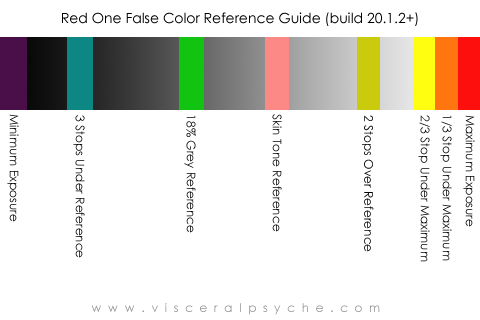
The modified False Color overlay provides the following information:

Purple
Minimum Exposure

Teal
3 stops under reference

Green
Reference Exposure for 18% Grey Card

Pink
Reference Exposure for Caucasian Skin

Straw
2 stops over reference

Yellow
2/3 stop under maximum exposure

Orange
1/3 stop under maximum exposure

Red Maximum Exposure

Note: This firmware version completes feature set development for Build 20.
 
Exposure assistance meter disclaimer

Exposure assistance meter disclaimer

The above firmware version has made adjustments to the calibration of the Histogram, Sensor RAW meter and False Color Overlays.

Accuracy is improved, however it is recommended that users conduct appropriate exposure tests before use on a commercial production.
 
Thank you Stuart. As a test pilot I have been testing this build for this past week
and it is GREAT. The false color, RAW histogram and your light meter all sync. Thanks again
 
Can you please post a (quickly made) reference bar similar to this one I copied from release B17 manual so we can easily visualize how it changed...

Can't wait for a release Build 20 so it can be used on real (paid) work. Right now I keep on using B17 but do all the conversions using new color science, making a new White Balance and grading with latest desktop apps... it works great but would simplify once the camera is running B20.

Thanks for all the amazing tools

Mikael
 

Attachments

  • Picture 1.jpg
    Picture 1.jpg
    5.6 KB · Views: 0
Thank you Stuart.
Does this release address any of the bugs in the Master/Slave feature.
I'm still experiencing frequent lockups in the slave camera.
Thanks!
Eli


The above firmware version has made adjustments to the calibration of the Histogram, Sensor RAW meter and False Color Overlays.

Accuracy is improved, however it is recommended that users conduct appropriate exposure tests before use on a commercial production.
 
False Colors

False Colors

Can you please post a (quickly made) reference bar similar to this one I copied from release B17 manual so we can easily visualize how it changed...

Sure

The green and pink bars provide quick exposure assistance for 18% reflectance grey and skin tone.

Teal represents areas of the image 3 stops under 18% reference grey, and straw areas of the image 2 stops over 18% grey.

Purple indicates minimum exposure, yellow, orange, red represent 2/3 of a stop under, 1/3 of a stop under, and maximum exposure.

If operating at IS0 320 and viewing REC709 on an HD-SDI monitor, Green is equivalent to IRE 44-47 and Pink is equivalent to IRE 60-63.

-
 

Attachments

  • FalseColorExposure255REC709.jpg
    FalseColorExposure255REC709.jpg
    10.7 KB · Views: 0
Last edited:
Thanks much for the quick reply.

I keep a printed copy of that chart taped on the camera body as a reference when working with DOP who never shot with the RED one, it helps a lot in the first days so they can expose properly. The new false colors look like they will be even more useful as they represent smaller value ranges. Really is like a multi colored zebra of the 21st century.

The only thing they had trouble with was the several teal colors representing darkish areas which were visually lighter than the gray above it, once they understood that, all was good.

Is it also now representing RAW exposure more accurately ?

Mikael

Sure

The green and pink bars provide quick exposure setup for 18% reflectance grey and skin tone.

Teal represents areas of the image 3 stops under 18% reference grey, and straw bar areas of the image 2 stops over 18% grey.

Purple indicates minimum exposure, yellow, orange represent 2/3 of a stop under, 1/3 of a stop under, and maximum exposure.

If operating at IS0 320 and viewing REC709 on an HD-SDI monitor, Green is equivalent to IRE 44-47 and Pink is equivalent to IRE 60-63.

-
 
Will give it a spin tomorrow on a short movie I'm DP'ing.

Looks like another significant upgrade! To think, just two days ago I was explaining the old version in detail to a cameraman for a job next week.... now I'll have to explain it all over again (but that's a good thing!).

Love the recent focus on image development and improvements! Keep it coming....

Cheers from Tokyo!

Paul
 
So does Skin tones fall 1 stop above 18% now? Or is it still + .3 Stop?
 
Zebras on Build 20

Zebras on Build 20

A note on Zebra operation in this version 20.1.2 of Build 20.

As you probably recall Zebra settings can be adjusted by the user and are remembered over power cycles.

Zebra settings are also stored as part of a USER PREFERENCES file.


In this Build the defaults were adjusted so that -

a) They are both enabled - so that's what the diagonal lines in the image are.

b) Shadow Zebra falls on the Purple false color bar

c) Highlight Zebra falls on the Yellow / Orange / Red false color bars.


Again, these are just default values, these settings can be adjusted to taste.

And you can turn them off if you wish - your choice.
 
Ok folks, here's a useful iPhone sized reference card you can copy to your Photos folder to carry around on set with you. Great way of showing new DPs what all the colours mean.

RedFalseColor_build20.1.2_iPhone_Reference_Chart.png


HTH

Paul
 
And just for those completists who want to see how accurate (or not) their iPhone's colour is.... :laugh:

GretagMacbeth_iPhone_Reference_Chart.png


Cheers!

Paul
 
For some reason I cannot change the user settings now on the back three user menu buttons. Side buttons work fine, but the back three are set at ISO, Color Temp and Shutter. Any clues for the clueless?
 
* Changed USER KEY 4 to VIEW RAW, changed USER KEY 5 to COLOR.

* Changed USER KEY 4 to VIEW RAW, changed USER KEY 5 to COLOR.

* Changed USER KEY 4 to VIEW RAW, changed USER KEY 5 to COLOR.
This concerns me are these still user selectable? i like to have 1 as raw 2 as color.
 
Stuart was generous enough a couple weeks back to help us out with this little handout we printed for REDucation last week.

The general information is for people relatively new to the RED, but the new false color chart with the ISO320 / REC709 IRE values may come in handy:

http://www.keslowcamera.com/Keslow B20 Handout.pdf
 
Back
Top