Welcome to our community

Be a part of something great, join today!

  • Hey all, just changed over the backend after 15 years I figured time to give it a bit of an update, its probably gonna be a bit weird for most of you and i am sure there is a few bugs to work out but it should kinda work the same as before... hopefully :)

No preview in finder OSX

Tim Janssens

Member
Joined
Jul 20, 2017
Messages
13
Reaction score
0
Points
0
Hello,

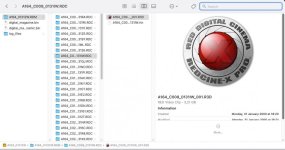
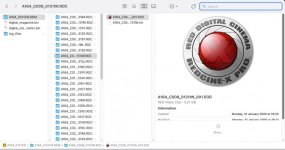
when I select an R3D file on my macbook M1, I get a nice thumbnail preview of the footage, but on my Mac Pro 2019 I only get the Red logo. Both are on the same operating system.

Screenshot 2021-11-30 at 18.59.55.jpg
 

Attachments

  • Screenshot 2021-11-30 at 18.59.55.jpg
    Screenshot 2021-11-30 at 18.59.55.jpg
    62.8 KB · Views: 0
Did either of you ever find a solution to this... It's incredibly annoying. Was working on the same hardware, software, OS, but no longer works after clean install.

The only thing I can think is that some legacy driver that never got deleted with OS updates was what did it, but the clean install finally nuked it.
 
Did either of you ever find a solution to this... It's incredibly annoying. Was working on the same hardware, software, OS, but no longer works after clean install.

The only thing I can think is that some legacy driver that never got deleted with OS updates was what did it, but the clean install finally nuked it.

Sorry. I have not found a solution. But I have not looked very hard. My previews stopped working and I did not do a clean install, but I am not sure what I did that killed the previews.
 
Thanks for following up Robert! Bombsquad actually knew the cause.

The solution is to use the older version of the R3DQuickLookPlugin file from RCXp v52. Not sure where it is in Windows, but on Mac it's ShowPackageContents of RCXp>Contents>Quicklook, replace the R3DQuickLookPlugin with the older version. Reboot and Bob's your uncle (or in this case, you).
 
I'm a bit late to this one, but since installing everything fresh on my new machine, I'm seeing the same problem. Tried pulling the QuickLook plugin out of one of the version 52 builds, but it didn't solve the issue. Do you know if we need to use a specific point release of version 52? Thanks!
 
I'm a bit late to this one, but since installing everything fresh on my new machine, I'm seeing the same problem. Tried pulling the QuickLook plugin out of one of the version 52 builds, but it didn't solve the issue. Do you know if we need to use a specific point release of version 52? Thanks!

I'm not exactly sure which version of v52 they gave me, but try the R3DQuickLookPlugin from v51 (just to ensure it's the older/working one). Still not sure why they haven't swapped back to a working one, since they know the cause.
 
Thanks for following up Robert! Bombsquad actually knew the cause.

The solution is to use the older version of the R3DQuickLookPlugin file from RCXp v52. Not sure where it is in Windows, but on Mac it's ShowPackageContents of RCXp>Contents>Quicklook, replace the R3DQuickLookPlugin with the older version. Reboot and Bob's your uncle (or in this case, you).

Thanks. Maybe someone can share the plugin?
 
Back
Top