Luis Otero
Well-known member
Actually, I barely use LUT at the node level. I use it in a node if there is a specific reason such clip will be needing a different look for a particular reason (flash-backs, etc.).
Once you are committed to LUT (either for film-out, DCP or broadcast), you use the settings to establish which and under what setting you assign it. If it is for film-out, you just select it as the "monitoring" one, so yo can see which will be the effect once the DPX is printed to that particular stock. That way, the rendered files will NOT have the LUT burned into them.
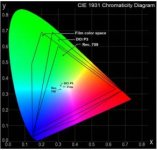
On the other hand, if you it will be used for Broadcast, or even DCP, you will use it as an "Output" LUT, hence it will be burned into the files. In the case of the DCP, you substitute it at the end (if you are not monitoring it already using DCI compliant color space) for a transformation LUT that will bring it from RGB to XYZ color space.
PS: And yes, you will RedLogFilm as the setting...
Once you are committed to LUT (either for film-out, DCP or broadcast), you use the settings to establish which and under what setting you assign it. If it is for film-out, you just select it as the "monitoring" one, so yo can see which will be the effect once the DPX is printed to that particular stock. That way, the rendered files will NOT have the LUT burned into them.
On the other hand, if you it will be used for Broadcast, or even DCP, you will use it as an "Output" LUT, hence it will be burned into the files. In the case of the DCP, you substitute it at the end (if you are not monitoring it already using DCI compliant color space) for a transformation LUT that will bring it from RGB to XYZ color space.
PS: And yes, you will RedLogFilm as the setting...