Welcome to our community

Be a part of something great, join today!

  • Hey all, just changed over the backend after 15 years I figured time to give it a bit of an update, its probably gonna be a bit weird for most of you and i am sure there is a few bugs to work out but it should kinda work the same as before... hopefully :)

ADOBE PREMIERE 6 --- I HAVE NO WORDS ....

Guyss,
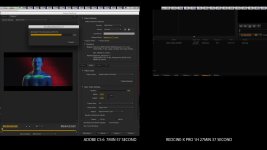
finish test , result is this:

hpz800 lion 10.7.3 , dual cpu intel 2,93 ghz, 48 gb ram
clip 5k , 2:35 (5:1) Red EPIC , lenght 4 min 23 second with audio.

Adobe premiere cs6 with redrocket: 3 min 42 second +-
Redcine-x pro 13 : 4 min 36 second +-

Adobe premiere cs6 without redrocket: 7 min 57 second +-
Redcine-x pro 13 without redrocket: 1 hours 27 min 37 second +-

Adobe you see in pics below, use all of core cpu , impressive guysss.:emote_22_yikes:
I'd like to try it with the new intel processors ... 32 core :)
this short time we would pass between the redrocket need more ....

thnaks
Luigi
 

Attachments

  • 13.jpg
    13.jpg
    67.9 KB · Views: 0
Positives: Performance is great. New interface is awesome.

Negatives:

1. Crashes frequently on my 2011 17" MacBook Pro. I uninstalled CS5.5 and then installed CS6. Even crashed once while restarting after a crash and opening that project again.
2. Frequently will not playback after some settings changed in the app's preferences. The same thing happened in the webinar on Wednesday when they tried to turn on Mercury Engine on an iMac (or was it MacBook Pro?), so clearly some kind of bug.
3. Disappointed that Speedgrade has limited media compatibility. When will this be expanded? Do we have to wait for CS6.5 or CS7, or might we see it in interim updates?
4. Warp stabilizer only works with media that's the same resolution as the sequence. Quite annoying. Also, would be nice to adjust more parameters, like customizing the scale AND rotation independently like with Apple's stabilizer. Overall I think I got better stabilization results from FCP's stabilizer than the Warp Stabilizer because of that.
5. Speedgrade doesn't seem very intuitive and there doesn't seem to be any documentation or help file in the app anywhere.

Overall, I'm pleased and hoping these issues are things that get addressed in updates.

There are some late breaking fixes for the OpenCL mode that should solve 1/2 for you. Remember you guys got this early ;) For 4 you can make a nested sequence...

Cheers

Dave
 
#1 and #2 - Hangs often on Windows 7 as well. When I make changes to the timeline, often it will not play back anything. Clicking play, space bar, enter, nothing. But it lets me save, then I end process and start over.

No hangs on my system with current version (Maybe more recent then the one available for download).

Early Mac Pro 2008 3,1
2 - 3.2 Xeons
24 GB ram
Quadro 4000
Maxx Digital raid array (750MB/sec.)
Lion 10.7.3
 
Johnny, are you running Mac OS 10.6.8? I think we have to upgrade to Lion to get playback and there's another updated driver for that on Matrox download website.

You must update to Lion to take advantage of Adobe transmit when using the vendor drivers (when they are available).
 
Guyss,
finish test , result is this:

....
Adobe premiere cs6 without redrocket: 7 min 57 second +-
Redcine-x pro 13 without redrocket: 1 hours 27 min 37 second +-
....

thnaks
Luigi

Adobe premiere cs6 at ( 7 min 57 second) , was this time using the mercury playback engine?
 
Adobe premiere cs6 at ( 7 min 57 second) , was this time using the mercury playback engine?

Of course ;) Jim
only Mercury rendering engine.
 
Is this normal?

I have this 6 second clip of a bird, and under Video Effects, added "Auto Levels" into the scene.

It fixed the color and contrast, but when the scene has any changes, the colors totally change.

Is it normal for an effect to change as the clip changes? Maybe the levels change during the scene?

Notice how the greens get darker when the bird flies away.

https://vimeo.com/41267745

dont touch auto levels, has never worked b4 even from cs3, plus its an 8 bit effect. stay away..... far away.
 
Adobe premiere cs6 at ( 7 min 57 second) , was this time using the mercury playback engine?

The Mercury Playback Engine is always operational. If you have (for instance ) the Quadro 4000 card, it is hardware driven. If you dont, it is software driven. I believe CUDA operation is reliant on whether you have a CUDA capable graphics card.
 
Testing: Playback much faster.
Rendering to H.264 about 20% faster on 4K footage downsized to 1080p, one Red Rocket, with Magic Bullet Looks, through AME. Much better use of multi-threading and RAM, judging by the W7 performance monitor.

I like the hover-scrub facility a lot.
 
accelerated mercury playback engine uses cuda, which is nvidia techology. To use AMD cards the MPE would have to be rewritten to take advantage of it. I wouldn't bank on AMD support anytime soon.
 
Directly from Adobe's Site:
Work dramatically faster thanks to sweeping performance, stability enhancements, and support for NVIDIA Maximus dual-GPU configurations and certain MacBook Pro OpenCL-based AMD GPUs.† Adobe Mercury Transmit enhances integration with third-party I/O devices

Supported AMD graphics cards for GPU acceleration:
• AMD Radeon HD 6750M (only on certain MacBook Pro computers running OS X Lion (10.7.x) with a minimum of 1GB VRAM)
• AMD Radeon HD 6770M (only on certain MacBook Pro computers running OS X Lion (10.7.x) with a minimum of 1GB VRAM)
 
Does it work with the hack?

Does it work with the hack?

Directly from Adobe's Site:
Work dramatically faster thanks to sweeping performance, stability enhancements, and support for NVIDIA Maximus dual-GPU configurations and certain MacBook Pro OpenCL-based AMD GPUs.† Adobe Mercury Transmit enhances integration with third-party I/O devices

Supported AMD graphics cards for GPU acceleration:
• AMD Radeon HD 6750M (only on certain MacBook Pro computers running OS X Lion (10.7.x) with a minimum of 1GB VRAM)
• AMD Radeon HD 6770M (only on certain MacBook Pro computers running OS X Lion (10.7.x) with a minimum of 1GB VRAM)

They seemed pretty specific it being Mac, and Lion.

Did you try the hack that adds the video card to the list? Very curious.
 
There are some late breaking fixes for the OpenCL mode that should solve 1/2 for you. Remember you guys got this early ;) For 4 you can make a nested sequence...

Cheers

Dave

Since we got it early, will the auto-update work or do we need to download and reinstall?

Nested sequences is a workaround, but will there be a fix at a later date? The stabilizer in FCP is resolution independent.
 
I'm running Lion on Mac. :-)

Nope..haven't tried the hack. Will wait I guess until the "official release" comes out, and see if that fixes the problem.

It's been said that those are the only supported video cards for OpenCL on the mac. Hopefully they'll add more for ya. I'd suggest sending adobe a note requesting it. Can't hurt, I'm sure popular demand is taken into consideration when supporting cards.
 
Johnny, are you running Mac OS 10.6.8? I think we have to upgrade to Lion to get playback and there's another updated driver for that on Matrox download website.

Hi Frazier....yes, i'm on Lion and have latest 2.5 or 2.05 matrox drivers....I also talked to matrox and they do have new drivers for cs 6 coming.....and i think im getting beta drivers sent to me today--fingers crossed. Frazier, are you getting the matrox player in cs 6 then? using the 2.5 firmware? should not be....
 
Testing: Playback much faster.
Rendering to H.264 about 20% faster on 4K footage downsized to 1080p, one Red Rocket, with Magic Bullet Looks, through AME. Much better use of multi-threading and RAM, judging by the W7 performance monitor.

I like the hover-scrub facility a lot.
Hey Paul. I've been testing CS6 exports under W7 and Mac. I'm purposefully not using a Red Rocket card, just to narrow down some factors. Can you tell me what kind of encode times you are looking at on your export? For testing purposes in Win7 under bootcamp on a Mac Pro, I threw a .r3d 3k 48fps 2min clip in PPro. I dynamically linked it to AE where I did a basic denoise. I then added a black and white effect to the clip in PPro, set up an export for AME which was basically VimeoHD preset (h.264, cropped for 16:9, no checkboxes for maximum render quality, 1920x1080, no audio).

Again, this was just me getting a feel, nothing crucial for practical purposes. It took the export between 3 and 4 hours. There are several factors at play here, many of which I did on purpose in an effort to see if AME would choke (browsed the web with multiple tabs, used Mac Drive to read/write to an OSX formatted drive). However, given the settings I described above on the machine settings I'll list, would that export time seem ridiculous or just a tad too long? I fully understand the benefits of a Rocket card, and presume it would dramatically reduce the time. I did not see my GTX 570 doing much at all during the encode, nor did I expect it too, just the CPUs being used heavily.

Mac Pro 2008 3,1
2xQuad Core Xeon 3.2ghz
14gb RAM
GTX 570 2.5gb VRAM

I'm quite happy with CS6 so far. My raw workflow has gained from the advancements. The situation I'm describing above is me testing capabilities a bit. I can post the clip if anyone is curious.
 
Back
Top