Welcome to our community

Be a part of something great, join today!

  • Hey all, just changed over the backend after 15 years I figured time to give it a bit of an update, its probably gonna be a bit weird for most of you and i am sure there is a few bugs to work out but it should kinda work the same as before... hopefully :)

"Magic Motion"...

Is it wrong if I confess I'm in love with this company?


Jono
 
When dealing with the footage, is it encoded in one R3D file or two streams R3D files. Am I right thinking that the MAX frame rate for this is 60FPS at the lower Redcode, and 25-30 at a higher recode. what sort of size files are we talking about here. Gb per min?

Will this need two RRcards to encode at real time.....It great to have multi RRcard support but I think there needs to be a single card solution as theres only 4PCI slots in a mac, and i'm already having to swap cards for different jobs, or you going to force us to by PC's for the 4RR cards we will need to process 3D HDR at just under real time for 5K. I'm just remembering the back lash when red first came out of not having the post support in place.

And are you planning on 3D support to keep the shutters in time on both exposures of one frame on both cameras.

I'm so glad that HDR is here been dreaming about HDR for motion for years. I know it wont be to long before you can adjust blur interdependently of DR, using some clever image processing and I guess thats what the foundry are working on.
 
Great to have options.

Will we be able to see the effect real-time while shooting, or only in post?
Same preview options for EasyHDR and HDRx?

Thanks!
 
FYI there was a "Magic Motion" thread of the same title about a week ago, so it might be wise to change the name to avoid confusion. Just noticed that...

I can't wait for these Epics to ship!!
 
Okay this is just getting ridiculous.... How bout you just tell us what the camera doesn't do amazingly well.... the list would be shorter.
 
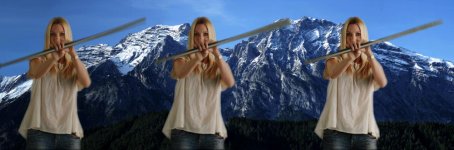
OK, I'll be the dumb one for this thread. I see the contrast change. I don't see any difference in blur in the three images. What am I missing?
 
What am I missing?

A critical eye?


...Hehe, anyway, it's subtle, but there is a difference and more noticeable in the areas that see faster motion / more blur.
 
>Is it fair to assume that if one drops the second "track" (resulting in "normal" motion) one also loses the additional DR?

Correct... except you still have The Foundry option. :-)

Jim

It took me a while but thanks to this simple question/answer it finally made this Magic Motion / HDRx functionality crystal clear to me :smile5:
Thanks for posting
 
OK, I'll be the dumb one for this thread. I see the contrast change. I don't see any difference in blur in the three images. What am I missing?

Look at the trailing edge of the spinning pole. It's most clearly defined in the first image; a more natural, continuous blur in the last.

Edit: By "more natural," I mean it's closer to a traditional film motion blur. Many people feel MagicMotion's extra definition on one edge of the blur gives a look closer to what the human eye perceives in real life.
 

Attachments

  • MotionBlur.jpg
    MotionBlur.jpg
    46 KB · Views: 0
Last edited:
FYI there was a "Magic Motion" thread of the same title about a week ago, so it might be wise to change the name to avoid confusion. Just noticed that...

Yeah! I was ignoring this thread cause I thought I had already read it. We need to come up with some system so we know which threads are new. "Magic Motion #2" or something...

HDRx and Magic Motion look more and more powerful with each post from you guys.
 
Does anyone know if Red has stated the max frame rate for HDRx and Magic Motion? I am assuming that you cannot do highspeed with HDR.

Also, I rember Jim said what the fastest shutter speed possible with HDRx and magic motion was but I don't remember. Anyone know.
 
This image reveals nicely of what is going on; One the right the metal bar appears straigh. It's just more blurred towards the end where the velocity is the highest. But, on the left in the "magic motion" processed image the bar appears as if it's bit bended. This must be an effect of the slight time shift between two images and because the images are interpolated to each other with some image processing.

Obviously, it's not possible to observe such artificial bending when the whole thing is shown in motion. So, this is hairsplitting. But what comes now into mind is to run a control test with something that has bigger angular velocity. Such as propeller of an airplane when the engines are turned on.
 
Does anyone know if Red has stated the max frame rate for HDRx™™™ and Magic Motion? I am assuming that you cannot do highspeed with HDR.

5K HDRx™™™ or EasyHDR™™™ will go up to 50fps. That's the plan.

Jim

Also, I rember Jim said what the fastest shutter speed possible with HDRx™™™ and magic motion was but I don't remember. Anyone know.

Up to 1/96th shutter base exposure.

Jim

There you go...
 
pretty wild stuff. crazy sexy cool.

Is anyone else hearing The Drifters singing "This Magic Moment" (sung to the tune of "This Maaaagic Motioooon") in their head every time they see Jim post one of these new Magic Motion links? or is that just me?
 
Is anyone else hearing The Drifters singing "This Magic Moment" (sung to the tune of "This Maaaagic Motioooon") in their head every time they see Jim post one of these new Magic Motion links? or is that just me?

hahahaha I wasn't before but thank you for implanting this in my mind . . . .

In all seriousness, this sort of technology might as well be wizardry and I can't wait to get my hands on it!
 
OK. Now that I've looked at this a few more times I have even more comments and questions.

One answer: I'm pretty sure the one on the right is from the motion sample posted earlier.

Just so we're on the same page: The pole is spinning clockwise the way we are looking at it, ccw to the young lady.

Q1: In the one on the left, the trailing edge is sharpest and brightest. In the one on the right, the entire pole is a pretty even blur. So I would conclude that these are two extremes of the variable settings. Is this correct?

Q2: So if these are the extremes, which one has max Magic Motion? This is where I'm really confused, because I would guess the one on the left - it matches with the light bulbs with the comet and tail look in the Vegas motion clip. But then the one on the right is from the post that was also meant to show off Magic Motion. OTOH the one on the right I think would look smoother than the one on the left if we could compare them both in motion.

Q3: Is it possible to go the other way, and have the Leading Edge the sharpest and brightest? This was Adam Wilt's question to Jim, and I'm wondering if it would look the smoothest of all. I know Jim's answer was "That would be an interesting science experiment." But if it results in smoother blur or even a new look with artistic potential (Adam Wilt called it the "comic book" look), can you try it?

Ultimate Q: If this algorithm is smart enough to drastically adjust parameters depending on the type of motion (speed, direction, etc) and brightness/contrast characteristics of the moving objects, then I'll stop asking questions and just wait for it.
 
Last edited:
Is anything else affected by the Magic Motion variable? It looks like there's a slight change in the green background from frame to frame.
 
Q2: So if these are the extremes, which one has max Magic Motion? This is where I'm really confused, because I would guess the one on the left - it matches with the light bulbs with the comet and tail look in the Vegas motion clip. But then the one on the right is from the post that was also meant to show off Magic Motion. OOTH the one on the right I think would look smoother than the one on the left if we could compare them both in motion.

Yeah. The left has the most highlight protection it would seem. (Left = most Magic Motion of the examples)

Q3: Is it possible to go the other way, and have the Leading Edge the sharpest and brightest? This was Adam Wilt's question to Jim, and I'm wondering if it would look the smoothest of all.

Jim said no last time I believe.
 
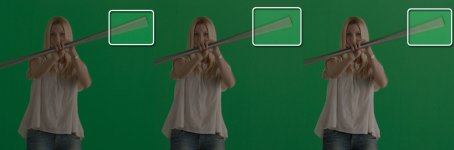
did a simple green-key with primatte - motion blure works well even on the jpg
this will be fun:)

what do say - can't wait
 

Attachments

  • 1286442716_key.jpg
    1286442716_key.jpg
    95.2 KB · Views: 0
Back
Top