Kyle Wullschleger
Well-known member
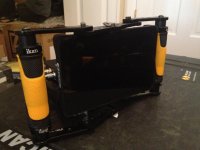
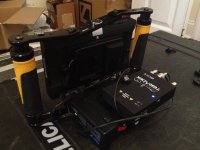
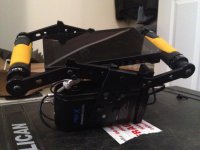
I just snapped a couple photos of a wireless setup I think I'm happy with.
I saw the Ikan Dragonfly used for $60 on Amazon so I ordered it on a whim because I've just been using a bare monitor essentially.
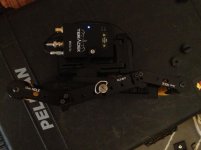
I'm using the SmallHD AC7 mounted diagonally so you still have access to all the ports and controls. A flat mounted bracket off the base to attach the Switronix powerbase 70 which has a quick release on one side and a 1/4" 20 receiver on the other to attach the bolt receiver. The batteries have been sitting around useless since the 5D days and have an LP-e6 dummy connection to attach to the canon battery plate. I had to dremel off a small piece of plastic on the battery plate for the dummy battery to fit but it was super easy. There are actually two power taps when using the dummy battery connection from the powerbase batteries so one is left open if I absolutely had to power any additional kit. Perhaps I'll add a small fan to keep the director cool.
It would probably be easier to have a battery plate with a dtap directly connected to the monitor but I had this stuff laying around and it actually makes for a really nice base so when it's set down there is zero stress on the monitor or any of the gear. And it gave me something to attach the Bolt to because of how I mounted the monitor to free up the connections on the bottom, the Bolt receiver didn't quite fit on top of the cage. I really wish the AC7 had side mounting points in this situation so I could mount the receiver vertically off of a bracket attached to either side.
The slightly diagonal setup of the monitor is able to be centered and countered by flipping the brackets on one side of the ikan setup so when you're holding it, everything actually feels straight across. Having the controls on the top and the ports on the bottom really bones you in this situation, but the versatility of being able to flip the angled brackets really helped.
Anyone else have a favorite bracketry setup for their monitor?
I saw the Ikan Dragonfly used for $60 on Amazon so I ordered it on a whim because I've just been using a bare monitor essentially.
I'm using the SmallHD AC7 mounted diagonally so you still have access to all the ports and controls. A flat mounted bracket off the base to attach the Switronix powerbase 70 which has a quick release on one side and a 1/4" 20 receiver on the other to attach the bolt receiver. The batteries have been sitting around useless since the 5D days and have an LP-e6 dummy connection to attach to the canon battery plate. I had to dremel off a small piece of plastic on the battery plate for the dummy battery to fit but it was super easy. There are actually two power taps when using the dummy battery connection from the powerbase batteries so one is left open if I absolutely had to power any additional kit. Perhaps I'll add a small fan to keep the director cool.
It would probably be easier to have a battery plate with a dtap directly connected to the monitor but I had this stuff laying around and it actually makes for a really nice base so when it's set down there is zero stress on the monitor or any of the gear. And it gave me something to attach the Bolt to because of how I mounted the monitor to free up the connections on the bottom, the Bolt receiver didn't quite fit on top of the cage. I really wish the AC7 had side mounting points in this situation so I could mount the receiver vertically off of a bracket attached to either side.
The slightly diagonal setup of the monitor is able to be centered and countered by flipping the brackets on one side of the ikan setup so when you're holding it, everything actually feels straight across. Having the controls on the top and the ports on the bottom really bones you in this situation, but the versatility of being able to flip the angled brackets really helped.
Anyone else have a favorite bracketry setup for their monitor?