Welcome to our community

Be a part of something great, join today!

  • Hey all, just changed over the backend after 15 years I figured time to give it a bit of an update, its probably gonna be a bit weird for most of you and i am sure there is a few bugs to work out but it should kinda work the same as before... hopefully :)

why is AE on a PC so much faster then a Mac ?

Daniel Crooks

Well-known member
Joined
Feb 15, 2009
Messages
96
Reaction score
0
Points
0
hi people

I'm running a fairly spec'd out Mac as my main workstation - 2x2.6(8core) Nehalem, 16GB RAM, ProAvio EB8 with Areca 1221x controller, ATI Radeon 4870. I also have a couple of PCs that I'm using only for rendering - XP64 ,i6 2.6(4 core), 12 GB RAM, some cheap video card and 2 standard internal sata drives. The PCs each cost almost a quarter of the Mac (not including the monitors). I almost fell off my chair when the PCs started rendering After Effects comps faster the Mac. How can this be ? More processors, more RAM, 730 MB/s disk reads and still the Mac is going slower ??? I've tried all sorts of MP balances but The PCs are still doing renders in 2/3s the time. Sure XP is flaky as hell and I have to reboot between renders but I am quite disappointed in Apple.
Could someone please explain whats going on ?

../daniel
 
there is a setting in the AE for mac that you can change the processes and ram being used...
try altering that?

If you have then...well I guess thats just the most bizarre thing ever...imagine if you decked your PC out then haha
 
yeah, that's what i meant by balancing MP i.e Multi Processing settings. It's actually quite a fine tuning process to balance foreground and background RAM requirements while leaving just enough for the system. I'm pretty sure I have these tweaked to their optimum on both Mac and PC. Still the Mac is lagging...
 
yeah, that's what i meant by balancing MP i.e Multi Processing settings. It's actually quite a fine tuning process to balance foreground and background RAM requirements while leaving just enough for the system. I'm pretty sure I have these tweaked to their optimum on both Mac and PC. Still the Mac is lagging...

Try reducing the RAM in the Mac to 12Gb. According to Barefeats.com, this is faster than 16Gb (really). Other than that, the performance differences are just down to multiprocessor efficiencies between the systems in all likelihood. Expect future Snow Leopard/Grand Central tech to improve this - once Adobe cotton on to the tech and implement it....
 
Try reducing the RAM in the Mac to 12Gb. According to Barefeats.com, this is faster than 16Gb (really). Other than that, the performance differences are just down to multiprocessor efficiencies between the systems in all likelihood. Expect future Snow Leopard/Grand Central tech to improve this - once Adobe cotton on to the tech and implement it....

I actually started out with 12GB going on advice about the new triple channel architecture (and being unable to afford the 6x 4GB chips *cough*), but the extra 4GB means another processor on the frontline which did help. Also put Snow Leopard on another drive to see if it would improve speed and there was a slight improvement but still not a patch on the humble PCs chugging away in the corner...

is AE on the PC really 64 bit ?
 
is AE on the PC really 64 bit ?

AE on Vista 64 is 64bit!

directly from Adobe:

You can experience 50% to 200%
faster high-definition (HD) workflows moving from 32-bit with 4GB of RAM to 64-bit with
16GB of RAM. Performance gains include increased editing speed, rapid switching among
tools, and faster rendering—all of which give you more time to be creative with CS4
Production Premium. Jan Ozer of Digital Content Producer and EventDV tested CS4
Production Premium on 32-bit and 64-bit systems and concluded that “rendering trials
clearly demonstrated that a 64-bit system delivered superior performance with most
formats*... the 64-bit system was 67% faster on my standard DV test file, up to 63% faster on
HDV-related tests, up to 50% faster on AVCHD tests, and up to 227% faster on tests using
footage from the RED camera.**”
 
sadly if you used AE with Vista 64 you'll amazed with its performance.. optimizations in the software goes far beyond hardware specs..
maybe you won't need to restart much.. its more stable system..
 
...and up to 227% faster on tests using footage from the RED camera.

arghhh.....
Oliver you're killing me. And to top it off now I'm getting some really weird MP glitches rendering with 10.6. This may well have been the last Mac I buy !
 
Sorry, but I had to chime in on this.

Currently, the only 64 bit Adobe app is Photoshop.

After Effects opens multiple instances of itself (executables) in order to use all of the available ram. It has been doing this since CS3.

One of the main virtues of a 64 bit OS is its ability to use essentially all the ram you can feed it.

And it's just quicker in general.

Adobe optimized the code for 64 bit.

And speaking of 64 bit OS's, I am currently using Windows 7 x64 RTM.

It is the smartest and most stable OS MS has ever produced IMHO.

Even the first betas were more stable and less buggy than any version of Vista; especially if you turn off all the eyecandy and stupid things like Superfetch, Windows Search and indexing among others.

I'm not a Microsoft fanboy. It's just that it is still mostly a Windows world and I made a choice based on that.

Regards to all.
 
And speaking of 64 bit OS's, I am currently using Windows 7 x64 RTM.

It is the smartest and most stable OS MS has ever produced IMHO.

Even the first betas were more stable and less buggy than any version of Vista; especially if you turn off all the eyecandy and stupid things like Superfetch, Windows Search and indexing among others.

I'm not a Microsoft fanboy. It's just that it is still mostly a Windows world and I made a choice based on that.

Regards to all.

Hi extrabyte,
When you say smartest and most stable OS MS has ever produced, do you mean from a crashing/memory leaking perspective? I've been really impressed with the CS4 workflow, and am considering setting up a PC environment for RED editing. It's kind of scary, b/c you lose the FCS options, but if CS4 is another animal on x64 PC, it just seems to make sense. Hopefully the Mac CS4 version will get tweaked for Snow Leapord and exhibit same faster performance as in the x64 PC environment.
 
Yes, CS4 in a 64bit enviroment is much better, and if you use 16GB or more it is great. Windows 7 only made it better. Agreed with extrabyte, don't know what they did, but they did it well. In my dual quad+16GB of ram everything runs faster than in vista or xp! and it even feels fine LOL.
 
In my experiences with OSX vs Windows, OSX has had great stability and is very simple to use, but it has never come anywhere close to utilizing the computer's hardware in the raw way that Windows does.

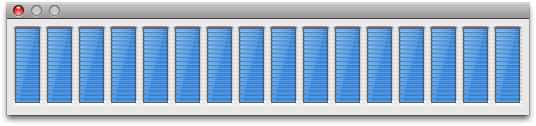
I have never seen a program on Mac use all the cores at 100%, to put it simply.
 
In my experiences with OSX vs Windows, OSX has had great stability and is very simple to use, but it has never come anywhere close to utilizing the computer's hardware in the raw way that Windows does.

I have never seen a program on Mac use all the cores at 100%, to put it simply.

Compressor on my 2.66 octocore Nehalem is pretty impressive.
 

Attachments

  • 16 threads.png
    16 threads.png
    15.1 KB · Views: 0
I posted the same questinon on the AE forum at creative cow and recieved a response from someone at Adobe stating that AE was definitely not 64 bit on any platform. Oliver, where did you get that 32 vs 64 bit info from ?
 
now that I read that little blurb again I think most probably it refers to the OS not the application, i.e. 64 bit OS is going to run AE better than 32 bit OS. This would also concur with the slight speed increase seen in Snow Leopard.
 
Hi Yousuf,

In answer to your question, yes. As far as crashing and memory leaks. But also with compatibility for applications both old and new. Just remember that (and I cannot stress this enough)the key here is to turn off all of the unnecessary processes that it wants to run(there's a lot). And from what I've read, when we get 8+ core processors, it will know how to handle those in a really productive way.

Regards.
 
That's great to know PP/AE CS4 on x64 PC is killer fast. I think I will have two workflow machines: 1) x64 Windows7 dedicated for CS4 workflow, and 2) OSX system for times when I need the FCS (Color) options

It would be ideal if Adobe can tweak CS4 for x64 Snow Leapord to achieve similar efficiency, then I would not have to invest in TWO SYSTEMS!
 
Back
Top