Pekka Varis
Member
- Joined
- Feb 10, 2014
- Messages
- 13
- Reaction score
- 0
- Points
- 0
Hello!
I am trying to get a hold on Davinci + Premiere cc 2015 workflow. First I try to get my material look at least roughly the same on both - for a start!
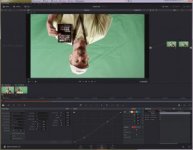
Here is what I think looks good on Davinci Resolve:
https://dl.dropboxusercontent.com/u/6416182/Screenshot 2016-06-16 12.10.36.png
So it is Color Space: "Camera RGB".
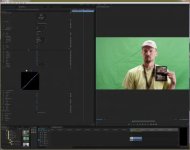
Support people at Davinci just told me that this same Color Space SHOULD be on Premiere too! I just do not see it in my selction on premiere!? The closest thing I can get is by using RedColor2:
https://dl.dropboxusercontent.com/u/6416182/Screenshot 2016-06-16 19.02.22.png
But the idea of using davinci resolve + premiere cc 2015 is to make it sync together so I do not want this kind of guess work here. What is wrong, why do I not see it in premiere? Is it cos I have not shoot my material with the most best setting in my red one mx- Redcode28 but not the 36?
Yours,
Pekka Varis
Finland
I am trying to get a hold on Davinci + Premiere cc 2015 workflow. First I try to get my material look at least roughly the same on both - for a start!
Here is what I think looks good on Davinci Resolve:
https://dl.dropboxusercontent.com/u/6416182/Screenshot 2016-06-16 12.10.36.png
So it is Color Space: "Camera RGB".
Support people at Davinci just told me that this same Color Space SHOULD be on Premiere too! I just do not see it in my selction on premiere!? The closest thing I can get is by using RedColor2:
https://dl.dropboxusercontent.com/u/6416182/Screenshot 2016-06-16 19.02.22.png
But the idea of using davinci resolve + premiere cc 2015 is to make it sync together so I do not want this kind of guess work here. What is wrong, why do I not see it in premiere? Is it cos I have not shoot my material with the most best setting in my red one mx- Redcode28 but not the 36?
Yours,
Pekka Varis
Finland