Welcome to our community

Be a part of something great, join today!

  • Hey all, just changed over the backend after 15 years I figured time to give it a bit of an update, its probably gonna be a bit weird for most of you and i am sure there is a few bugs to work out but it should kinda work the same as before... hopefully :)

Who is Responsible for Camera Timecode?

Peter Moretti

Well-known member
Joined
Apr 20, 2008
Messages
1,595
Reaction score
0
Points
36
A friend of mine has wrapped shooting a feature film, and I've been working on creating sync sound DNxHD 36 proxies out of Redcine-X and Avid MC. (Thanks to a lot of help from people on the Avid Workflow forum, I've bee able to get this done! ;)

While doing this work, I encountered a day of shooting where the camera .R3D files were out of sync with the smart slate (the audio BWF files were in sync with the slate). However I encountered another day when all three--picture, sound and slate--were out of sync with each other (each had a different timecode). The other 14 days were fine. ;)

So my ? is, "Who is generally responsible on set to ensure that the slate, camera and sound recorder are all properly synced to each other? The DP also operated, so would he at least be responsible for the camera to smart slate sync? Or would it be the 1st AC? The DIT (there was no on-set transcoding/dailies creation being done)?

Also, do you have any rules of thumb for trying to prevent this problem from occuring?

THANKS VERY MUCH!
 
Depending on how the departments are set up, that would likely be sound dept and 1st AC. TC is coming from sound dept and the 1st AC is making sure that whatever they are sending the camera is connected properly (could also be DIT if there is one).

I have a smart slate and Ambient ACL-204's and mini lockits as part of my camera package because I spent hours as a kid manually syncing audio on 3/4" and betacam tape. It's easy to get perfect TC sync now and it is saving someone hours of time. The new lockits will jam wirelessly and the next firmware release will enable them to auto sync themselves constantly. The 204's feed the camera (with genlock) and audio recorder while the mini is velcro'd to the smartslate. Sound recordist can manually zap all the lockits a couple times a day to make sure all are sync'd.
 
1st A.C. and Sound dept are responsible together for making it work. D.P. is usually too busy with other decisions / problems, and has to delegate that task to the crew.
 
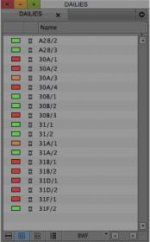
I agree with Glen, but even within the same span of shooting, I will find difference in sync when using timecode. The following image is the result of syncing by timecode and I colored them based on my expectation of sync for editorial. As you can see, the ratio of perfect sync versus not is about 44% success.

Green: Perfect
Orange: 1 frame out
Red: 1+ frame out

I work in 1/4 frame accuracy - 1+ means 1.25 or 1.5, out of sync to where I determine sync to be based speed of clap, and sound of sticks. Even Red's tutorial video on syncing with Redcine X Pro for both timecode and manual wil demonstrate this. If you look carefully at the timecode in the video of the manual example (it was the same clip that was used for the automatic by timecode), you will see the 1 frame slip needed to make it in sync. The example here was from a RED shoot, all clips coming from the same card, same camera, same audio device. To me, sync is based on eye and ear, then timecode follows for downstream tracking of whatever that relationship might be.

Michael
 

Attachments

  • Sync.jpg
    Sync.jpg
    7.9 KB · Views: 0
While doing this work, I encountered a day of shooting where the camera .R3D files were out of sync with the smart slate (the audio BWF files were in sync with the slate). However I encountered another day when all three--picture, sound and slate--were out of sync with each other (each had a different timecode). The other 14 days were fine. ;)


How do you know they were "fine"? Did you hand-check every one of them, making sure the sticks matched in audio and video? Just because you think the TC numbers "match" doesn't mean the sticks do.

I do lots of syncing as part of DIT'ing, and i never even bother looking at audio TC - I just manually sync everything. Auto-sync based on TC doesn't organize by scene and take anyway (no bin names, and no naming of merged clips by scene and take).
 
Joe,

I was surprised how on the timecodes were on the good days. To be honest, the amount of time crunch I was under to get the proxies to my friend determined how much time I spent checking the auto sync. But when timecodes were off, they were way off.

Michael shared with me a great tutorial by Avid's Matt Feury on syncing where he copies the scene and take name from the sound file and copies it to the synced source's name.

The syncing part starts at about 7:20. http://youtu.be/f3VhaoANjh0
 
Michael shared with me a great tutorial by Avid's Matt Feury on syncing where he copies the scene and take name from the sound file and copies it to the synced source's name.

That's if the sound guy named them in a way that's actually useful - and if he even gave them the right name in the first place.

It does take time to sync - might as well take the time to do it right (manually).
 
I'm struggling a lot with syncing in Final Cut Pro X. some material we have time synced and some we have only a clapper board for. Our sound channels are all in 8 different files. Do you guys collapse them in 1 8 channel sound file before importing or just sync all 8 channels? Any pointers to how I can make syncing universe a bit more friendly :)
/Andreas
 
I'm struggling a lot with syncing in Final Cut Pro X. some material we have time synced and some we have only a clapper board for. Our sound channels are all in 8 different files. Do you guys collapse them in 1 8 channel sound file before importing or just sync all 8 channels? Any pointers to how I can make syncing universe a bit more friendly :)
/Andreas

Is one of the tracks a mix track and the other ISO's?

Michael
 
How do you know they were "fine"? Did you hand-check every one of them, making sure the sticks matched in audio and video? Just because you think the TC numbers "match" doesn't mean the sticks do. I do lots of syncing as part of DIT'ing, and i never even bother looking at audio TC - I just manually sync everything. Auto-sync based on TC doesn't organize by scene and take anyway (no bin names, and no naming of merged clips by scene and take).
This is the right answer as I see it. To me, the timecode merely gets you in the ballpark; the slate clap confirms that sync is real. All the automatic dailies systems I know of -- MTI, Pix, etc. -- will sync up automatically, but they still require some user verification to make sure it's exactly dead-on.

In answer to the o.p.'s question, when SMPTE timecode first started around 1980-1982, IATSE in Hollywood determined that since timecode was an audio format, its jurisdiction came from 695, which was the sound mixer's local. This has generally been the case in America. I have no problem with the sound department being responsible for furnishing timecode (both sync boxes and slates), but it's the camera department's responsibility to keep an eye out on it and make sure it's consistent. I make it a point to carry PDF manuals for all major cameras so that the assistant and I can get into the menus and make sure it's jamming correctly and all is well. But all cameras (Red included) have bad days where they won't jam, they have a processing delay and are 1 frame late, and similar problems. Crap happens.

Think of the way things were in the world of film for the last 80 years, and syncing is still a lot easier than that. Plus we have about 5 times more footage to deal with every day on an average feature. My observation is that it only takes an assistant about :30 seconds per take to check every scene. Even assuming 200 takes (which is ridiculous), that's only about 90 minutes to check them all, which is not a big deal in the grand scheme of things.
 
Back
Top