Welcome to our community

Be a part of something great, join today!

  • Hey all, just changed over the backend after 15 years I figured time to give it a bit of an update, its probably gonna be a bit weird for most of you and i am sure there is a few bugs to work out but it should kinda work the same as before... hopefully :)

Whites clipping at 90%. Am I doing something wrong?

JR Monteiro

Well-known member
Joined
Feb 24, 2012
Messages
87
Reaction score
0
Points
0
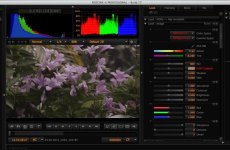
I went out and did some camera tests in my back yard and opened them up in Redcine and it seems to me that the camera is clipping the whites at 90%. I can bring the clip point up by adjusting the "Gain" setting but I am concerned that I am not getting the full dynamic range out of the camera because something is set wrong. Below is a picture of my Redcine screen with everything set at the default settings. Should I have used a different ISO setting to get it to clip at 100%

Thanks
 

Attachments

  • Screen Shot 2013-10-27 at 12.21.31 PM.jpg
    Screen Shot 2013-10-27 at 12.21.31 PM.jpg
    91 KB · Views: 0
Its interesting, the RED won't hit "100%" on the waveform until you set the ISO to 1600, even though the image will clip. I dont know why. This is why i think they did away with the waveform as an exposure tool cause of the way RAW works with exposure.

Just use the red/Purple, and dont worry too much about the scopes.
 
Where your goal posts and stop light were when you exposed the footage is the important issue. It looks to me like you slightly overexposed the highlights in the footage and then brought them down in RCX. From what I see, I'd guess that there was some activity in the right goal post during shooting.
 
Where your goal posts and stop light were when you exposed the footage is the important issue. It looks to me like you slightly overexposed the highlights in the footage and then brought them down in RCX. From what I see, I'd guess that there was some activity in the right goal post during shooting.

It looks over exposed to me. That's why I posted it. But according to the goal posts I was in safe territory. When I set up the shot, I opened the iris up until the lights came on and then backed it off a stop until they went out. None the less the highlights are definitely rolled off and clipped according to Redcine and no adjustments at all were made in Redcine. Does that mean to protect highlights I need to expose 2 stops below what the stoplights say?
 
Even though your histogram appears to "clip," just by looking at your JPEG image, I see that it doesn't appear to have any spectral highlights that completely blow out. It is quite possible that the brightest point of anything in your image was at 90% luminance.

Do a quick test - take your ISO or FLUT step-by-step down to the minimum amount possible. If you see any areas that remain white or appear magenta, you'll know that you have overexposed regions. If not, then your meters were indeed correct, and your max exposed brightness was around 90%.
 
Also curious on the WB and tint settings?
 
Back
Top