Welcome to our community

Be a part of something great, join today!

  • Hey all, just changed over the backend after 15 years I figured time to give it a bit of an update, its probably gonna be a bit weird for most of you and i am sure there is a few bugs to work out but it should kinda work the same as before... hopefully :)

White Balance Q

Joined
Oct 19, 2021
Messages
12
Reaction score
0
Points
1
Will I get an accurate white balance if I am in the magnify mode on the SDI output in order to fill the frame with the 18% grey card or do I need to move the camera closer with magnification off?
 
White balance is based on what the sensor sees, not what the monitoring output shows. If you magnify SDI, you won't see the how much of the sensor area the card covers and uses for white balancing (you could still check its coverage on the built-in display if not magnified, too). And although the manual says you should place the card in the center of the image, it doesn't tell how much of the full area will be considered for the balance, so better fill the frame completely with the card if possible.
If you're shooting R3D, white balance is just metadata and doesn't affect the footage right away. Only indirectly perhaps if you're making lighting decisions based on what you see in the white balanced SDI output.
 
I have been zooming in with Magnify mode for nearly 10 years with good results on my WB. What Alex suggests is not supported by my experience but maybe I am wrong? Michael it would be quite easy to set up a test and make this science ? If you do please share your finding.
 
Tom, you're certainly right if that worked well for you all the time. I never auto white balanced in camera so far, so I just took it from the manual and it's not very clear there how much of the frame's center area is used for the WB. I only did a quick test yesterday, one with the card filling the full sensor area, then with a small gap at the bottom where red background ran through, and the WB values were different. But this test was with the unmagnfied view and I think (hypothetical) if you don't see how much of the sensor the card really covers because you only see the magnified part of it, YMMV.
 
Yeah, back in my Canon 7D days foward, I would always try to fill the entire frame with a 18% Grey card (For a slightly warmer White Balance) and a White Card for a more Neutral White Balance to get the best Manual White Balance. I always used a stand with a C-Clip to make sure the 18% Grey card or White Card was always perfectly perpendicular to the camera because sometimes using the Grey card or White Card slightly Off-Axis would result in a different White Balance, also make sure the Grey or White Card is evenly illuminated as well because that can affect the quality of the manual white balance as well.


And do a Manual White Balance in the same lighting that your subject is in. If the subject is in the sun do a manual white balance in the sun, if in the shade do a manual white balance in the shade not in the sunlight ...etc.
 
Last edited:
Some more results from yet another semi-scientific test, this time with pictures and numbers.

tl;dr: WB changes with the area covered but independent of SDI or LCD zoom.

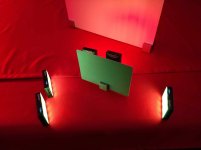
This is the setup, a greenish lit 18% card in an otherwise red environment:

Setup

The closest shot where the card covers the full area of the sensor:

Close

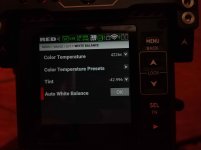
After Auto WB, temp is 4210 and tint -43:

Close 4210 -43

Now the same at medium distance with the card surrounded with the background a bit:

Mid
 

Attachments

  • Mid_4226_-43.jpg
    Mid_4226_-43.jpg
    142.5 KB · Views: 0
The zoomed SDI/LCD view still covers the full area of the card without showing any background. After Auto WB, temp is 4226 and tint -43, but still close to the first one above:

Mid 4226 -43

And then a far shot where the card covers about half of the width.

Far

Again, the zoomed view still covers its whole area. But temp is now 2631 and tint -13:

Far 2631 -13
 
Since we're in the process of compiling the Christmas wish list here, I'd love to have single, physical buttons for everything except Format Card :)
 
Back
Top