Welcome to our community

Be a part of something great, join today!

  • Hey all, just changed over the backend after 15 years I figured time to give it a bit of an update, its probably gonna be a bit weird for most of you and i am sure there is a few bugs to work out but it should kinda work the same as before... hopefully :)

When footage is SLOWED DOWN it jerks along. Can this be remedied??

George D.

Well-known member
Joined
Oct 22, 2008
Messages
980
Reaction score
0
Points
0
Location
N. California, USA
Hi there everyone.

I'm working on some R3D edits in Adobe Premiere Pro CS5.5 today, and there are some shots that I would like to slow down a little, maybe 20-50% slower. I notice though, that after I've done it, if there is a pan or tracking move during the shot, it does not move slowly, but jerks along. This, of course, makes the shot unusable when it's slowed down.

In other words, I am trying to get the shot to last just a little longer, or have something move a little slower, but the skipping makes it unusable.

Is this normal, and if so, is there any way to get rid of it?

The shot was not done at a faster frame rate when I shot it, because there was no intention of it running slower at the time.

BTW - I'm using a Windows7 PC.

Thanks for your time.

George

.
 
To slow it down correctly you need to meet next rules:
Use 2x or 4x modifier to slow it down. Not 20 or 35%.
And first of all you need to shoot your clips with the speeds 2x or 4x greater than your timeline fps.

So if your timeline is 25 fps and you need to slow your footage twice than you need to shoot at 50 fps.
 
One word: Twixtor. Depending on the shot, it might not be perfect, but it will be a substantial improvement.
 
george...

I have to echo what Andrey said...non even slow mo's will lead to weird interpolation that will require either frame blending or pixel motion frame generation

Also make sure if you are using frame blend as well...right click menu...otherwise you are only using repeated frames to achieve the effect and will always be jerky

if you have to do a non even frame interpolation, optical flow retiming can bring nice results (ala twixtor and others)....sometimes doesnt work however


In regards to twixtor....no need to buy it

you have that type of effect built right in to PPro in the form of timewarp....it is hidden however..(dont ask me why)

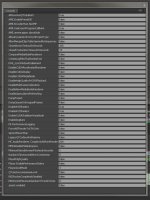
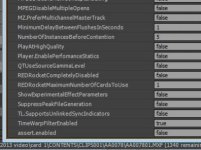
press ctrl- F12....brings up the console window...then in the upper right corner select 'debug database view'
scroll down and select timewarp filter and type true in the value (or 1 I cant remember) then restart and the timewarp filter will be available...

The timewarp filter is based off the foundry's kronos and uses optical flow retiming, and is also the base for the new motion blur effect in AE

it is pretty well the same quality as twixtor

Here is the help for timewarp....it can be a little weird to get used to sometimes....and there are a lot of options...just make sure to set it to pixel motion to use optical flow
http://help.adobe.com/en_US/afteref....html#WS641C5190-1DAD-4150-B17F-F339C6DF1FB2a
 
george...

I have to echo what Andrey said...non even slow mo's will lead to weird interpolation that will require either frame blending or pixel motion frame generation

Also make sure if you are using frame blend as well...right click menu...otherwise you are only using repeated frames to achieve the effect and will always be jerky

if you have to do a non even frame interpolation, optical flow retiming can bring nice results (ala twixtor and others)....sometimes doesnt work however


In regards to twixtor....no need to buy it

you have that type of effect built right in to PPro in the form of timewarp....it is hidden however..(dont ask me why)

press ctrl- F12....brings up the console window...then in the upper right corner select 'debug database view'
scroll down and select timewarp filter and type true in the value (or 1 I cant remember) then restart and the timewarp filter will be available...

The timewarp filter is based off the foundry's kronos and uses optical flow retiming, and is also the base for the new motion blur effect in AE

it is pretty well the same quality as twixtor

Here is the help for timewarp....it can be a little weird to get used to sometimes....and there are a lot of options...just make sure to set it to pixel motion to use optical flow
http://help.adobe.com/en_US/afteref....html#WS641C5190-1DAD-4150-B17F-F339C6DF1FB2a

Thanks Mike, that is very helpful.

But, for some reason, there is NO "Timewarp filter" that I can see.

Please see attachment.


Thanks,

George

.
 

Attachments

  • jnuyhgtygy.jpg
    jnuyhgtygy.jpg
    96.4 KB · Views: 0
sorry to hear that...maybe this is only in cs6? I dont have 5.5 installed right now to confirm...

we had this by default in cs4...then they yanked it, and it was one of the largest feature requests they had to bring it back....it was there hidden in cs6 the whole time

anyway...if you have the production suite..it is in AE as well...for sure
 

Attachments

  • timewarp.jpg
    timewarp.jpg
    24.3 KB · Views: 0
sorry to hear that...maybe this is only in cs6? I dont have 5.5 installed right now to confirm...

we had this by default in cs4...then they yanked it, and it was one of the largest feature requests they had to bring it back....it was there hidden in cs6 the whole time

anyway...if you have the production suite..it is in AE as well...for sure

Hmmmmmm, looks like I better upgrade to CS6. Didn't want to spend the money, but I guess I better.

Thanks,

George

.
 
well for what its worth cs6 has some big improvements....

now the real decision is do you want to spend money on cs6...or just jump to Creative Cloud?

As I think cs6 will get left behind once dragon comes out....
 
There is TimeWarp in AE.
 
Back
Top