Welcome to our community

Be a part of something great, join today!

  • Hey all, just changed over the backend after 15 years I figured time to give it a bit of an update, its probably gonna be a bit weird for most of you and i am sure there is a few bugs to work out but it should kinda work the same as before... hopefully :)

What's a Professional Speaker Setup for Editing Rooms?

Jeremy Wiles

Well-known member
Joined
Nov 17, 2008
Messages
601
Reaction score
0
Points
16
Location
West Palm Beach, FL
Website
www.kingdomworks.com
Hello,

I'm really in need of upgrading the audio in my editing room. Currently I have two Yamaha HS50M speakers and a cheap mixer with some sound absorption on the walls. My speakers are on the isoacoustics monitor stands.

Can anyone suggest a more professional audio setup for playback? I think where I'm really lacking is I don't have any bass, my mixer is junk and it's just not immersive. I'd like to keep it under $5k.

I'm not doing any recording in this room, just editing.

Thanks for the help.

Jeremy
 
also interested in this, both 2.1 and 5.1 setups.
 
just a fun fact: most music albums are in the end mixed so the sound is good on a car stereo due to 80% of the music is listened in cars. probably now days you need to check laptops speakers as well :)
 
just a fun fact: most music albums are in the end mixed so the sound is good on a car stereo due to 80% of the music is listened in cars. probably now days you need to check laptops speakers as well :)
Can vouch for this -- been in the studio with some fairly large bands and all of them mux to CD to listen in their cars at lunch time, regardless of how it sounds through proper monitors.

That being said, obviously you don't want to mix to laptop speakers. I use M-Audio monitors (fairly low end) and they have been incredibly helpful in hearing a fuller range. Anything going theatrical or broadcast always get sent to post-sound houses for mixing and mastering so I just need to be able to review cuts properly. Internal work always gets mixed to stereo and is mostly for web. Stereo monitors at my desk, 5.1 system in the home theater. It's my cost-effective way of going about it.
 
For what it's worth, I have a pair of Dynaudio BM5As and like them for their neutral response.
 
Try a pair of yamama HS8 monitors

If after getting them you want more bass... the HS8S sub can be added

http://www.yamahaproaudio.com/global/en/products/speakers/hsseries/specifications.jsp


I use just a pair of HS8 monitors and they have plenty of bass.
and use an ART EQ355 to kill the bass during odd hours (as well as to tune the sound further).
Then I also use a ART Pro VLAII tube compressor to add warmth and give a more analogue sound
Everything runs off a MBOX and gets "mixed" or rather edited in ProTools or in MCP
 
I'm really in need of upgrading the audio in my editing room. Currently I have two Yamaha HS50M speakers and a cheap mixer with some sound absorption on the walls. My speakers are on the isoacoustics monitor stands.
The JBL LSR series (particularly the small 4300 and the larger 6300) are made for mid-field use, basically on a desktop. As a general rule for sound:

• I'd move the computer and drives out of the room so that there's a minimum of background noise

• make sure there are carpets on the floor and curtains on all windows to minimize reflected echoes as much as possible

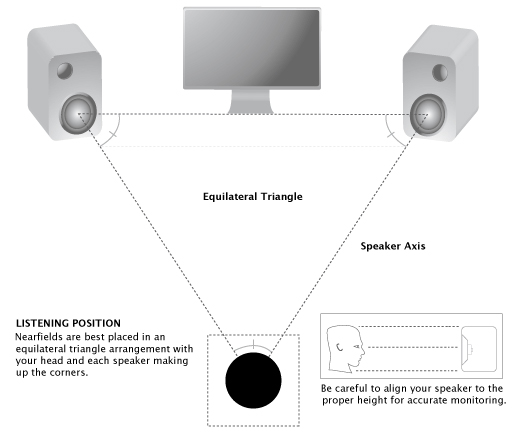
• arrange the speakers so that you're roughly at the apex of an equilateral triangle:

triangle-1.jpg


• be aware of normal sound reference levels and what they mean for "average" rooms. Generally, sound mixers go for 79dB for reference levels in small rooms and for home video/TV projects, but there are exceptions. There are many good links and explanations on the Gearslutz Forum's post section:

https://www.gearslutz.com/board/pos...theater-dvd-broadcast-tv-commercials-etc.html

• for dialogue editing, I'm generally a fan of doing the initial pass with headphones, simply because I can hear any edits going on when I've had to chop up dialogue very precisely. I don't think it's a good idea to mix on headphones per se, but dialogue editing can work fine. I like the venerable Sony MDR-7506 headphones, but there are newer models that are arguably more accurate.

• I would be very, very cautious about doing any extensive sound processing in an edit bay that's not specifically set up for sound mixing and recording. I'm not convinced it translates well for broadcast or theatrical. As a rough mix, it's fine.
 
Agree with Brody, I would get Genelec. Simply fecide how much money you want to pour into it and pick what ever model that suites that budget. We got a the 1030a models and never had any complaints. The sound studio next to us got the most beefy once and they for sure sound more and possibly better, but simply they are all quite good and they are not really that expansive and as it seems, they some how became something of a standard in the industry. You need the Genelec speakers and the Herman Miller chairs or it´s not a reall editing room. lol.
 
I'm really liking my Adam A7x speakers with the Sub 10 MkII. I also have a room with Genelec 1030's and I like the Adams better. The Genelecs ar a little to bright for me although they are a very popular speaker.
 
Genelecs have EQ controls on the back so you can (in theory) tip the high frequencies up or down as required. I do see a lot of Genelec powered speakers in edit bays, but I honestly think the JBLs are better. The newer Genelecs are not bad.
 
Sorry I am going to be boring...;-) (Kit is cool and kit recomend is what is asked for but 90% of the time it is not enough)

I found out this the hard way more than once but the room is the most critical factor in this.. Some configuarations in certain rooms will always sound shit and there is imutable physics between this and what th speaker manufactures marketing teams would have you believe.

These guys saved a room for me... And my old speakers now sound great where as before I was going to drop $7k+ on fancy speakers.

http://www.gikacoustics.com
 
Sorry I am going to be boring...;-) (Kit is cool and kit recomend is what is asked for but 90% of the time it is not enough)

I found out this the hard way more than once but the room is the most critical factor in this.. Some configuarations in certain rooms will always sound shit and there is imutable physics between this and what th speaker manufactures marketing teams would have you believe.

These guys saved a room for me... And my old speakers now sound great where as before I was going to drop $7k+ on fancy speakers.

http://www.gikacoustics.com

Yep!

Might consider a consultation, at the least, with Jim @

http://realtraps.com

There are many traps out there... To get the right treatment for a room, with the functionality that you need for that or those applia=cations might take a bit of knowledge and measuring the room (acoustically) before doing anything. For example, on the link above, you can see configurable vocal booths (ADR useful), that use traps that can be reconfigured easily to treat the room for listening and attenuating certain frequencies . There is a lot that can be done, but to do a "basic" room treatment is the single best bang for the buck that I have always done first, when setting up a room for any sort of listening...WAF always in mind though...

Thank you very much

Fury
 
I would add a recommendation for the Dynaudio BM5A's. Very honest speakers. More valuable than your speakers is to invest in treating your room. I would spend a proper amount on consulting and treatment for your edit room.
 
Here is another suggestion. I was going to spend quite a bit on new nearfield speakers but then bought a pair of excellent 20 year old hi fi speakers that were very expensive in their day. $300 in the used section. I have used them ever since.
 
Hello,

I'm really in need of upgrading the audio in my editing room. Currently I have two Yamaha HS50M speakers and a cheap mixer with some sound absorption on the walls. My speakers are on the isoacoustics monitor stands.

Can anyone suggest a more professional audio setup for playback? I think where I'm really lacking is I don't have any bass, my mixer is junk and it's just not immersive. I'd like to keep it under $5k.

I'm not doing any recording in this room, just editing.

Thanks for the help.

Jeremy

I have the same Yamaha HS50s, simply adding the Yamaha HS8S Subwoofer does a wonderful job of covering the range from low to high. To even better cover it you could swap the HS50s for HS8s along with the subwoofer. The Yamahas are great studio monitors, you could definitely spend more if you wanted, but the increase in performance will be minimal. For my current home setup, the HS8S set to 1/4 of it's total available gain does an amazing job filling in the low end. Very easy to balance and tune to your own tastes as well. If you don't already I would highly recommend using balanced XLR cables to connect everything up. Made a noticeable difference for me when switching out the TRS cables I was using before when I added the subwoofer.

I just use an Apogee Duet as an interface and it too does an amazing job. If I was to get something higher end it would most likely just be one of the higher end offerings from Apogee. I like to listen to an audio mix on speakers and headphones so a good pair of headphones with flat response is useful as well. Sony 7506s continue to work great for me.

As others mentioned the room is the most important factor here, I would invest your money into the subwoofer, a better mixer/interface, and put all the rest into the physical aspects of your setup.
 
Back
Top