Welcome to our community

Be a part of something great, join today!

  • Hey all, just changed over the backend after 15 years I figured time to give it a bit of an update, its probably gonna be a bit weird for most of you and i am sure there is a few bugs to work out but it should kinda work the same as before... hopefully :)

What the hell does this mean?

Jason Von Drayco

Well-known member
Joined
Sep 2, 2011
Messages
89
Reaction score
0
Points
0
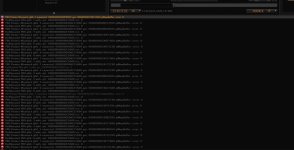
What does this error mean? Footage shot in MX Red. I can't import the .R3D or a snapshot of an .R3D into Nuke as it give me the error "out of frame range". Its not nuke, as i can import other footage fine.

http://img99.imageshack.us/img99/3309/capturemf.jpg
 

Attachments

  • Capture.jpg
    Capture.jpg
    95.5 KB · Views: 0
I have same problem, but everything works ok. Just tons of error messages (win7 and GTX 560M).
 
Jason: I'm confused. You're talking about Nuke but showing a screenshot of RCX. Any issues in Nuke have nothing to do with the errors you're showing in RCX, so I would advice you contact The Foundry for that.

As David indicated, the shown RCX bug is fixed for the next release
 
Jason: I'm confused. You're talking about Nuke but showing a screenshot of RCX. Any issues in Nuke have nothing to do with the errors you're showing in RCX, so I would advice you contact The Foundry for that.

As David indicated, the shown RCX bug is fixed for the next release

Thanks guys! Must be nuke wigging out then.
 
Actually, i keep getting the error "out of frame range", but when i export a Trimmed R3D on the clip it works fine, Could this be the metadata of the clips or so, as other footage from many projects comes in without error?
 
Not sure why that would make a difference. Nuke support will have to tell you what out of range means in this case.
 
Back
Top