
John Shofner
Well-known member
Part 3! Part 3!

Follow along with the video below to see how to install our site as a web app on your home screen.

Note: this_feature_currently_requires_accessing_site_using_safari
Sorry, but hat information is incorrect. Dolby PRM-4220 is an SDR monitor. Even though it is capable of 600 nits, it doesn't mean that it is an HDR monitor. People frequently confuse brightness with HDR.
The Dolby monitors that are HDR capable are Pulsar (4000 nits) and the newer and less expensive one as well, that I can't remember the name right now.
At this time Sony X300 is the only professional monitor, that you can actually purchase, unlike Dolby's monitors. And because of that, even though it is $30k, it is slowly becoming a standard for HDR mastering around the world.
This is really good but as a founding member of the Secret Society of Pedantic Gamma Cultists I cringe at your portrayal of different gamma spaces.
Gamma should never affect how you aesthetically see an image. If two different gamma encodings look aesthetically different someone fucked up. The point of gamma is to avoid quantization and banding... period. The idea is that whatever gamma you encode an image in should be reversible and therefore ultimately irrelevant. Gamma should be invisible to everybody in the entire imaging pipeline except to automagically reduce banding and even then a good dithering engine should hide all but the most difficult cases.
Edit: Just one editorial note, I'm not sure if you were just trying to illustrate the concept but if you were hoping to be exact: your bit depth gradient scale actually shows 8, 9 and 10 bit relative to one another. 2^n doubles with every bit so 10 bits would be 4x as many gradient steps as 8 bit and 12 bit would be 16x as many.

For that much money ($30k+), I'd rather buy X300, that is a true 4k HDR monitor and it doesn't require a cheat. 600 nits is not enough for a true HDR requirements, as only OLED can meet HDR recommendation at 540 nits maximum brightness. SDR Dolby monitor is LCD with local dimming, so that wouldn't work either. The blacks are nowhere near the OLED levels.Because of its high brightness output and 12 bit panel you can cheat its dynamic range by scaling SMPTE ST2084 into Gamma 2.4 with a LUT on the display that will effectively give it the HDR EOTF scaled into the display's native brightness range. You're right though, I probably shouldn't refer to it as HDR directly, though there is a workaround that can cheat its HDR.

There is a large group of people that believe 1000 nits is all you need for HDR. To me, HDR begins at 1000 for LCD. OLED is the exception. The 540 nits is more for edge lit LCDs. OLED already exceeds the lower end UHDA limits.jake blackstone said:600 nits is not enough for a true HDR requirements, as only OLED can meet HDR recommendation at 540 nits maximum brightness.
The Dolby Maui is a 2000 nit LCD and its black level is not great either. The PRM has much a better black level. Last time I checked, the Pulsar consumes around 32-amps.jake blackstone said:SDR Dolby monitor is LCD with local dimming, so that wouldn't work either. The blacks are nowhere near the OLED levels.
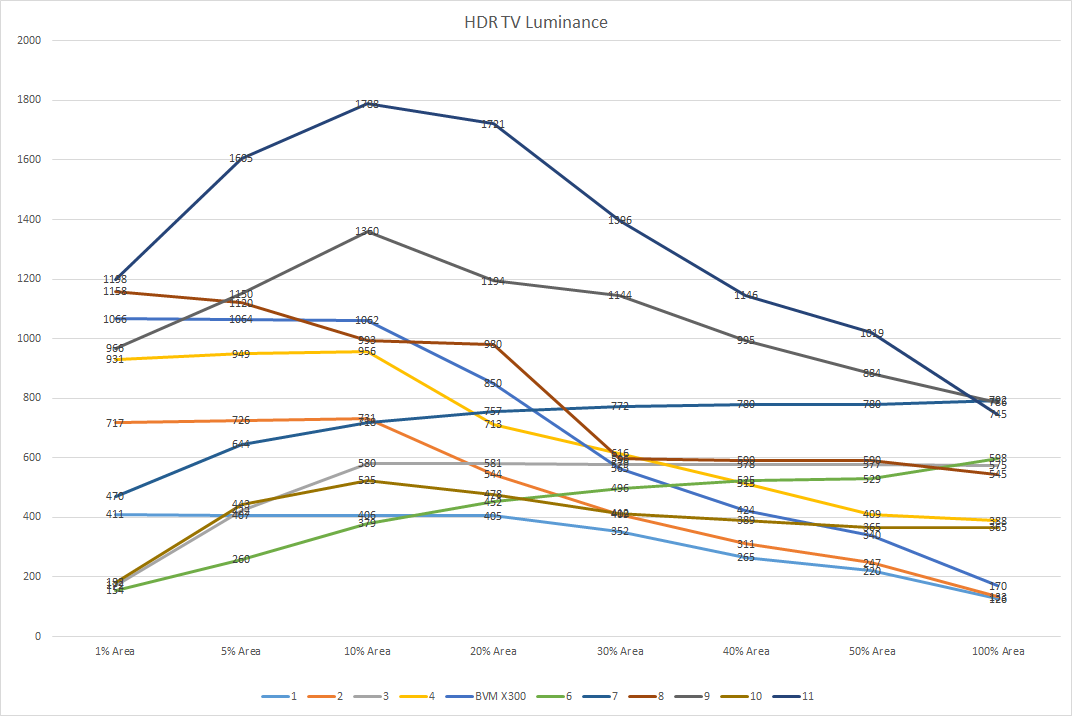
For that much money ($30k+), I'd rather buy X300, that is a true 4k HDR monitor and it doesn't require a cheat. 600 nits is not enough for a true HDR requirements, as only OLED can meet HDR recommendation at 540 nits maximum brightness. SDR Dolby monitor is LCD with local dimming, so that wouldn't work either. The blacks are nowhere near the OLED levels.
For those interested, I wrote a simple Windows command line tool that will convert a nit into a bitlevel. It currently uses limited range because that is what is delivered to the consumer. I will add a switch later to convert into full range. I will also add the inverse to go bits into nits.
Thanks for the clarification, Stacey. Does Dolby publish the specs for Pulsar or Maui anywhere?The Dolby Maui is a 2000 nit LCD and its black level is not great either. The PRM has much a better black level. Last time I checked, the Pulsar consumes around 32-amps.
I have to admit, the prospect of staring into the firey hell of 4000 nits for 10-12 hours a day is daunting. In truth, my eyes get tired after 4-5 hours of continuous 100 nits. I just had my eyes examined a week ago (true story), and the doctor told me one my problems is that I don't blink enough. "Colorists never blink" is what I replied to him. (Color acuity was perfect according to his tests, BTW.)Ultra mega super extra ultra hyper. 4000 nits is garbage, that's not even 10000. If I don't see an 80KW truck parked in front of the studio, I'm not even entering a grading suite and taking my welding glasses elsewhere.

I have to admit, the prospect of staring into the firey hell of 4000 nits for 10-12 hours a day is daunting. In truth, my eyes get tired after 4-5 hours of continuous 100 nits.

I just had my eyes examined a week ago (true story), and the doctor told me one my problems is that I don't blink enough. "Colorists never blink" is what I replied to him. (Color acuity was perfect according to his tests, BTW.)
In truth, my eyes get tired after 4-5 hours of continuous 100 nits. I just had my eyes examined a week ago (true story), and the doctor told me one my problems is that I don't blink enough. "Colorists never blink" is what I replied to him. (Color acuity was perfect according to his tests, BTW.)