Welcome to our community

Be a part of something great, join today!

  • Hey all, just changed over the backend after 15 years I figured time to give it a bit of an update, its probably gonna be a bit weird for most of you and i am sure there is a few bugs to work out but it should kinda work the same as before... hopefully :)

What am I seeing here?

Rick Darge

Banned
Joined
Dec 29, 2006
Messages
3,775
Reaction score
0
Points
0
Age
44
???????? this is not good...
 

Attachments

  • Screen shot 2010-04-24 at 6.04.24 PM.jpg
    Screen shot 2010-04-24 at 6.04.24 PM.jpg
    14.3 KB · Views: 0
Have you updated the quicktime plugin that the Red guys put out around the NAB? Can't remember where, but it's somewhere on the forums.

Also, does it happen on Redcine-X or the Loupe Window on Clipfinder? What happens when you render out?
 
  • Thread starter
  • Banned
  • #4
This issue has nothing to do with the QT codec. It's being seen live on the 17" monitor, LCD and EVF. This is a sensor problem. A huge problem. It's on the r3d & proxy files. What is this? Anyone else ever get this issue with an MX sensor or M sensor? I'm going to render out some tests and check those. And for the record I installed the new QT but I'm still seeing it.
 
This issue has nothing to do with the QT codec. It's being seen live on the 17" monitor, LCD and EVF. This is a sensor problem. A huge problem. It's on the r3d & proxy files. What is this? Anyone else ever get this issue with an MX sensor or M sensor? I'm going to render out some tests and check those. And for the record I installed the new QT but I'm still seeing it.

Why not find out what it is and what is causing it before declaring it "a huge problem"?

Jim
 
  • Thread starter
  • Banned
  • #6
It's a huge problem because it cost me a shoot today. Problem wasn't there yesterday. Checkout these MOV files for a better idea. You would know best Jim.

Both of these were rendered out to ProRes4444 at 2k then downsampled for the web via h.264. This line was in the HD-SDI feed, LCD and EVF. It was also in the r3d file and the QT file. Not sure how to get rid of it after the fact. Black shaded the camera twice. It wasn't there the day before. We recorded 4 hours onto 3 different drives yesterday without fail and no issues.

www.rickdarge.com/WTF_LINE_BIG.mov [37MB]
www.rickdarge.com/WTF_LINE_SMALL.mov [1MB]
 
It's a huge problem because it cost me a shoot today. Problem wasn't there yesterday. Checkout these MOV files for a better idea. You would know best Jim.

Both of these were rendered out to ProRes4444 at 2k then downsampled for the web via h.264. This line was in the HD-SDI feed, LCD and EVF. It was also in the r3d file and the QT file. Not sure how to get rid of it after the fact. Black shaded the camera twice. It wasn't there the day before. We recorded 4 hours onto 3 different drives yesterday without fail and no issues.

www.rickdarge.com/WTF_LINE_BIG.mov [37MB]
www.rickdarge.com/WTF_LINE_SMALL.mov [1MB]

It looks like it's hardware related. It would be best to contact support and have the camera sent to be checked out.
 
  • Thread starter
  • Banned
  • #8
Thanks Deanan. That was my fear, that it was the sensor. Any idea why it would be OK one day and then weird the next? Does the sensor undergo a "break-in" period? Like a sneaker?
 
Thanks Deanan. That was my fear, that it was the sensor. Any idea why it would be OK one day and then weird the next? Does the sensor undergo a "break-in" period? Like a sneaker?

There's no break in period. We'll have a better idea once we fully inspect it.
 
In the process of uploading a 500MB R3D sample to my FTP. Will email you once it's there. How do I go about getting the LOG file? Is that the same as the PROFILE file?
 
Shutter angle?

Shutter angle?

Someone else posted a "Patch" seam image a week or so ago on M-X.

The M-X is rated about a stop and 1/3 faster then the M sensor, so the "patch" matching is more critical.

The pattern of the multi-readout has not been published (?), but depending on what that pattern is, the combination of some kinds of lights (50/60Hz) and shutter angle could cause an unbalance in the "patches".

Also you might try to warm the camera up for 30 minutes, then redo the black "dark field" calibration twice, since the black level can drift with heat changes.

I saw something similar on an Acam test shot, it was a night shot so there might have been some sodium lights involved, and at the gain I was looking at the background with any unbalance in the readout patches would stand out more.

With flickering lights if the camera is in motion, or the dark field subtraction is not even, the seams might show up. Also flickering lights might interact with the several rolling shutters to make "dancing" patches that are there and there from frame to frame.

There may be nothing "wrong" with the camera, it may be just an issue of the lighting and doing the dark field subtraction calibration after the camera has warmed up?

Does the pattern change from frame to frame or stand still? Does its looks change depending on how long the camera has been on?
 
Forgive my total blindness....what is wrong with the image? My untrained eye is not seeing whatever you guys are seeing and I'm curious to know what's wrong.

To my eye the green screen is a bit dark and there is a darker band down the right side of the image but that darker band didn't seem to darken over the subject. I am not calling into question that there may be something wrong, but other than uneven light on the green screen I am having a bugger of a time seeing what's wrong.

Looking for an education. Thanks guys.
 
Forgive my total blindness....what is wrong with the image? My untrained eye is not seeing whatever you guys are seeing and I'm curious to know what's wrong.

To my eye the green screen is a bit dark and there is a darker band down the right side of the image but that darker band didn't seem to darken over the subject. I am not calling into question that there may be something wrong, but other than uneven light on the green screen I am having a bugger of a time seeing what's wrong.

Looking for an education. Thanks guys.

I have to echo this question. There is unevenness on the green screen, but since it's not on the subject, I really don't know what you guys are referring to.
 
Rick,

I can understand how this might freak you right out, but I am not sure you would get your best answer to this at REDUSER. I appreciate that you are sharing it but I think that the best course of action is to persue this with RED.

If there is a solution or a cause to the problem then it would be great if you could post it back into this thread to help us all understand it better.

I had a small issue on a shoot last week and I immediately called RED and started working the problem, in the end we narrowed it down to a probable cause and solution.

I had the urge to post on REDUSER right away, but when I thought about it I realized i'd get the best support and answers from RED.

I am not saying "do not post this kind of thing" because I think it is important to give other users a heads up.

I hope you report back if and when it is solved.

David
 
Forgive my total blindness....what is wrong with the image? My untrained eye is not seeing whatever you guys are seeing and I'm curious to know what's wrong.

To my eye the green screen is a bit dark and there is a darker band down the right side of the image but that darker band didn't seem to darken over the subject. I am not calling into question that there may be something wrong, but other than uneven light on the green screen I am having a bugger of a time seeing what's wrong.

Looking for an education. Thanks guys.

So I am not blind or crazy! :001_huh: Thanks for having the courage to ask this question! I looked and looked and saw only what you saw but couldn't really identify a distinct and obvious problem. I appreciate that these guys are total professionals and have the eye for subtle issues so I echo your request that someone take a minute to point out those "issues" to us, the unenlightened. Sincere thanks in advance!
 
So I am not blind or crazy! :001_huh: Thanks for having the courage to ask this question! I looked and looked and saw only what you saw but couldn't really identify a distinct and obvious problem. I appreciate that these guys are total professionals and have the eye for subtle issues so I echo your request that someone take a minute to point out those "issues" to us, the unenlightened. Sincere thanks in advance!

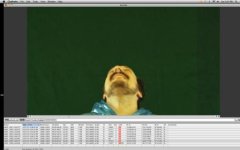
There is a dark vertical 'band' running down the right hand side of the image that appears to have a dark, almost blueish hue to it. Look at the larger .mov that has been posted if you can't see it properly in the image.
 
Yea, checkout the larger MOV file here,
www.rickdarge.com/WTF_LINE_BIG.mov

Much easier to see what's happening here. Quite nasty. It seems like the band is darkening and slightly saturating whatever is in its path. It's on every r3d that I shot yesterday. Can't get rid of it.
 
Rick,

did you get the same line at on-set preview with RED LCD or HD-SDI monitoring?

Did you get the same after in RCX or...?

It looks more like a de-bayer issue to me than it is a sensor.

What is your computer configuration?

Also could be DIT issue with corrupted media?

Did you properly reformatted all media before sooting?

Did you immediately reinstall firmware, did sensor black-shading,...?

Normally when you find an issue at on-set monitoring you don't shoot till that problem is finally solved!!??

It's not making sense to continue shooting when you find an issue and then later get mad in post!!?
 
did you get the same line at on-set preview with RED LCD or HD-SDI monitoring?

YES

Did you get the same after in RCX or...?

YES

It looks more like a de-bayer issue to me than it is a sensor.

What is your computer configuration?

Macbook Pro & Mac Pro Station

Also could be DIT issue with corrupted media?

NOPE, tried CF cards and Red-raids

Did you properly reformatted all media before sooting?

YES

Did you immediately reinstall firmware, did sensor black-shading,...?

YES

Normally when you find an issue at on-set monitoring you don't shoot till that problem is finally solved!!??

No shit.. This problem wasn't there on Day One but existed on Day Two

It's not making sense to continue shooting when you find an issue and then later get mad in post!!?

Try telling that to my producers. If a problem with the hardware isn't there on a Friday, why would it crop up on a Saturday, using the same camera?
 
Rick,

are you telling that you saw (preview) the issue on that second day and then continue to shoot?

Now I can't get it?

Normally I stop to drive a car when find that something have got wrong with it!!

And for a safety of your next job the first thing you should be to get a confirmation from your BOMB-SQUAD

guy to call him via HOTLINE for a support if something get wrong in the case that you can't get yourself...
 
Back
Top