

Refah Mahmoud
Member
UPDATE: Firmware bug. Fix is incoming.
Hi all,
I noticed a strange playback glitch while prepping a Monstro. Red-coloured objects show a vertical line right down the middle of the monitor. The line runs the whole height of the monitor, top to bottom, but is most clearly visible when something red is in the frame. This line is only there when playing back from the mag, but it isn't visible in live view, in the R3D after offload, or when playing prores proxies. I tried several mags (formatted fat32 and UDF) and both Helium and Monstro cameras, and this issue seems to affect playback on any DSMC2 body with a 7+ firmware.
The line is visible on both the touchscreen and external monitors, and it doesn't matter if I use legacy or IPP2, nor does it matter what resolution, white balance, compression level, or frame rate. It also shows up if you play back Helium footage on a Monstro or vice versa.
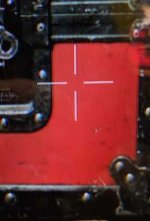
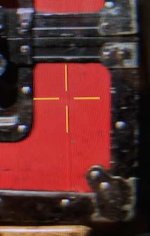
I used my phone to take some pictures, but it's a little tricky to see the line in all the moire even though it's very obvious in person. The photo with the white crosshairs is a Helium with FW 6.3.105 that shows no line, while the photo with the yellow crosshairs is the same footage in a Monstro with fw 7.0.1 that has the line.
Can anyone replicate?
- Refah
Hello Refah,
Our team has found the cause of the issue. It is essentially a squeezing issue on the monitor. They are hard at work on a fix. I don't know when that fix will happen but we will put it in a future firmware update.
Thank you for reporting this and your patience. At this time I will be closing this ticket. If anything else comes up, don't hesitate to reach us at support.RED.com.
Best,
Alex | Product Support
Hi all,
I noticed a strange playback glitch while prepping a Monstro. Red-coloured objects show a vertical line right down the middle of the monitor. The line runs the whole height of the monitor, top to bottom, but is most clearly visible when something red is in the frame. This line is only there when playing back from the mag, but it isn't visible in live view, in the R3D after offload, or when playing prores proxies. I tried several mags (formatted fat32 and UDF) and both Helium and Monstro cameras, and this issue seems to affect playback on any DSMC2 body with a 7+ firmware.
The line is visible on both the touchscreen and external monitors, and it doesn't matter if I use legacy or IPP2, nor does it matter what resolution, white balance, compression level, or frame rate. It also shows up if you play back Helium footage on a Monstro or vice versa.
I used my phone to take some pictures, but it's a little tricky to see the line in all the moire even though it's very obvious in person. The photo with the white crosshairs is a Helium with FW 6.3.105 that shows no line, while the photo with the yellow crosshairs is the same footage in a Monstro with fw 7.0.1 that has the line.
Can anyone replicate?
- Refah
Attachments
Last edited:


