Remy Schepers
Member
- Joined
- Oct 22, 2011
- Messages
- 5
- Reaction score
- 0
- Points
- 0
Hi Guys,
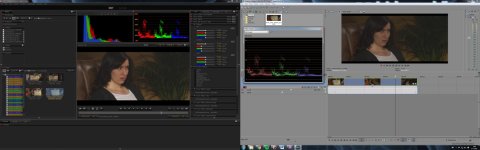
The enclosed screengrab says it all.
For some reason Vegas shows luminance in an entirely different fashion than CINE X. I also tested Premiere which did show the same picture as CINE X so I'm assuming somehow Vegas is interpreting the footage in the wrong way. You can see the difference clearly also by comparing the scopes from CINE X and Vegas.
A simple added curve in Vegas appears to be a workaround for the issue. But for obvious reasons this is far, far from ideal.
Any ideas how to permanently solve this?
Any help will be greatly appreciated as I've got to grade this picture in the upcoming month using this set-up along with Magic Bullet.
Thanks in advance!
The enclosed screengrab says it all.
For some reason Vegas shows luminance in an entirely different fashion than CINE X. I also tested Premiere which did show the same picture as CINE X so I'm assuming somehow Vegas is interpreting the footage in the wrong way. You can see the difference clearly also by comparing the scopes from CINE X and Vegas.
A simple added curve in Vegas appears to be a workaround for the issue. But for obvious reasons this is far, far from ideal.
Any ideas how to permanently solve this?
Any help will be greatly appreciated as I've got to grade this picture in the upcoming month using this set-up along with Magic Bullet.
Thanks in advance!