Welcome to our community

Be a part of something great, join today!

  • Hey all, just changed over the backend after 15 years I figured time to give it a bit of an update, its probably gonna be a bit weird for most of you and i am sure there is a few bugs to work out but it should kinda work the same as before... hopefully :)

Underexposing

Michael Frymus

Well-known member
Joined
Mar 15, 2012
Messages
328
Reaction score
0
Points
0
Location
Ontario, Canada
We started shooting our short film, but looking at some of the shots we've done so far, they look.....underexposed by a stop.
I properly calibrated my light meter and have been using that to judge exposure for the RED One - Non MX.

Looking at the footage in RedCine-X, they are underexposed by a stop. I boosted the expoosure by 1 and it was better.
But, when shooting it looked properly exposed through the camera.
But bringing it back makes it look very contrasty, underexposed, and horrible colour.

I changed the Red colour/gamma from the default but then it looks bad.

I even checked exposure before shots on my dslr camera with the exact same setup and it looked perfectly fine. But through the Red One, its horrible.
What is going on??


*This is the schools Red One Camera


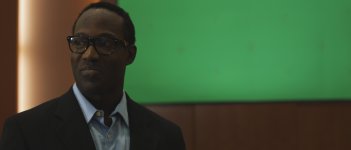
I just quickly grabbed a still. Horrible one, but it was in a rush from a random clip at a random time. Slightly out of focus as he was turning. But looking at it, you can tell its dark.Not the way I saw it through my camera. To play it safe, for everything I shot, I believe I shot it right on what my meter was telling me or up to 1/2-Stop over. But this is what I still got.Maybe some settings are wrong or what?
 

Attachments

  • A311_C023_0512LA.jpg
    A311_C023_0512LA.jpg
    38.9 KB · Views: 0
Last edited:
Posting an R3D really helps to judge the situation--if you can upload one to a file sharing site and then post a link, everyone will be able to help. Here are a few things in the mean time--

1) Light meter. Getting the camera to match the meter is a matter of testing and profiling. Ryan Walters has uploaded profiles you can load into your light meter--here they are. If you want the meter to match the camera this is probably the place to start. (Funny story, I don't use these because my light meter is broken, which strangely enough puts me in the Red ballpark, and I like how it's not specific!)

2) Histogram. Monitors lie. When you say the image "looked properly exposed through the camera," do you mean through a monitor or EVF? Both are made for brightness, for composing the image and focus pulling, not for judging exposure. Sad but true. You would need a calibrated monitor at the DIT tent to judge what you're really getting. Otherwise, the histogram in the bottom left corner is like your pilot's instruments... the only thing you can really rely on. You can have an apparently bright image in the monitor but if the histogram's colors are sitting towards the left, you are underexposed.

Look at this picture courtesy of Tom Lowe to see what I'm talking about. If you're shooting the moon in a dark sky, it wouldn't usually make sense to have the histogram to the right, super exposed--it would look surreal. But to the left of the histogram, just before where it says "RAW," there's an empty white bar--as this bar fills up with the color red, more and more of your image is really just noise floor. If you want underexposure, there are three ways to do it. Underexpose carefully in camera, so this bar doesn't fill up; underexpose without paying attention to the histogram, bad idea; or expose as bright as you can in camera and then "print down" by lowering ISO / FLUT etc in post.

3) You mentioned switching gamma off the default setting... what switch did you make? You want to install the latest firmware for the Red One, so you can light and shoot with Red Color 3 / Red Gamma 3. If you have a good exposure, switching gamma in post to RedLogFilm will yield a really nice looking grade. If you're underexposed, it's a bit trickier.

4) Red One M is a 320 speed camera, and many people chose to rate it at 250. What are you rating it at?
 
Posting an R3D really helps to judge the situation--if you can upload one to a file sharing site and then post a link, everyone will be able to help. Here are a few things in the mean time--

1) Light meter. Getting the camera to match the meter is a matter of testing and profiling. Ryan Walters has uploaded profiles you can load into your light meter--here they are. If you want the meter to match the camera this is probably the place to start. (Funny story, I don't use these because my light meter is broken, which strangely enough puts me in the Red ballpark, and I like how it's not specific!)
That is exactly what I did and it was through this site.

2) Histogram. Monitors lie. When you say the image "looked properly exposed through the camera," do you mean through a monitor or EVF? Both are made for brightness, for composing the image and focus pulling, not for judging exposure. Sad but true. You would need a calibrated monitor at the DIT tent to judge what you're really getting. Otherwise, the histogram in the bottom left corner is like your pilot's instruments... the only thing you can really rely on. You can have an apparently bright image in the monitor but if the histogram's colors are sitting towards the left, you are underexposed.

Look at this picture courtesy of Tom Lowe to see what I'm talking about. If you're shooting the moon in a dark sky, it wouldn't usually make sense to have the histogram to the right, super exposed--it would look surreal. But to the left of the histogram, just before where it says "RAW," there's an empty white bar--as this bar fills up with the color red, more and more of your image is really just noise floor. If you want underexposure, there are three ways to do it. Underexpose carefully in camera, so this bar doesn't fill up; underexpose without paying attention to the histogram, bad idea; or expose as bright as you can in camera and then "print down" by lowering ISO / FLUT etc in post.
Used both the evf and a monitor... two monitors. All looked very similar, but the final image looks way off.
We dont have the RED monitors for the Red One. Dont know how to judge with histograms/waveform on them. So, I use my meter instead.

3) You mentioned switching gamma off the default setting... what switch did you make? You want to install the latest firmware for the Red One, so you can light and shoot with Red Color 3 / Red Gamma 3. If you have a good exposure, switching gamma in post to RedLogFilm will yield a really nice looking grade. If you're underexposed, it's a bit trickier.
The camera records at the normal RedGama. Not #2 or #3 or anything else.
I couldn't even find a way to change it.

4) Red One M is a 320 speed camera, and many people chose to rate it at 250. What are you rating it at?
I have it set to 320
 
Best thing to do I think is to check out False Color. This is probably the best tool to judge exposure in the picture. Then use your light meter to judge for the same exposure, and switch to the histogram to see how they compare to each other. Do this a few times and you should be good and be able to read the histogram. There is loads of information to be found here on how to use False Color.
 
I think the best general advice I have heard or followed is to use an old "film trick", expose for the skintones where you want them, light the rest accordingly. No problem if stuff gets over or underexposed, as long as it is not "what you need/want" not to be...

When "everything is right" it often just looks "TV".

The DP's I have worked with who have shot most features, are the same who don't worry too much about "letting things go if they don't tell a story"....
 
I think the best general advice I have heard or followed is to use an old "film trick", expose for the skintones where you want them, light the rest accordingly. No problem if stuff gets over or underexposed, as long as it is not "what you need/want" not to be...

When "everything is right" it often just looks "TV".

The DP's I have worked with who have shot most features, are the same who don't worry too much about "letting things go if they don't tell a story"....
Thank you for this!
 
Back
Top