Welcome to our community

Be a part of something great, join today!

  • Hey all, just changed over the backend after 15 years I figured time to give it a bit of an update, its probably gonna be a bit weird for most of you and i am sure there is a few bugs to work out but it should kinda work the same as before... hopefully :)

Ugly Red/Orange Color

Daniel Soderberg

Well-known member
Joined
Jan 7, 2011
Messages
1,889
Reaction score
0
Points
0
Location
San Francisco
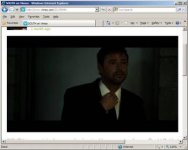
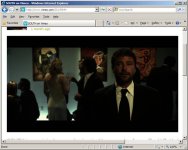
Does anyone else notice how in dim lighting the correctly exposed part will be red/orangeish, and then the nearby darker areas will drop any color and become desaturated?

Pictures attached. Look at his face...

Sorry the pictures are low quality, but I'm sure other Redusers have seen a similar effect.
 

Attachments

  • clip_image002.jpg
    clip_image002.jpg
    35.6 KB · Views: 0
  • clip_image003.jpg
    clip_image003.jpg
    13.6 KB · Views: 0
Just looks grossly underexposed to me. There is no magic bullet for this except more light.
 
Better quality pics would help first. can't really make much out...then, more info....what did you transcode to....project settings, etc.....R U doing this and asking how to get better look? or was this just off the web? if off web...could be a multitude of things...quality of video put up....and about a hundred other things.
 
It's not because of the low quality of video... it's something I notice on a daily basis in my footage in dark scenes. I'm surprised others haven't recognized this happening as well.

And yes David, it is underexposed, but the areas that are dark still have information (are not clipped) and should not lose all color in such a way. It goes from Orange to Dark Grey pretty quickly on his face...
 
Have you tried to use False Color as an exposure tool yet? This can be very helpful when lighting for a scene. If the guy's face would be pink and grey in False Color mode, and the white balance was set cooler then I think the problems would be gone. If the guys face is important for the shot (and it usually is), then light, expose and grade for it. For now with this kind of shot, I would play with the curves, set a cooler white balance and set it to a higher Iso. Then apply neat video noise reduction or something similar.
 
This is all under-exposure and color temp. Now I have to ask why you're showing us low-res screencaps from something on Vimeo? Is this just something you're observing in other peoples' stuff or something you are encountering yourself? None of this is a problem if you light and expose your shots properly, and take your footage through a proper color correction in post. Not even a full on creative grade, just a base or "best light" color pass. I'm going to extend myself only partially onto the proverbial limb here and assume that none of those things happened here with the clip you're referencing.
 
Dimmed tungsten lights will give a strong red/orange hue because the color temp drops so low there is nothing else there.

I have encountered this problem from time to time shooting dark scenes in stage plays with dimmed fixtures. Doesn't matter what kind of camera you use. At some point there is so little color spectrum left that there is nothing for the camera to record except red. A tungsten light at full 3200K brightness is still about 2-1/2 stops hotter in the red channel than the blue. And all silicon base camera sensors are native daylight balance which doesn't help. Doesn't matter how sensitive the camera is or how high the ISO setting. It still can't record what is not there.
 
This is all under-exposure and color temp. Now I have to ask why you're showing us low-res screencaps from something on Vimeo? Is this just something you're observing in other peoples' stuff or something you are encountering yourself? None of this is a problem if you light and expose your shots properly, and take your footage through a proper color correction in post. Not even a full on creative grade, just a base or "best light" color pass. I'm going to extend myself only partially onto the proverbial limb here and assume that none of those things happened here with the clip you're referencing.

Jeff,

Yes this is something I saw on Vimeo, but as I've already stated, it is something I experience on my Red MX from time to time.
I can see how it might be mostly an issue with color balance, so I will work on altering that first, but I don't see how underexposure should create an issue because most people will purposefully underexpose things on purpose from time to time going for a dimmer look.

Thanks for the response,
Daniel
 
I'd agree and say 99% if you start adjusting color temp and tint, you can make this go away. Also, the new color science in Redgamma 2 or Redlogfilm will make the falloff into black much nicer. This appears to be low, over dimmed tungsten, and if you start getting in the 2600 degree kelvin area, this is what you might get. It also reminds me a lot of the falloff of the original redgamma color space. I bet if this were an R3D to play around with, you would be amazed at what people here would be able to do with this exact footage.


Tim
 
well....then u can't even begin to get into this since this is a clip uploaded to vimeo at what kind of transcode---low res .mov or h264 file or who knows what......just a BIG wast of time unless u can show a high quality photo and give info on the settings you are using in RCX or whatever grading app you are using. i can pull plenty of ugly grabs off vimeo and utube.....but nothing you say will tell me how to fix it....since we don't even know at what rez it was shot, trancoded to etc......
 
Dimmed tungsten lights will give a strong red/orange hue because the color temp drops so low there is nothing else there.

I have encountered this problem from time to time shooting dark scenes in stage plays with dimmed fixtures. Doesn't matter what kind of camera you use. At some point there is so little color spectrum left that there is nothing for the camera to record except red. A tungsten light at full 3200K brightness is still about 2-1/2 stops hotter in the red channel than the blue. And all silicon base camera sensors are native daylight balance which doesn't help. Doesn't matter how sensitive the camera is or how high the ISO setting. It still can't record what is not there.

Very true. The fix for this is to use ND on your lights instead of dimmers. A real pain but it sure does work.
 
Very true. The fix for this is to use ND on your lights instead of dimmers. A real pain but it sure does work.

Definitely doable in a production setting, but not if you are documenting a live stage performance. Scenes change both in level and in color. Not all gels or color combinations are video friendly, especially when dimmed.
 
Yes this is something I saw on Vimeo, but as I've already stated, it is something I experience on my Red MX from time to time.
I can see how it might be mostly an issue with color balance, so I will work on altering that first, but I don't see how underexposure should create an issue because most people will purposefully underexpose things on purpose from time to time going for a dimmer look.

With tungsten lighting, which is predominantly gold/orange in color, color balance and exposure work hand in hand. While your exposure index (ISO) is not hard-baked into the RAW, there is an acceptable range of response from the sensor. CMOS sensors in general are the least sensitive to blue. The Mysterium and MX are no exceptions, MX being a bit more balanced. When your light allows you to expose optimally, there is still enough information in the blue channel to make a properly balanced image. As you begin to under-expose, there may still be enough light to fill in the red channel, but nowhere near enough to register anything in the blue. So you get red/orange where you should get flesh tones or other typically neutral tones. You compensate this with filtration. Use a CTB - Color Temperature Blue - filter in front of the lens if if you're shooting entirely with tungsten. Yes, you will have to put more light into your scene, but this will even out the way the camera sees the overall color separation. If you have mixed lights or are augmenting outdoor daylight with tungsten, you should gel the lights rather than filter the camera.

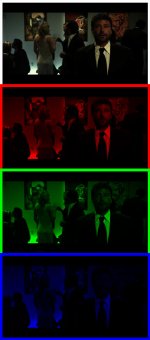
I know it's completely stupid to analyze a jpg screen grab of a vimeo clip, but look at the channels. In the blue channel, the guy is like the invisible man. Not only that, but the WB isn't all the way to where it should be. They probably had to back off to keep his face from turning to a globular mess. Look at it at full res or enlarged in photoshop, totally obvious what's going on here.

Dimming the lights isn't always the best way to get the shadowy look, either. It's often better to shoot well exposed with a thick histogram and to push the image down into the shadows in post.
 

Attachments

  • noblue.jpg
    noblue.jpg
    71.1 KB · Views: 0
You can make RED footage look incredible... or terrible. There is an easy way to make it look great and lots of ways to make it look bad. That is up to you. It isn't the camera... it is the operator or colorist. REDucation?

Jim
 
Daniel,

I have to say. If you want to present an arguement like this then I would suggest the following.

1. Don't post vimeo screen captures. It is no way to judge footage.
2. Upload an r3d snapshot of the footage you think is bad
3. Let others see the RED r3d file to guide you where the exposure or color temperature has gone wrong.
4. It takes one second and a few minutes to provide an r3d snapshot
5. provide, lens data, exposure, lighting info from the shot.

These threads lead to a great amount of FUD for people. By the time it got to vimeo so much could have happened to the file.

Show me the r3d, show RED the r3d, show the community the r3d and the comments that come back can be constructive.

This is like throwing darts with a blidfold on. Just makes people guess and it makes people want to rip their hair out.

David
 
With tungsten lighting, which is predominantly gold/orange in color, color balance and exposure work hand in hand. While your exposure index (ISO) is not hard-baked into the RAW, there is an acceptable range of response from the sensor. CMOS sensors in general are the least sensitive to blue. The Mysterium and MX are no exceptions, MX being a bit more balanced. When your light allows you to expose optimally, there is still enough information in the blue channel to make a properly balanced image. As you begin to under-expose, there may still be enough light to fill in the red channel, but nowhere near enough to register anything in the blue. So you get red/orange where you should get flesh tones or other typically neutral tones. You compensate this with filtration. Use a CTB - Color Temperature Blue - filter in front of the lens if if you're shooting entirely with tungsten. Yes, you will have to put more light into your scene, but this will even out the way the camera sees the overall color separation. If you have mixed lights or are augmenting outdoor daylight with tungsten, you should gel the lights rather than filter the camera.

I know it's completely stupid to analyze a jpg screen grab of a vimeo clip, but look at the channels. In the blue channel, the guy is like the invisible man. Not only that, but the WB isn't all the way to where it should be. They probably had to back off to keep his face from turning to a globular mess. Look at it at full res or enlarged in photoshop, totally obvious what's going on here.

Dimming the lights isn't always the best way to get the shadowy look, either. It's often better to shoot well exposed with a thick histogram and to push the image down into the shadows in post.

Jeff,

Thanks for all the info, and tips for fixing the color balance (and your patience).
I was able to make the clip look much better by adjusting the temperture and tint.
And sorry for using a still from Vimeo, but I wasn't trying to get people to specifically judge that image. I was just using it as an example because I assumed others had seen this look/issue before.

Thanks again,
Daniel
 
Daniel,

I have to say. If you want to present an arguement like this then I would suggest the following.

1. Don't post vimeo screen captures. It is no way to judge footage.
2. Upload an r3d snapshot of the footage you think is bad
3. Let others see the RED r3d file to guide you where the exposure or color temperature has gone wrong.
4. It takes one second and a few minutes to provide an r3d snapshot
5. provide, lens data, exposure, lighting info from the shot.

These threads lead to a great amount of FUD for people. By the time it got to vimeo so much could have happened to the file.

Show me the r3d, show RED the r3d, show the community the r3d and the comments that come back can be constructive.

This is like throwing darts with a blidfold on. Just makes people guess and it makes people want to rip their hair out.

David

David,

Sorry for posting a low res Vimeo still, but I wasn't planning to have redusers analyze the shot... but rather I thought using the still as an example would remind users of the issue they may have also come accross.
 
This "issue" also presents itself with daylight-balanced film when used with tungsten lighting, as just one of many other situations where such color falloff can occur. CTB filters and other methods for altering light balance external to the camera have existed for a long, long time for good reason. You can correct with gain and tint controls, creative color grading, etc.. But the more you do external to the camera to get the most balanced image into the camera will pay off in spades later on in the post process. Like with most anything else, there is a learning curve and a creative process to all this madness.
 
I think the phenomenon he's talking about may have more to do with tonality than color balance. Though the two are related. Basically he's looking at skin tones pulled up from a part of the image that is lacking detail between tones, so the skin is looking flat, unreal, with a saturated orange color. Because saturation is related to contrast, what you are seeing comes from trying to create contrast in places where tonality is lacking. After all skin naturally has an orange hue, it's subtlety of tone that makes it look human.

This isn't a Red specific thing, and in fact much worse on many other cameras. The more bit depth you have the easier it will be to avoid but still always present. It doesn't happen as much with film because of the built in response curve and immense depth of film images.
Basically to avoid this you need to learn to bring up exposure while still maintaining a dark feel, by controlling contrast within a frame, rather than shooting in low light.

If you want to get into the ugly technical details of what I'm talking about, read this:
http://www.normankoren.com/digital_tonality.html

Cheers,
IBloom
 
The ND on lights is the way to go to avoid this issue with orange tungsten lights that have been dimmed, use ND on the lights. This will help keep the color temp closer to what you want but still cut the amount of light down and in a way that you know exactly how much you are taking out of the light.
 
Back
Top