Welcome to our community

Be a part of something great, join today!

  • Hey all, just changed over the backend after 15 years I figured time to give it a bit of an update, its probably gonna be a bit weird for most of you and i am sure there is a few bugs to work out but it should kinda work the same as before... hopefully :)

Two 16GB CF Cards Went Bad Today?!

Michael, I am trying to provide the top reasons for a card failing/footage being corrupt. From where I sit, yes, that seems the most logical answer based on the information I have.

BC
 
Hi guys,

I have two 16GB cards that failed to mount/format on Red Non-MX cameras with build 30 and on computers. I haven't issued a support ticket, which I will do this week, and just wanted to join the party here if it helps anyone including Red. All my other cards are working flawless, yet.
 
Brent,
No one is more sorry than I am. I would hope that in the future Red would word their updates better than "performance enhancements" if they actually are to keep your cards from completely failing. I now also have a 16gig card from the same batch that is unusable because of its liability.

There have been many times that I have been told to send my stuff down for updates and it is not always easy to do. I am either away working or the camera is and sending it down would be financially or logistically undoable. If these updates are to extend the life of a product, they should be strongly worded as such.
 
I just want to make sure here that not getting the firmware update made the cards die, which is implied at the top of the page. If that is the case then I should just chuck out my remaining 16gig card from the same batch because it would be considered a liability to a shoot. Maybe I could sell it for 20 bucks.

Hi Michael & Brent,

Is it 'common knowledge' that 16GB RED CF cards without the firmware update are subject to spontaneous failure? If so, this is the first I'm learning of it...

If I understand this correctly, from now on I will have to check every card on every shoot to ensure that it indeed has the firmware update, or I will not be able to use it in confidence.

Somehow I missed the recall intel (I don't own any CF cards myself; I always rent them from camera owners and/or rental houses), and again, this is the first I've heard of particular cards spontaneously failing despite prior reliability.

Maybe I'm a bit slow, but I'm still waiting for someone from RED to say plainly: 'If the CF cards don't have the firmware update, they will permanently fail.'

Best,

- Jordan
 
I know that all my cards sent in for the firmware update came back with little grey dots on the top edge. I don't have any of them here now to check, but I'm thinking all my 16GB cards have the dot, even ones I bought after the update was available. But it has been some time since I've bought cards.

Bad readers can still cause damage and corruption amongst cards and it may cause one or two to fail here and there. The reader issue could be intermittent or could be a problem that has compounding effects over time. Certain cards may be more susceptible than others too. There really are a lot of variables, such as reader issues may be related to a bad cable. Also when I say reader, there could very well be a problem with the CF module in the camera too.

Which makes me wonder... I really don't know of a good way to thoroughly test a CF reader like the Lexar FW800 reader. The only tests I can think of is to run a bunch of repeat read/write cycles to a few cards and it either works or it doesn't. I suppose RED could run diagnostics on the camera and the onboard CF module. Cables are easy enough to test if you have the proper equipment...

So far, it seems the firmware theory is very plausible. I do recall stability being a concern with the previous firmware and that RED wanted us all to upgrade. If I recall, I sent in my 16GB cards when I sent in the camera for the audio board upgrade.
 
So far, it seems the firmware theory is very plausible. I do recall stability being a concern with the previous firmware and that RED wanted us all to upgrade. If I recall, I sent in my 16GB cards when I sent in the camera for the audio board upgrade.

email notification was called:

"Optional RED 16GB CompactFlash Card Firmware Upgrade"

text was:

"Due to reports from our customers and own internal testing, we have discovered that some external CompactFlash reader/writers have insufficient specs to handle the requirements of the RED 16GB CompactFlash Card. As a service to our customers, we have created a new version of firmware for the RED 16GB CompactFlash Card. All cards shipping on March 16 or later will have this firmware."

I`ve not done the upgrade, because I understand the "optional" upgrade was necessary if there are problems with "out of the specs" CF-readers.

Using Nexto or SANdisk I never had a problem, only using the Cam by myself, I thought it was not necessary.

I hope the firmwareupgrade is NOT the reason...!

bg
alex
 
In my case it seems unlikely that the firmware on the cards was the problem. Of the cards that died one had new firmware and one old firmware. I still have one card that is working - with old firmware.

Regardless of firmware, I think CF cards should not just suddenly die.
 
Thanks for chiming in Brent! Glad to hear you guys are looking at it.

Question: Why would the R3D be corrupted but NOT the proxies? That is what we experienced. If it were not for that, I would guess (BAD FIREWIRE CABLE) since we use LEXAR reader and it works fine and our CF Module does not have bent pins and records fine now.

Thanks and again glad to hear engineers are looking into it!

Redcode , and wavelet compression in general, is multi-resolution. You start with low resolution samples of the image and feed into it detail coefficients, effectively growing it to full resolution in stages. This is also the reason wavelet compression can achieve such good compression since the detail coefficients are generally easier to compress, as well as being spread out across different frequency bands.

Playing back a quarter or half res. proxy doesn't require all the R3D data (Detail coefficients) to be used, or even read (hence realtime playback), so if the data corruption was there, it wouldn't show up at that playback resolution.

However, if the proxies still worked at full resolution, that would be strange indeed.


Regardless of firmware, I think CF cards should not just suddenly die.

Everything living eventually dies, how long it takes varies. Its part of evolution, and a natural defence against cancer :anti-old:
 
Brent,
No one is more sorry than I am. I would hope that in the future Red would word their updates better than "performance enhancements" if they actually are to keep your cards from completely failing. I now also have a 16gig card from the same batch that is unusable because of its liability.

There have been many times that I have been told to send my stuff down for updates and it is not always easy to do. I am either away working or the camera is and sending it down would be financially or logistically undoable. If these updates are to extend the life of a product, they should be strongly worded as such.

Michael, the email stated: "any remaining RED 16GB CompactFlash Cards that still need the firmware upgrade need to be sent to RED as soon as possible." I am sorry if that is not pretty clear to send them in.

BC
 
Maybe I'm a bit slow, but I'm still waiting for someone from RED to say plainly: 'If the CF cards don't have the firmware update, they will permanently fail.'

I never said that. I just said that not having the firmware update on the cards is one of the potential causes that you can have issues with footage at offload.

BC
 
We take media integrity very seriously. For people that have reported issues (esp ones that say the card is dead), I am more than happy to bring your cards in and use them for engineering analysis so we can dig deeper into this issue. Please email me at brent - at- red - dot - com to start the process.

BC
 
Last edited:
We take media integrity very seriously.

BC
Then it seems like at a minimum, making "hash" signatures of all files the camera writes to disk/card should happen, no?

This wont detect a corrupted file the camera somehow writes to a god media, and cannot recover any damaged files but it will at least tell you if what you copied onto your edit/backup system matches what the camera put out and is fairly simple to implement (although in an embedded system it could I suppose require bandwidth that just doesn't exist)
 
I've had my 16GB cards for a year and have not experienced the corrupt frame problem until build 30.5.0.

Ditto. On a 3-day 3D commerical about a month ago, I had 2 takes that were corrupt on a 16GB CF. Never had an issue before. This was Red One no MX, build 30.5.0

Also, this issue was nagging me daily over the past month:

http://reduser.net/forum/showthread.php?t=46331
 
Followup

Followup

We take media integrity very seriously. For people that have reported issues (esp ones that say the card is dead), I am more than happy to bring your cards in and use them for engineering analysis so we can dig deeper into this issue. Please email me at brent - at- red - dot - com to start the process.

BC

As much as I am loathe to re-open a "COMPLAINT DEPT" thread, I wanted to provide an update to everyone here.

As I requested above, a few people reporting issues did send me their cards in for eval. And we (RED) engaged the services of a media firm that specializes in failed CF card failure analysis. Every one of the "dead" cards I received has the same issue.

Earlier in this thread, I had posted:

To be frank, there are usually five possible scenarios when something like this happens:

1. Damaged/Cheap/Non-UDMA external reader/writer - Can not only corrupt footage, but can also damage the CF card itself.
2. Bad firewire cable used for offload - Can cause corrupt footage.
3. RED ONE CF Module's reader/writer - Can not only corrupt footage, but can also damage the CF card itself. This is usually the result of a bent pin on the reader/writer.
4. Bad CF card - Damage to a CF card is usually caused by #1 or #3 above. A truly independently bad CF card is extremely unlikely given our historical QC rate analysis on them. I am talking really, really small percentage.
5. First gen 16 GB CF - Needs firmware updating.

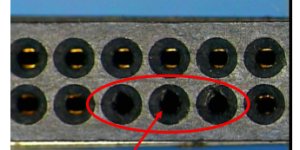
#4 above was the lucky number. Every "dead" card had physical damage to the slots of the CF cards where the pins engage (see attached image from one of the cards). What happens is when pins or guide rails on a reader / writer are not perfecting aligned, the pins of the reader/writer hit the slots indirectly on the card. And when they do go in the slot, the pins hit the pins on the inside of the card itself. Eventually, they push the pins inside the card up or to the side (like you see in the image). Thus, over time, you lose connectivity. Yet, the card is not "dead". We had the media firm put on a new set of connector slots onto the a "dead" CF card. Voila, worked like a charm - actual media is fine.

So, some other thoughts:
* Use a magnifying glass and look at the connectors of your cards. See if you can see damage being induced.
* If you can, try to isolate the reader/writer causing the damage. To the naked eye, the pins may looked aligned, but they only have to be off by just a hair. Also, check the guide rails of the reader to make sure they allow you to cleanly insert the card.
* Not only can this damage cause a card to appear dead, but it can also cause an intermittent connection between card and reader/writer - which causes corrupt data, etc.

We also ran tests here with M-X sensor and Build 30.5.0 of RED ONE firmware. We could not find any evidence of these causing issues with media data.

I hope this helps clear up the reported issues in this thread.
BC
 

Attachments

  • damaged_pins.jpg
    damaged_pins.jpg
    80.5 KB · Views: 0
Thank you very much for following up on this Brent, it is very much appreciated and certainly gives piece of mind now we know what to look out for. :thumbsup:

Keep on trucking :)

All the best,

Tom
 
No worries, Tom. When we say we are looking into something, we actually do :)

BC
 
Back
Top