Welcome to our community

Be a part of something great, join today!

  • Hey all, just changed over the backend after 15 years I figured time to give it a bit of an update, its probably gonna be a bit weird for most of you and i am sure there is a few bugs to work out but it should kinda work the same as before... hopefully :)

Troubleshooting the new feature - "Low Power Warning video overlay" v2.0.3

winthenichols

New member
Joined
Feb 19, 2025
Messages
4
Reaction score
0
Points
1
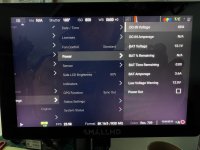
I just updated my Red Raptor to version 2.0.3. It says it added a "Low Power Warning video overlay".

I just ran a few tests where I made the voltage warning at 14v, 13v, and 12v. I ran the battery out each time. I never got any kind of waring across the screen.

Has anyone tested this out yet? Do you guys know if there's a toggle switch for the new feature?

Thanks!
 

Attachments

  • IMG_5136.jpg
    IMG_5136.jpg
    620.6 KB · Views: 15
To actually get the low battery warning working, you need to add this low battery warning in video overlay menu under SDI1/SDI2 menu
 
Does that mean you can only get the low battery warning through the SDI channels? It doesn't pop up on the main Small HD usb-c monitor?

Thanks for your help!
 
Not sure about seeing the warning on the RED SmallHD monitor, I do not own one.

You're welcome!
 
I have the same behavior with my Raptor. I did the same tests with various Vmounts and never get a warning.

Please keep us up to date.
✌️
Alright, after contacting RED, here's what I learned.

Their response was that there are two low battery warning indicators. One on the menu LCD. The battery percentage normally shown below the battery icon is replaced with the current voltage reading. On the V-RAPTOR, this voltage will appear in red. On the KOMODO-X, it will blink red. Both are visual cues that your battery is running low.

Second, the ON/OFF switch LED will begin blinking amber. This light is supposed to be your main signal that the battery is low or nearing the voltage level you set for the warning. Just keep in mind that there will not be any pop-up alerts to let you know. It is important to watch the battery indicator on screen and keep an eye on the blinking amber light on the power button so you can avoid unexpected power loss.

I recommended that they set up a low warning indicator for the DSMC3 monitor. When I'm operating and focused, I'm not looking at the side of the camera. The most efficient low battery warning I currently use, is on a client monitor. And the voltage monitoring turns red. That would be really helpful if they put that just into the DSMC3 monitor. I thought that is what they meant in the update description.

With the V-mounts straight into camera, you should at least be able to see the battery percentage. I use a Creative Solutions V-mount to Gold adapter. And that thing doesn't have the hardware to send smart battery info to the camera. It's expensive enough. I don't know why they didn't add that hardware into the build. So I only get the voltage reading.

So in conclusion, all the low battery warning are currently on the side of the camera. So I guess you're supposed to mostly rely on an AC. But if your skeleton crew oping, then you're currently out of luck until they hopefully put it in an update.
 
Back
Top