Welcome to our community

Be a part of something great, join today!

  • Hey all, just changed over the backend after 15 years I figured time to give it a bit of an update, its probably gonna be a bit weird for most of you and i am sure there is a few bugs to work out but it should kinda work the same as before... hopefully :)

Transcoding R3Ds in FCP-X - Error Message

Dominick Pietrzak

Well-known member
Joined
Sep 18, 2010
Messages
707
Reaction score
0
Points
16
Location
NYC
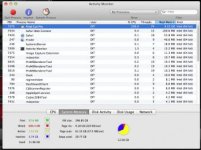
Hello! I just started using FCPX today, and I'm transcoding footage to proxies for a longer length film I'm working on. After some time, I got a message saying that my sysytem was out of memory and that I had to quit other applications. FCPX was the only one open so I had to force quit it. Looking at activity monitor, and FCPX is using a ton of RAM! Is there any solution to this? It just keeps going up and quits at "Swap Used: 59GB"
 

Attachments

  • Screen Shot 2013-01-10 at 10.31.26 PM.jpg
    Screen Shot 2013-01-10 at 10.31.26 PM.jpg
    20.3 KB · Views: 0
I mean file structure wise... does FCPX do anything special with the proxy transcodes?
 
Nope. They just have to be named the same. I did a similar test using my Samurai clips and through those in the folder as proxy and it worked.

I mean file structure wise... does FCPX do anything special with the proxy transcodes?
 
Doing a little test now.

Okay so I made the Proxy in RCX. Put that in the Proxy folder of the FCPX event. Opened up FCPX and then imported the proxy via File->Import->Media.

One thing I noticed right away is that it is no longer reading the Metadata as to when it was shot. That'll probably be a problem for the production due to the amount of footage.
 
The file structure for the folders have to be there. Just import transcode one clip to proxy to create the folders. Quit FCPX. Put the proxy files (any files really) that have the same names as the original clips into the proxy folder. Open FCPX and switch back and forth in the preferences window.

Bob
 
All of the file structure folders are there. I transcoded about 10 clips already, they all appear in the event folder in FCPX. I also just transcoded 3 new clips in RCX. I put them in the Event -> Transcoded Media -> Proxy Media folder.

However, they do not appear in my event in FCPX. What am I doing wrong? Or what could I have forgotten to do?
 
Wait, got it! Forgot to import the actual clips first into FCPX. Everything works! Thanks a lot Bob!
 
I'm getting some black flashing with my fcp x renders.

Anyone else having these issues?
 
it's weird.

if I do them in small batches or redo them they are fine. It's when I set off large batch that there seems to be some throughport issues.

The advantage to going the FCP route is the fact that at teh end of the edit you can click ONE radio button in preferences and your timeline reads from the R3D for final output.

David
 
That's a great tip bob. I'm going to go that route until the next FCP X version is releasea dn hopefully addresses some of this.

d


The file structure for the folders have to be there. Just import transcode one clip to proxy to create the folders. Quit FCPX. Put the proxy files (any files really) that have the same names as the original clips into the proxy folder. Open FCPX and switch back and forth in the preferences window.

Bob
 
Yeah I was not too happy with the FCPX transcodes.

Regarding the latter, it should work this way the RedCine route also. In playback preferences, you can select original media and it will take em back to the original R3Ds.

Unless you mean something else? Still kinda new to this.

it's weird.

if I do them in small batches or redo them they are fine. It's when I set off large batch that there seems to be some throughport issues.

The advantage to going the FCP route is the fact that at teh end of the edit you can click ONE radio button in preferences and your timeline reads from the R3D for final output.

David
 
There are a couple of things I'd like to see in FCP proxies.

1. Why do the proxies have to be 5K when generated by FCP? Presumably no scaling speeds up renders.
2. Decent renders with the Rocket installed (no black flashes)
3. option to do a 720P proxie to save some space.


I think if you follow Bob's advice of putting the RCX generated proxies in the FCP proxy folder it should work normally, otherwise, I would have to see for anomalies.
 
Yes size options would help too. The nice thing about inserting your own is that the proxies can actually be any size and quality. I had my 1080p footage from the samurai in the proxy folder. This allows me to render out of the proxy time if I wanted to. With this option, I can access the r3d files when I want to scale or reframe. Just be aware that the original proxy will be overwritten. It can get tricky.

There are a couple of things I'd like to see in FCP proxies.

1. Why do the proxies have to be 5K when generated by FCP? Presumably no scaling speeds up renders.
2. Decent renders with the Rocket installed (no black flashes)
3. option to do a 720P proxie to save some space.


I think if you follow Bob's advice of putting the RCX generated proxies in the FCP proxy folder it should work normally, otherwise, I would have to see for anomalies.
 
Do you get the black flashes in the renders as well bob? I have not seen that problem since build 12 on the RED ONE.

David
 
The Proxies shouldn't be 5k... They should be 1/2 the native resolution. My scarlet proxies are 2k. It's possible if you have the playback quality set to "best" instead of "better performance" that it makes proxies at full size.

Here is my question - Why make proxies for your entire project?

With FCP X, you can just render the clips in your timeline that are "too slow" when editing native r3ds.

With scarlet footage, the prores proxies are actually larger in file size than the r3ds, haven't played with any epic data rate r3ds in fcpx yet.
 
OK, so I must be missing something because I'm having trouble getting FCP-X to recognise my REDCINE-X-rendered proxies (which are much faster than FCP's).

I imported all my media and left the R3Ds in place. Then I made a couple of proxies but, because it was taking too long, rendered them all with a 1/2 Good debayer in RC-X. Then imported into the Proxy folder and I get a bunch of angry red clips when I try to switch to proxies. I tried clicking the 'Make Proxy' button in the Inspector tab but it actually rendered it again. I also tried removing and reimporting the clip with the proxy still in the folder and no luck there either. Is there something I'm missing here?

-Andrew

EDIT: Looks like I'm not the only one, continue on if you found this through Google:
http://www.reduser.net/forum/showthread.php?114565-Creating-proxies-outside-FCPX-10-1
 
Back
Top