Welcome to our community

Be a part of something great, join today!

  • Hey all, just changed over the backend after 15 years I figured time to give it a bit of an update, its probably gonna be a bit weird for most of you and i am sure there is a few bugs to work out but it should kinda work the same as before... hopefully :)

Transcoding Epic without a rocket..Please help!!!

James Hogarth

Well-known member
Joined
Nov 18, 2013
Messages
119
Reaction score
0
Points
0
Location
Glasgow
Hi All,

I'm fairly new to RED so need some advice.

I will be working with epic shooting at 4k.

I will be offloading using Shotput and transcoding using Da vinci light or Red cini x (Advice on what's best for epic and how much difference would be good too).

I will be using a 2013 iMac 27"

3.5 GHz Intel Core i7
32 GB 1600 MHz DDR3

NVIDIA GTX 780M 4096 MB

What I'm hoping you guys can tell me is what would be the best workflow on this system with the above soft wear shooting 4k epic without a rocket.

Any help is greatly appreciated
 
Don't be afraid. Redcine-X is a great tool to work with. I would transcode at Half res quality (to HD for editing) I usually burn in the TC and Clip name out of frame (1,85 in a HD container). Now RCX gets you faster transcoding time using the GPU so you'll probably get near to 1:1 speed at Half RES.

Redcine-x is IMHO the best tool for fast transcode delivery. You can make first light correction to get close to the final look (so editor and director gets used to the look), If some shots are with high ISO you can render them at full res with some denoise applied so you get a better appreciation to where the noise floor lands.

The learning curve is fairly rapid in RC-X I would definitly go for it.

Have a nice weekend.

Patrick

PS: I understand the choice to work on 4k because you shoot with the Scarlet? If you shoot on Epic there is really no downside shooting at 5k. Using 5k 8:1 compression gets me really good results and is download time/hard drives space saving. But they should test what best suites their shooting conditions.
 
Latest version of RedCine X (22) is GPU accelerated, I get almost real-time transcodes going out to ProRes 4444 at full-res debayer with a GTX 680, so you should be right in that range on that system, especially if you go half-res and ProRes 422 for dailies.
 
SHOOT 5K PLEASE! ;-)

SHOOT 5K PLEASE! ;-)

I will be working with epic shooting at 4k.

Ok so it's with the Epic. I don't see why on earth they decide to shoot at 4k. You'll allways get better results shooting higher RES even for HD delivery as your grain structure will be smaller and so you can have higher iso settings for the same noise floor. Higher iso shooting means also nicer highlight fall off as we shoot in RAW.

4k debayer also means 80% less resolution as actual pixels count. So shooting 5K also means a real 4k master (if you tend to go this way). But I can only emphasis that there is no real down side shooting at 5k, none for post, beraly none for transcoding time.

Patrick
 
Thanks so much for your responses guys I really appreciate it what would the FPS doing this do you reckon?

Also do you know of any idiots guide links that show from opening red cini x to exporting transcodes into selected folders

And also how to create looks to put in camera or take looks from camera and put onto clips

I'm only really used to alexa and da vinci so this is all new ground but I really appreciate the help you guys are giving me
 
Latest version of RedCine X (22) is GPU accelerated, I get almost real-time transcodes going out to ProRes 4444 at full-res debayer with a GTX 680, so you should be right in that range on that system, especially if you go half-res and ProRes 422 for dailies.

That sounds great thanks Jon
 
Looking at the export options on RedCine X i don't see an option for 422 or 4444 the way I do in Da vinci...
 
I never create look in RCX. I think this is more a thing of cameras that bakes in the look in a codec or Raw cameras that have hard time to do it in camera.
I usually do a simple look in camera using the look tools. (mainly iso selection, WB, contrast, saturation).

You can create a look and export to the cam, but you nearly have to have the DI station on set to get the desired result. This level of fine tuning is not my way of doing it, I must admit it also depends on the project.

Have you allread opened a clip in RCX?

Pat
 
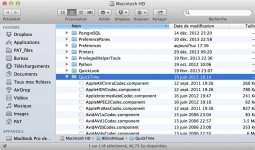
Infact it won't let me install these codecs as I don't have FCP on this mac
 
I can send you a wetransfer with the codecs that you put on your library-Quicktime if you want.

Here

Tell me if it works.

Pat
 

Attachments

  • qt.jpg
    qt.jpg
    101.2 KB · Views: 0
That would be amazing thanks Pat my email is
 
Last edited:
Got them and downloaded thanks Pat I'll reopen RedCiini X and try it
 
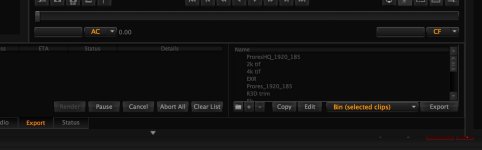
i've took some files in and highlighted them and clicked the + in export...Where do i see the new codecs? Thank you so much for all your help
 
And here are my exports settings. A lot are tests so not all are well configured but you can see what kind of presets are possible.

Right clicking in the export tab you can import my preset folder, change them copy them or recreate others.

Patrick
 

Attachments

  • Export_settings.jpg
    Export_settings.jpg
    35.8 KB · Views: 0
Back
Top