Welcome to our community

Be a part of something great, join today!

  • Hey all, just changed over the backend after 15 years I figured time to give it a bit of an update, its probably gonna be a bit weird for most of you and i am sure there is a few bugs to work out but it should kinda work the same as before... hopefully :)

Tons of stuck pixels in low light mode

I sent my GEMINI at the beginning of the year, I received this message last week ... " Our repair team have completed the initial evaluation and confirmed your reported issue. They are working on resolving the Dancing Pixels issue and your camera is currently going through our testing process to see if errors continue to occur. I will follow up with you as soon as the camera is working up to RED Specs and is ready to ship "
So there is a problem.
 
Can any Gemini Owners please share their experiences?

Watching this one closely as I just listed my Scarlet-W for sale
otherwise I was planning the trade in in 2 weeks time.

As a large part of my work is out of my hands at the end of the shoot day
(production organises post) work-arounds do not really work for me

Any extra post work to mask Pixels and the production will specify "not your camera"
for future work.
 
Hi, gemini owner. No issues with lit pixels. Nor have I heard of any issues from the DITS i usually work with. I do not think this is a pervasive problem.

Nick
 
If you're looking for a guarantee that the specific brain you receive will be utterly flawless, you're not going to get it here. Some of us have sensors that appear to be without these sort of defects, or perhaps our shooting conditions just haven't exposed them.

You can buy one and scrutinize its output to know whether you see anything you're not happy with. Testing someone else's camera isn't going to do it, and soliciting anecdotes here won't either. Buy it, manually calibrate it, test it, and know what you're dealing with. You'd want to do that before offering it up for use on set anyway. I'm extremely happy with mine, it's pretty mind-blowing.
 
Could it be a black shade issue? As in, if you've been using auto, try manual (or vice versa)... Again, not idea, but better than having to render out of raw/transcode (in my opinion).
 
I sent my GEMINI at the beginning of the year, I received this message last week ... " Our repair team have completed the initial evaluation and confirmed your reported issue. They are working on resolving the Dancing Pixels issue and your camera is currently going through our testing process to see if errors continue to occur. I will follow up with you as soon as the camera is working up to RED Specs and is ready to ship "
So there is a problem.

Just a reminder that conversations between RED and their customers are meant to be just that, one-on-one conversations. Please do not quote from those conversations here.
 
Hi, gemini owner. No issues with lit pixels. Nor have I heard of any issues from the DITS i usually work with. I do not think this is a pervasive problem.

Nick

thanks, for sharing! All I have seen so far from the sensor looks fantastic, but I have not scanned through R3d files at 100% myself.
Surely your DITS did...
 
In case you hadn't already seen it. According to Nate, "On the Helium, Gemini and Monstro, you're going want to always do a "Manual" calibration...."

At about the 5:40 mark.


RED TECH | Black Shade Calibration


By RED Digital Cinema


Published on Feb 11, 2019
This RED TECH demonstrates how to run a Black Shade Calibration which ensures clean and consistent pixel sensitivity across your entire image.

In this tutorial:
• What Black Shading is and why it is important
• How to perform a Black Shade Calibration
• Navigating to Menu - Settings - Maintenance - Calibrate - Sensor
• Differences between Manual and Auto Calibration
• Which calibration is recommended
• How often should it be done

► DOWNLOAD the corresponding Operation Guide for more information by camera https://www.red.com/downloads

► MORE https://www.red.com/red-101/black-sha...

► TO REQUEST a video on a specific topic, please email REDTECH[at]red.com

► WATCH all the RED TECH videos here: https://www.youtube.com/playlist?list...

► SUBSCRIBE to RED Digital Cinema’s YouTube: https://www.youtube.com/user/shotonre...

► CONNECT with RED Digital Cinema online:
Visit the RED Digital Cinema WEBSITE: http://www.red.com/
Follow RED Digital Cinema on TWITTER: https://twitter.com/red_cinema
Follow RED Digital Cinema on INSTAGRAM:
https://www.instagram.com/reddigitalc...
Follow RED Digital Cinema on FACEBOOK: https://www.facebook.com/reddigitalci..
 
Just a reminder that conversations between RED and their customers are meant to be just that, one-on-one conversations. Please do not quote from those conversations here.

Well Brent, I didn't know it, sorry.
 
A Redcine-X workaround isn't really an option for projects going through R3D IP2 grading in Resolve.
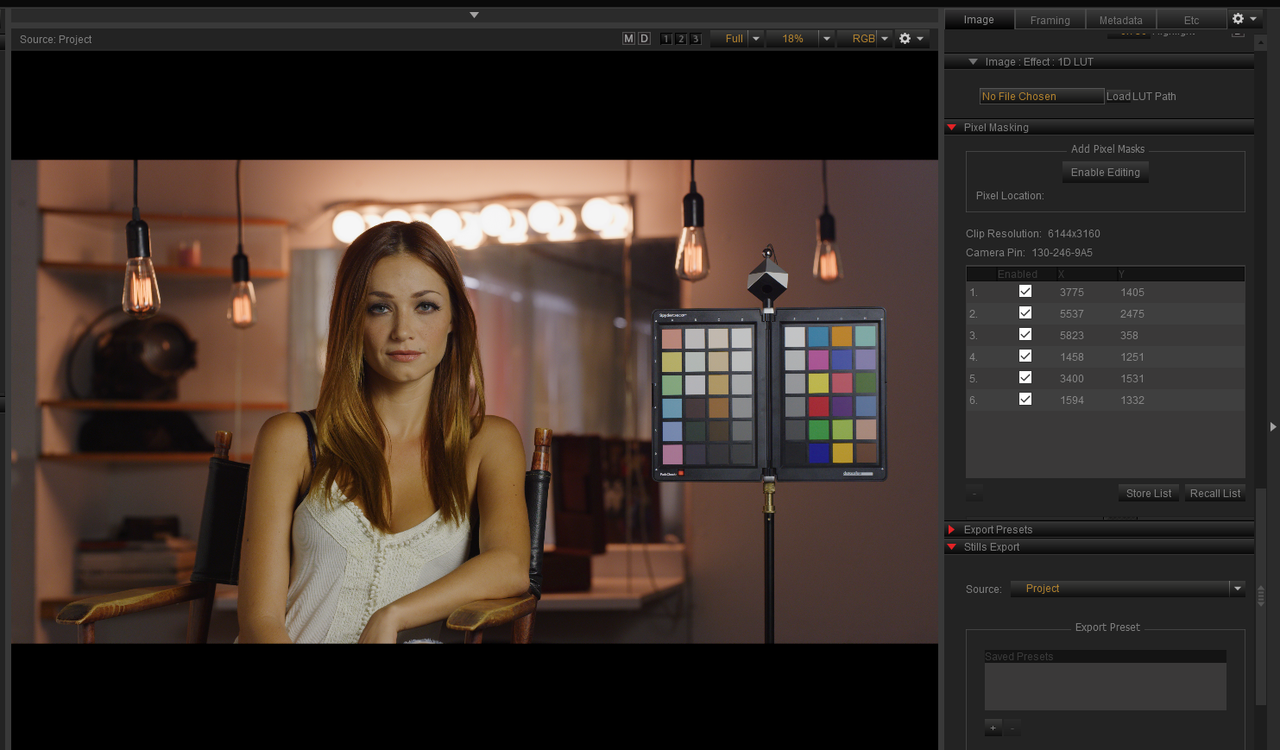
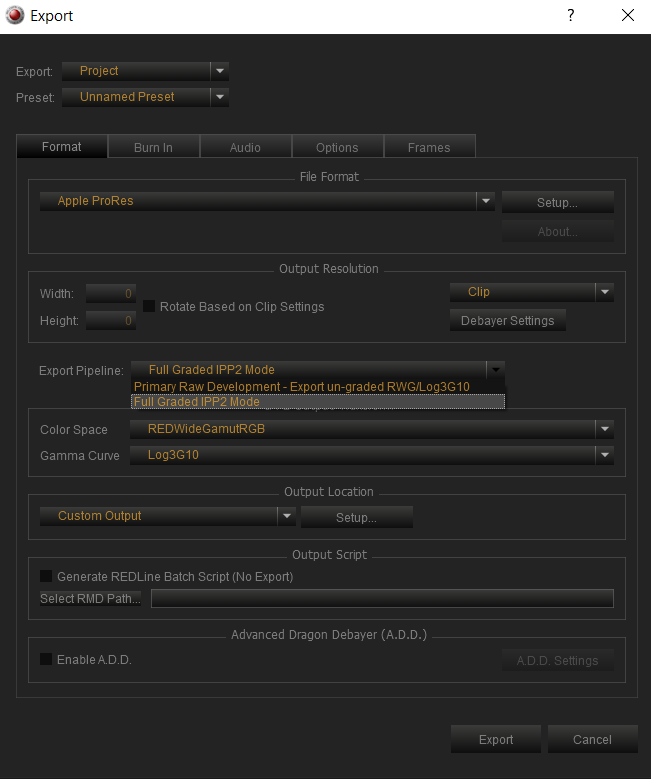
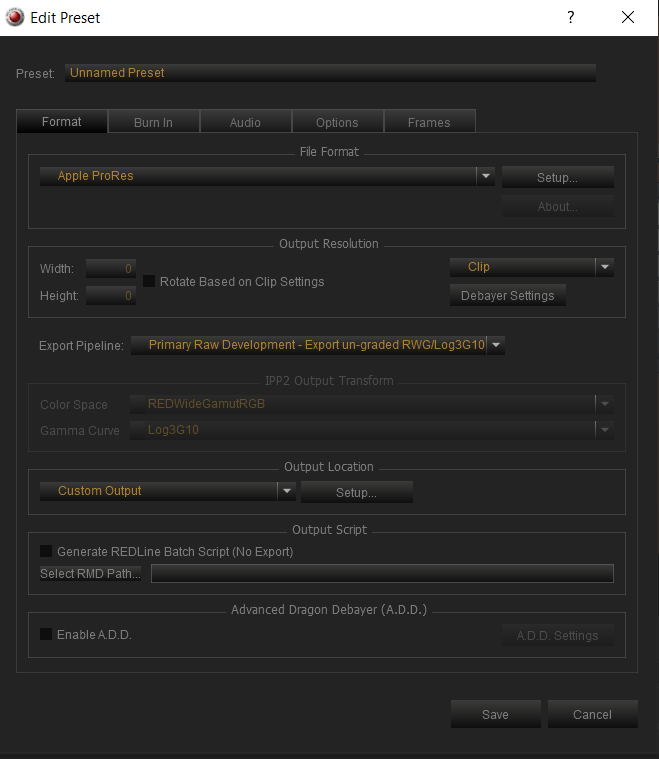
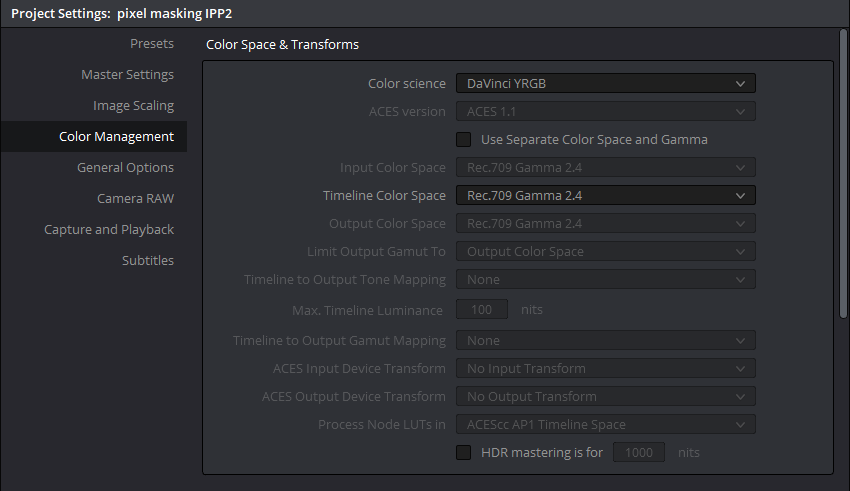
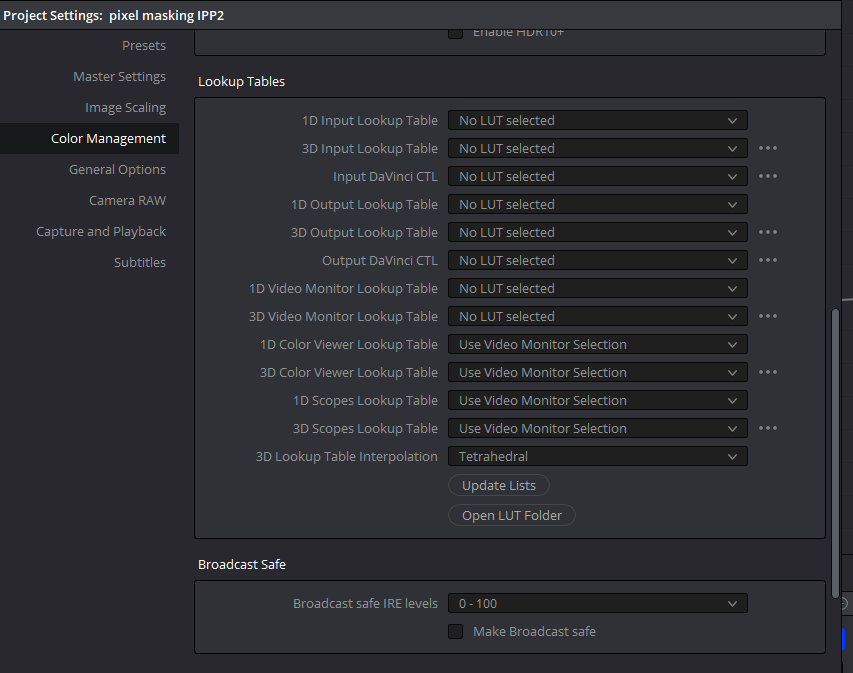
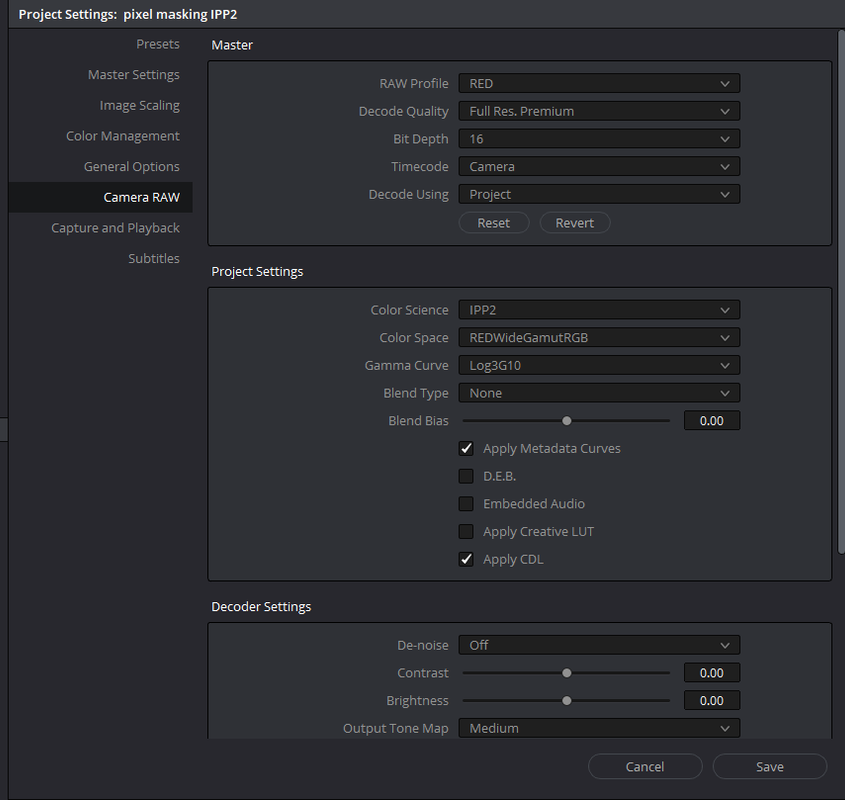
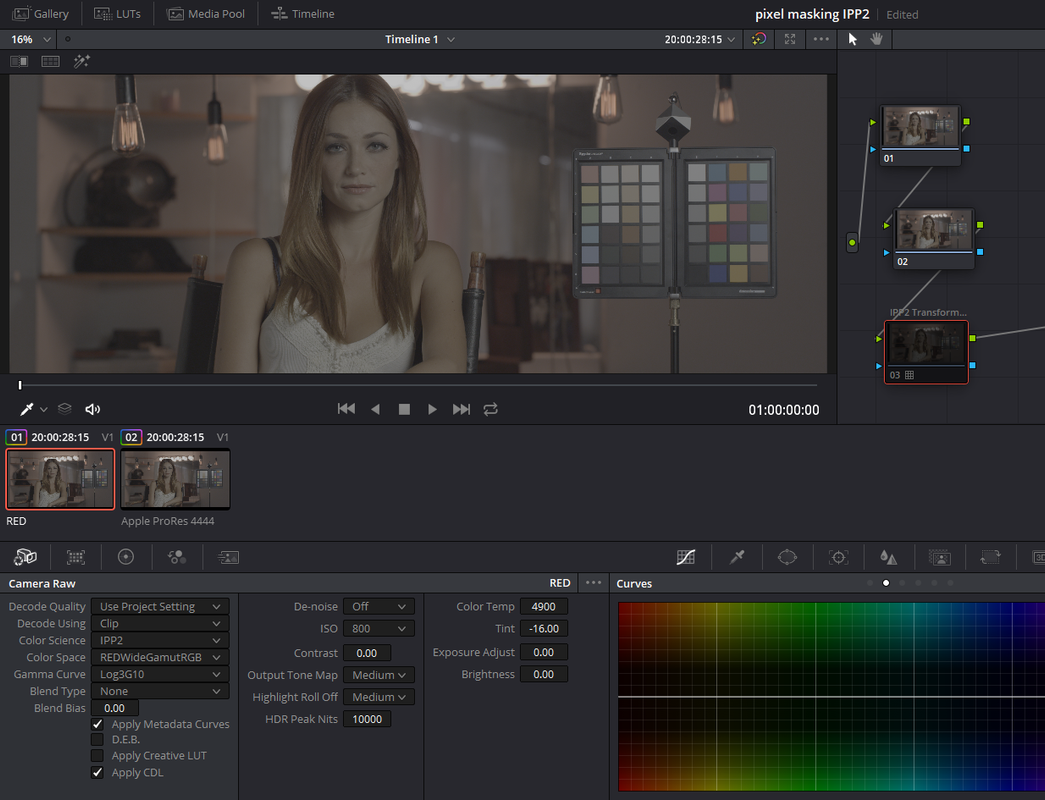
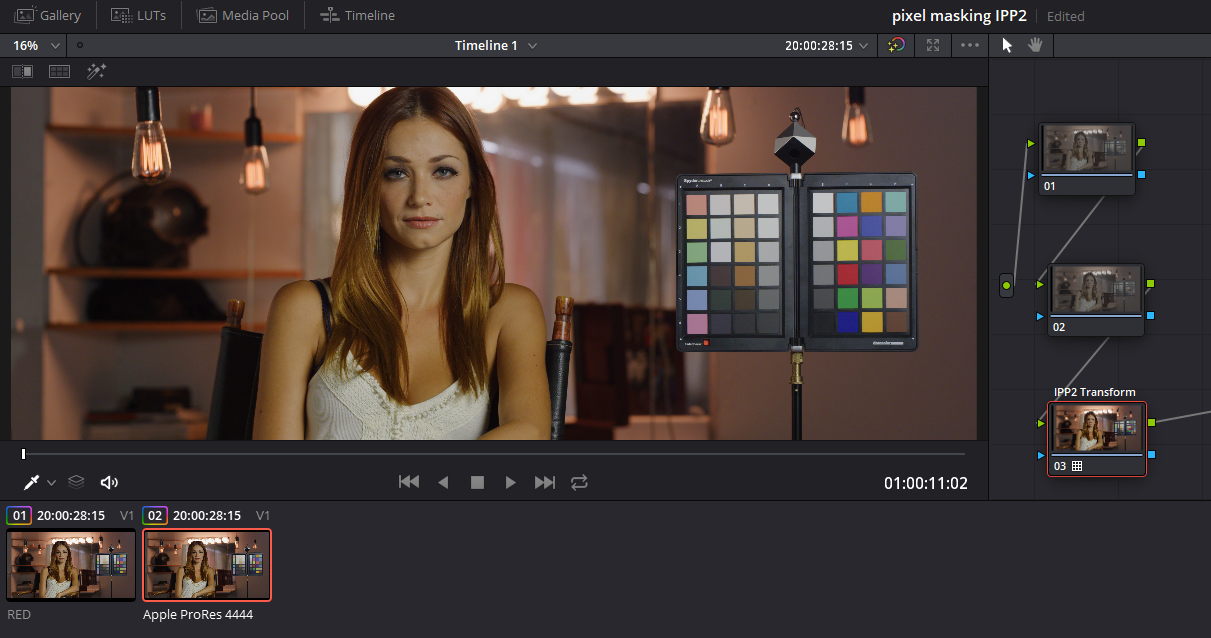
Assuming you don't have a defective sensor, and have done a good black shading and have a manageable amount of hot pixels, you can use a Pixel masked .R3D transcoded to ProRes or DNxHR in a Resolve IPP2 Project along side any other .R3D file. It obviously won't be a Raw .R3D file but it will work fine with IPP2
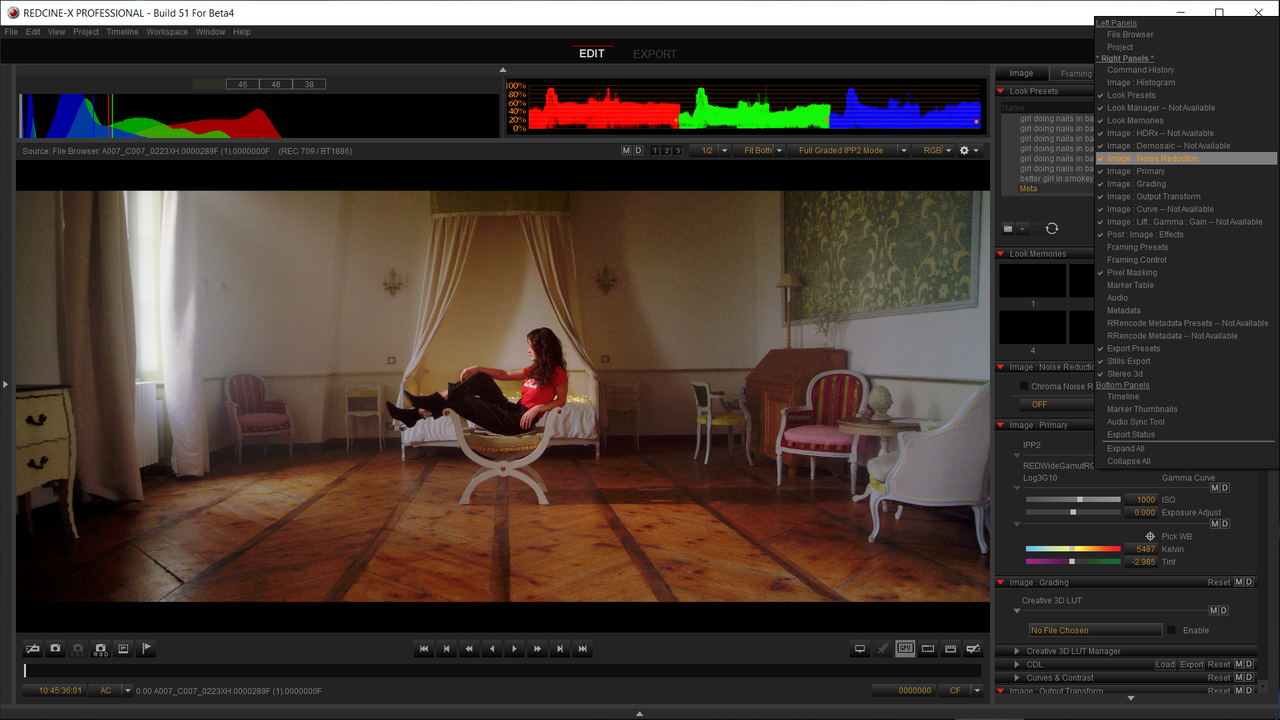

1) Use the Setup for "Pixel Masking" in "Post 5" on page 1.

2) Here is the same sample .R3d from Phil Holland I always use. Lets pretend it had 6 hot pixels that needed to be masked.


Screenshot-82.png


3) Now at export, Instead of just exporting it out as a ProRes or DNxHR "Full Graded IPP2 Mode" next to "Export Pipeline", Choose "Primary Raw Development-Export Un-Graded RWG/Log3g10" and your done in Redcine-X.


Screenshot-102.png


Screenshot-80.png


Inside Resolve, The usual Project suspects.


Screenshot-107.png


Screenshot-105.png


Screenshot-83.png


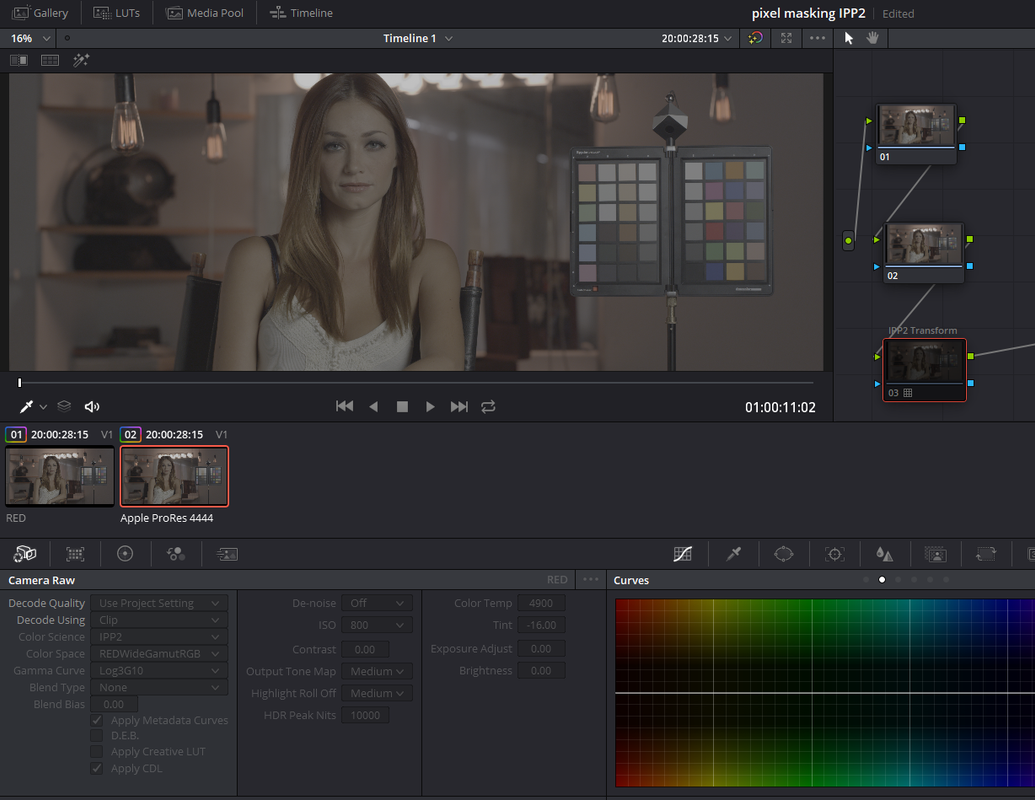
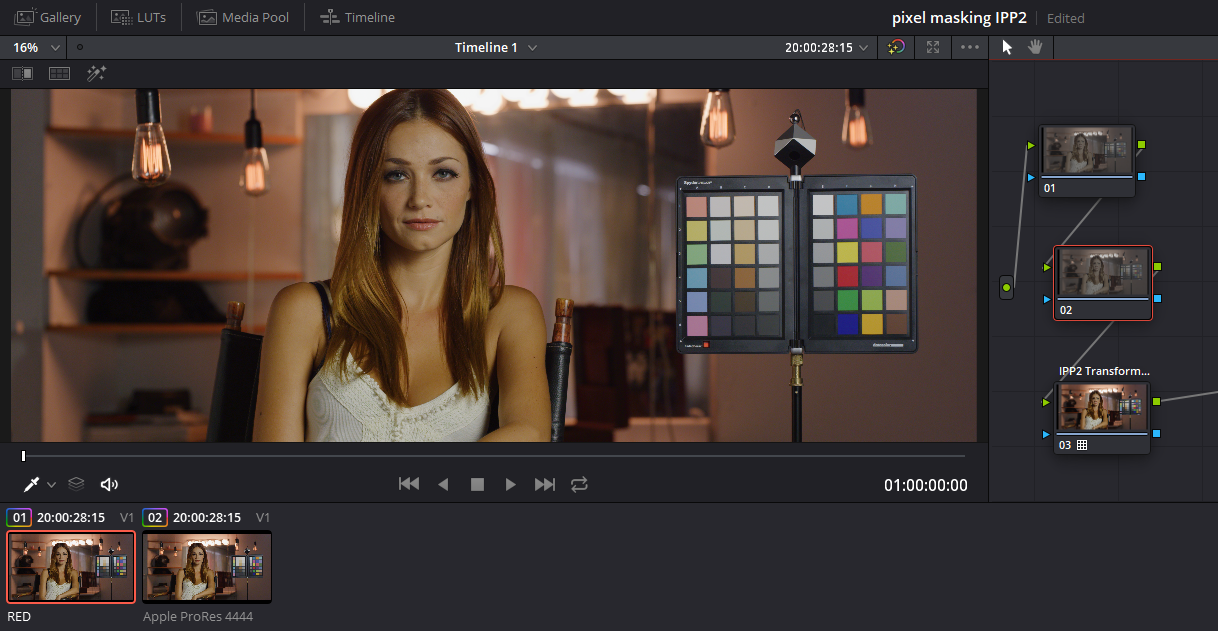
Here are the same image in both a .R3D file and a ProRes 4444 file both at 6144x3160, the .R3d is 2.55 GB and the ProRes is 2.60GB on the same IPP2 timeline. The ProRes file with the supposed 6 Pixel Masked Hot Pixels. As you can see both are in the un-developed RWG/LOG3G10. The .R3d from the the "Red" Raw IPP2 project settings and the ProRes file encoded at export in the un-graded RWG/LOG3G10 format.


Screenshot-94.png


Screenshot-95.png


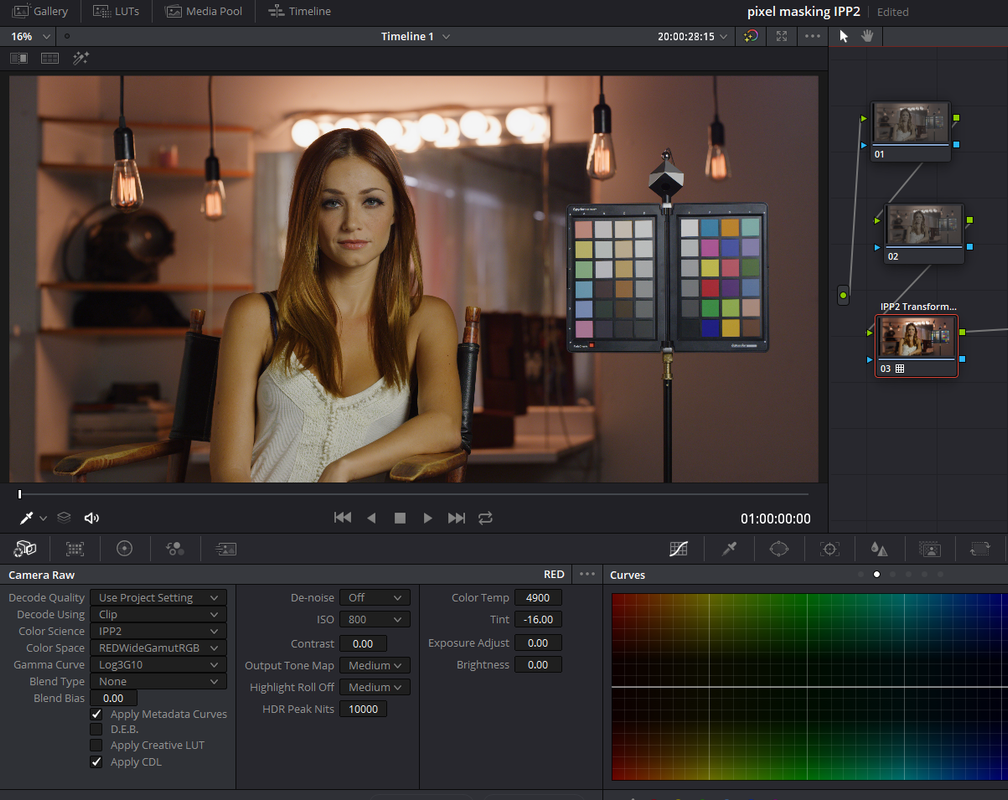
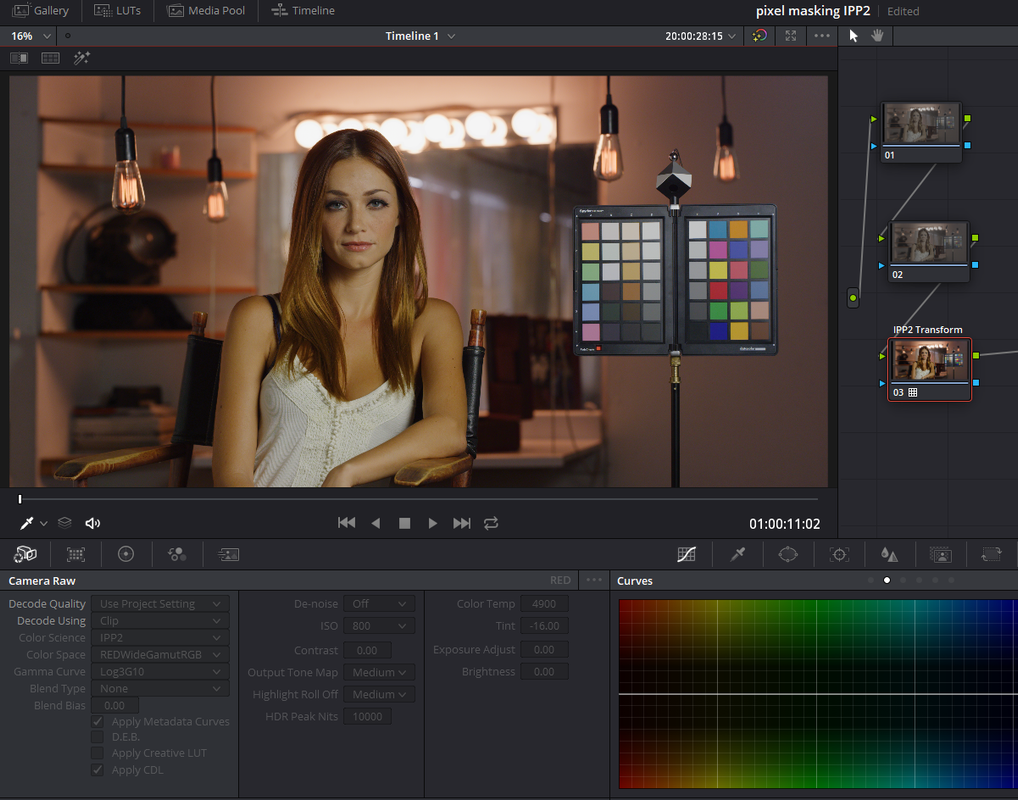
Now here are both developed with a High Con/Very Soft IPP2 Output Transform applied in the Last node in their node tree.


Screenshot-92.png


Screenshot-93.png


Screenshot-90.png


Screenshot-91.png
 
FIRE NOMADS | GEMINI 5K S35 | Shot on RED


By RED Digital Cinema


Shot entirely by natural light during sunrise/sunset, ‘FIRE NOMADS’ takes you on a romantic and poetic journey of two people coming together because of the passion for fire, at the same time demonstrating the beauty and charm of the fire dance. The elements that define the styles of the two performers: masculine vs feminine; man-made structure vs nature; Yang vs Yin; finally joined together in a romantic duet that blends fire and the nomadic way of life into one harmonious swell.

Shooting with the DSMC2 GEMINI 5K provided the possibility to adapt to ever-changing lighting conditions and lengthened the opportunity to film after sunset and still capture all the details of the magic hour, at the same time keeping the skin tones well-defined with the 16.5+ dynamic range.

Gear for #FIRENOMADS:
#ShotonRED #GEMINI5K https://www.red.com/DSMC2-BRAIN?quant...
Cooke Panchro Classic Primes set
Angénieux EZ-1 FF 45mm-135mm
Gimbal shots on @djiglobal Ronin with Cooke Speed Panchro S2 32mm rehoused by TLS
#JebsenIndustrial

Director / Producer / Editor: Fan Di Instagram- @fanxiaoba
Producer / Cinematographer: Jacky Poon
Assistants / BTS: Wong Kei Cheong, Carolina Rodrigues

Starring:
Fire NoMads - Bertrand Pignet (France), Jingwen Zhao (China)
Professional fire performers based in Dali, China.
“We met in Dali, China in 2011 and started fire performing in the streets of the old town. Seven years later, fire performing and event organizing is our way to combine passion and life style.”

► Follow Fire NoMads
Facebook : https://www.facebook.com/FireNoMads
Youtube: https://www.youtube.com/channel/UCcdT...

Music:
’Lantern’ by Pablo Love, Campbell E Browning, Jean-Yves Prieur
‘Nylon’ by Giovanni Antonio Parricelli

► SUBSCRIBE to RED Digital Cinema’s YouTube: https://www.youtube.com/user/shotonre...

► CONNECT with RED Digital Cinema online:
Visit the RED Digital Cinema WEBSITE: http://www.red.com/
Follow RED Digital Cinema on TWITTER: https://twitter.com/red_cinema
Follow RED Digital Cinema on INSTAGRAM:
https://www.instagram.com/reddigitalc...
Follow RED Digital Cinema on FACEBOOK: https://www.facebook.com/reddigitalci...
 
It obviously won't be a Raw .R3D file but it will work fine with IPP2
But that's what I mean. I use RAW in Resolve in order to only process the footage once at color grading. It's also much more powerful to color grade the footage on the actual R3D files. Having to be forced to go through a tedious process of masking pixels is not viable for long format shooting. Who will pay for the extra post-production time to do this? Red?
 
Christoffer,


BETA 4 - REDCINE-X PRO (WINDOWS ONLY)

https://www.red.com/downloads/options?itemInternalId=16144&version=2

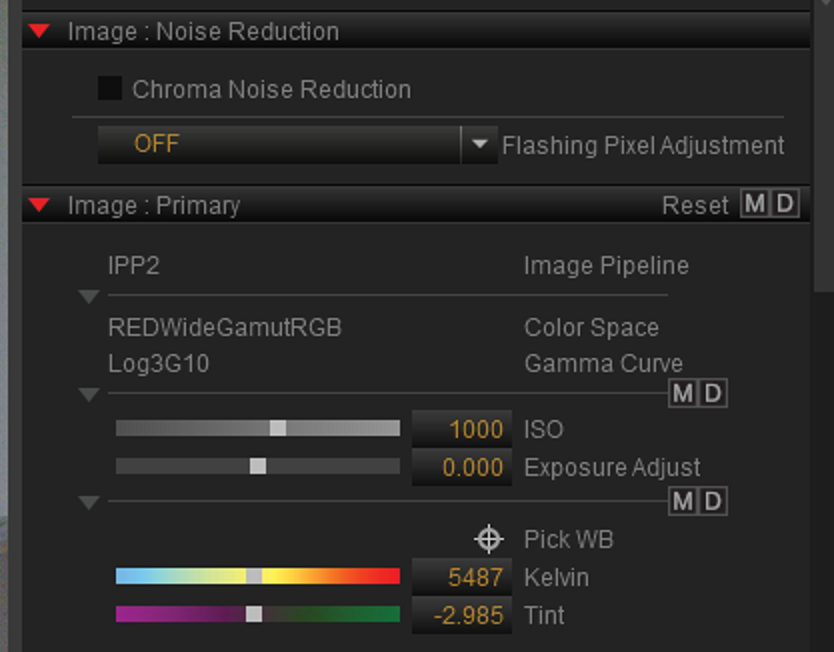
Have you tried the new "Chroma Noise Reduction/ Flashing Pixel Adjustment" tool inside of the Beta Redcine-X Pro build 4. This should apply to the .R3D file. However, it is still beta and I don't know if this will need to be part of some upcoming SDK so that other programs can have access to it.

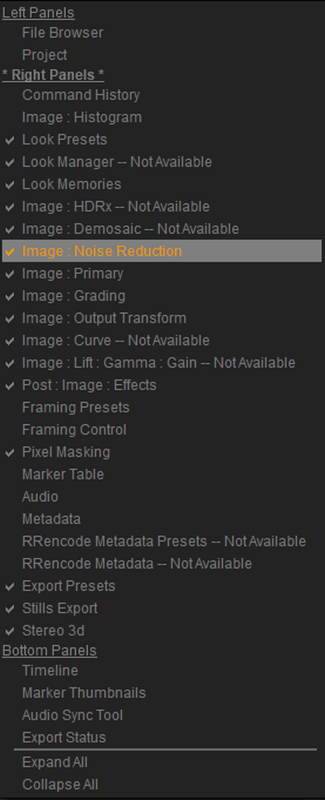
But if you don't see it already available in Redcine-X, "Right Click" in the Right-Hand side of the Redcine-X Pro Beta 4 and select "Image Noise Reduction" to enable it if it's not already there.


Screenshot-42.png


Screenshot-47.png


Screenshot-45.png
 
Have you tried the new "Chroma Noise Reduction/ Flashing Pixel Adjustment" tool inside of the Beta Redcine-X Pro build 4.
But it's still in Redcine, I cannot rely on using Redcine for my post workflow when grading RAW in Resolve is the standard for all productions I'm doing. Stuck pixels need an in-camera fix. The footage I've seen online has as much bright pixel spots as a DSLR, which is uneacceptable for the Gemini price-range.
 
Christoffer,


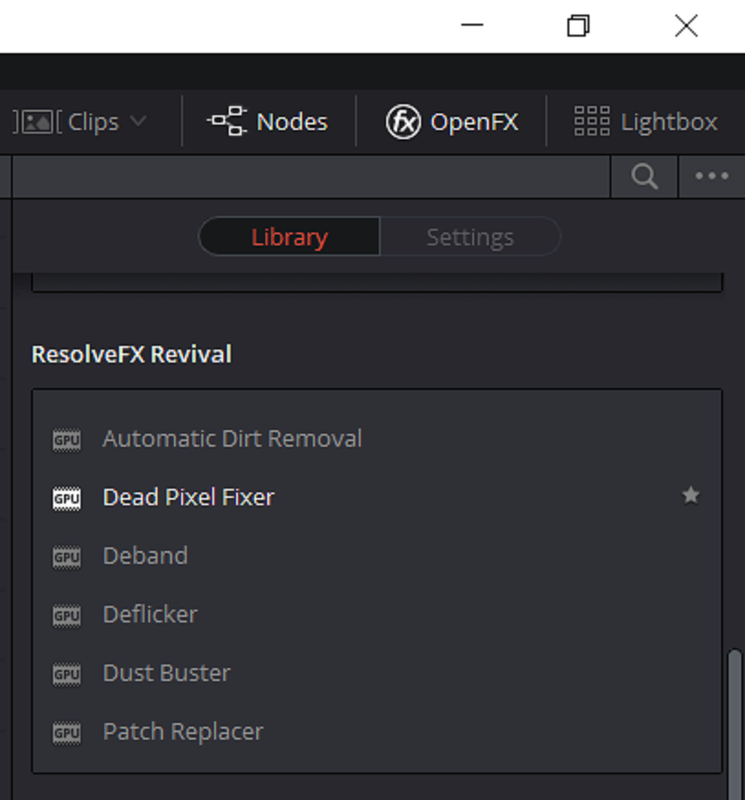
Until this is probably addressed by Red in-camera or in a firmware update or you might want to try a better black shading, In Resolve, there is a dead pixel fixer tool.

DaVinci Resolve 14 New Features: Dead Pixel Fixer


In Resolve 15, it's under "OPENFX" "Resolve FX Revival"


Screenshot-152.png
 
Last edited:
Just a reminder that conversations between RED and their customers are meant to be just that, one-on-one conversations. Please do not quote from those conversations here.
Did no one else find it funny that he commented on a customer confirming the issue, but didn't take the time to comment on the issue itself lol. I think its important for you guys as a company to atleast comment and answer questions about these issues. No one is expecting a perfect camera, but it would def build confidence in the owners and buyers if when there is a legitimate issue, you say " hey we are aware and a fix will be out soon" or something. anyways I never had one problem with my red MX, or my Scarlet w. Not one issue. But it seems like the gemini and helium has all types of quirks. I sat in RED store Miami for hours and really contemplated buying the gemini, but just a couple of issues + some small things like lens coverage made me go spend double on an alexa mini. When you have to press a whole bunch of buttons just to make the camera work correctly it just scares non technical people, like producers and some directors away. The less people that shoot with it, the less people want to shoot with it, the less jobs you get with it, and the harder to warrant the investment. It trickles all the way down. I don't think any function in a $20,000+ camera should have to be done manually, unless you want to. There should be an automated option that works reliably in most situations. just my opinion... well lots of opinions lol.
 
Did no one else find it funny that he commented on a customer confirming the issue, but didn't take the time to comment on the issue itself lol. I think its important for you guys as a company to atleast comment and answer questions about these issues. No one is expecting a perfect camera, but it would def build confidence in the owners and buyers if when there is a legitimate issue, you say " hey we are aware and a fix will be out soon" or something...
My thought exactly.. kind of dissappointed with that post to be honest :(
 
Well these conversations have sealed my deal. No Gemini for this cat.

Stephen
 
I agree. I do wish RED would make a statement similar to what you’ve mentioned above. RED is definitely aware of the issue, and I do honestly believe they are trying to fix is ASAP, but the lack of communication on the issue leaves customers guessing and seeking the world wide webs trying to figure out answers, which only makes things worse.

I have full confidence that those having issues will get their cams fixed...but for newcomers...it’s definitely going to leave a bad taste in their mouth.
 
Back
Top