Welcome to our community

Be a part of something great, join today!

  • Hey all, just changed over the backend after 15 years I figured time to give it a bit of an update, its probably gonna be a bit weird for most of you and i am sure there is a few bugs to work out but it should kinda work the same as before... hopefully :)

Timecode boxes: Ultrasync ONE vs Ambient NanoLockit vs Tentacle Sync

David Peterson

Well-known member
Joined
Oct 20, 2014
Messages
1,109
Reaction score
3
Points
38
Location
Auckland, New Zealand


Started a new thread for this, as it is an area (timecode!) in which the sound department overlaps with the camera department thus it might interest the camera geeks here as well.

Because I got to try out the NanoLockit for the first time, was impressed with its feature in how it can autodetect FPS

But Ultrasync ONEs remain my favorite! And the Tentacle Syncs are still handy for DSLR/mirrorless shoots that lack a TC input on the camera.
 
Great overview!

I really love the simplicity of the Tentacle Sync-E especially with their recent mention of being able to wirelessly sync them all together at the push of a button. The Ultrasync One seems to take all that even further with RF capabilities and definitely seems like the best option for multi-camera shoots with their Pulse base station and genlock capability. Have they been pretty much issue free so far for you?

I love the idea of a timecode basestation. Your post lead me to Curtis Judd's video on the TC Systems stuff. Would be absolutely amazing if a company sold a recorder with a time sync base station like the pulse built right in. Would be amazing to see one of the recorder companies partner with Timecode Systems to build this into a new recorder. The way they have integrated the Pulse with Sound Devices 6 series is really cool. Would love to see this with the MixPres and recent Zoom recorders.

I actually didn't realize that Ultrasync Ones can also act as a master for all their other devices as well, I though the Pulse or Wave was required for that. Definitely very tempting!
 
Last edited:
Ultrasync ONEs have key advantages over the competition:
1) LCD screen, very handy for you to quickly check TC! Even when your recorder is not with you. Also a friendly AC can help keep an eye out too for if the camera is behaving badly, because they can see the true TC on the Ultrasync ONE.

The only big feature the Ultrasync ONEs lack which I wish they had is there is no scratch mic, so I'll keep my Tentacles around for DSLR shoots.

One major feature of Ultrasync ONEs which I am not using now, but I hope to in the future, is that they can integrate well with the Sound Devices 6xx series of mixers/recorders. And probably one of those are on the cards for me in the future (or maaaaaaaybe, and here is my other hope: Zoom will support this as well with their F series in a future firmware update?? One can dream!).


Ultrasync ONEs have been absolutely flawless for me, the only two issues I've had are:

1) an AC once turning it off mid shoot (WTF??????????? Utter moron), so I've now got into the habit of locking them before handing them off to the AC as an extra safety measure. (again, this a feature other TC boxes often don't have)

2) not being able to fit in that Arri Mini configuration last weekend, but that isn't really an Ultrasync ONE fault at all! You can debate instead which of these two it is the fault of: a) the camera department for pushing the gimbal to the limit and not being able to spare an extra inch of space for TC or b) the sound department for not carrying a hundred different cables for every possible different scenario which might happen and they might be needed for
 
Hey David I am really considering getting the Ultrasync/Wave bundle since they are still sold together and wanted to ask which particular cable are you using to connect the Ultrasync to Red 4 pin lemo? It looks like Timecode Systems sells a cable that connects both outputs into a single 4 pin lemo to go into the Red (for around $100), but not a simple single cable solution. Any other good options out there?
 
Is it possible to only use one timecodebox and connect it to booth the sound devices mixpre-6 and the cameras v-lock expander? I will surely get two time code boxes at once but i still would prefer to only use one when you have the mixpre rigged onboard the camera.


Can you have two tentacle boxes and later get an ultra sync one and have them working together or do you have to stick to a brand?
 
Is it possible to only use one timecodebox and connect it to booth the sound devices mixpre-6 and the cameras v-lock expander? I will surely get two time code boxes at once but i still would prefer to only use one when you have the mixpre rigged onboard the camera.


Can you have two tentacle boxes and later get an ultra sync one and have them working together or do you have to stick to a brand?

Yes you can split the signal out of a tentacle and the Ultrasync One's have two outputs so if mounting everything to the camera you can use one TC box. And yes timecode can be jammed between Tentacle and Ultrasyncs. Timecode can be wirelessly resync'd with the Tentacle-E from the app, but the main advantage of the Ultrasync is that it can continuously transmit TC over RF. If using them together you would need to manually connect them up to jam sync.
 
Great! Do you have any links Andrewhake for such cables?

I had prior seen that ultra sync one had two outputs but it said sync on one and ltc on the other so I was not sure if it was different signals on the ports. Really good there is also cables for the tiny tentacle!


I got answers from the ultrasync one and they got cables for this (not the tentacle y split of course).
 
Yes you can split the signal out of a tentacle and the Ultrasync One's have two outputs so if mounting everything to the camera you can use one TC box. And yes timecode can be jammed between Tentacle and Ultrasyncs. Timecode can be wirelessly resync'd with the Tentacle-E from the app, but the main advantage of the Ultrasync is that it can continuously transmit TC over RF. If using them together you would need to manually connect them up to jam sync.

There are many other advantages to the Ultrasync.

And while you could split a timecode signal from a Tentacle, I personally would suggest rather than taking that risk to just get an Ultrasync instead.

As sometimes you might run into issues if you split up the TC level as it would then be at a bit lower level, but as it is at line level and you're only splitting it up across two inputs and doing only a very short cable run then you should most probably be ok.

The key reason to buy a Tentacle is if you're doing a lot of mirrorless/DSLR shoots.

Is it possible to only use one timecodebox and connect it to booth the sound devices mixpre-6 and the cameras v-lock expander? I will surely get two time code boxes at once but i still would prefer to only use one when you have the mixpre rigged onboard the camera.


Can you have two tentacle boxes and later get an ultra sync one and have them working together or do you have to stick to a brand?

1) the Ultrasync ONE has two outputs, both can be set to identical LTC together

2) timecode is designed intentionally so that you can keep the same time across a wide variety of devices, even unifying cameras and audio recorders! ;-) So yes, of course you can use timecode boxes from different brands at once.
 
Will this cables work with the Ultrasync one to red.

From ultrasync one to the reds V-LOCK I/O EXPANDER sync port.
There is these two options with 90 degree on the bnc.
https://shop.tentaclesync.com/product/tentacle_to_alexa_mini_adapter_cable/
https://shop.tentaclesync.com/product/tentacle-to-90-bnc/


And from ultrasync one to mixpre-6
I got answer from ultra sync and they recommended this cables.


https://www.timecodesystems.com/product/tcb-53-ultrasyncone-y-cable/
img_2648.png

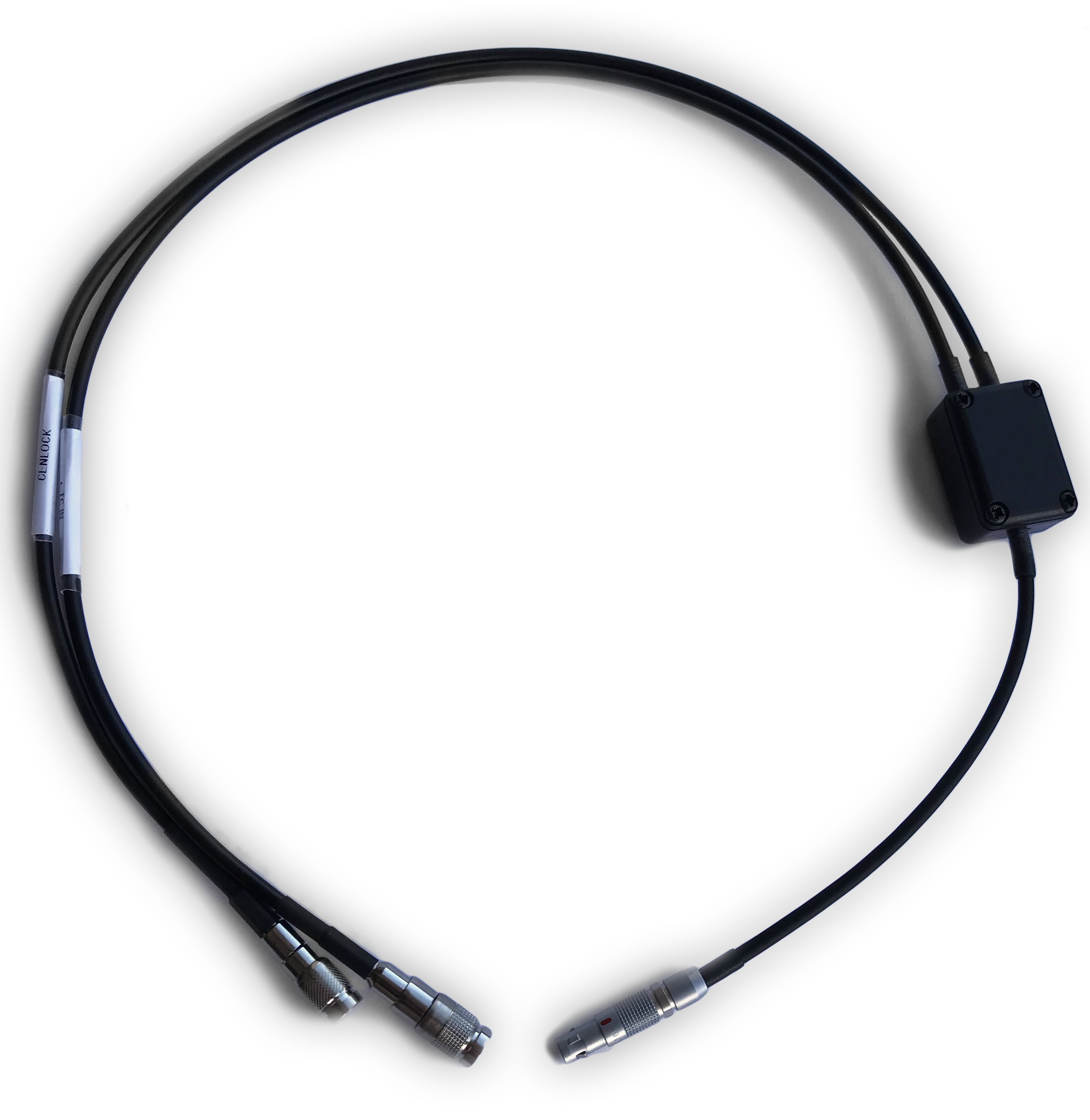
TCB-55 UltraSync ONE to RED camera: timecode/genlock sync cable
Cable to feed both timecode and genlock from the UltraSync ONE to all RED cameras that have a 4-pin LEMO sync port.


https://www.timecodesystems.com/product/tcb-55-4-pin-lemo-red-cable/
tcb-53-3-e1505146087803.png

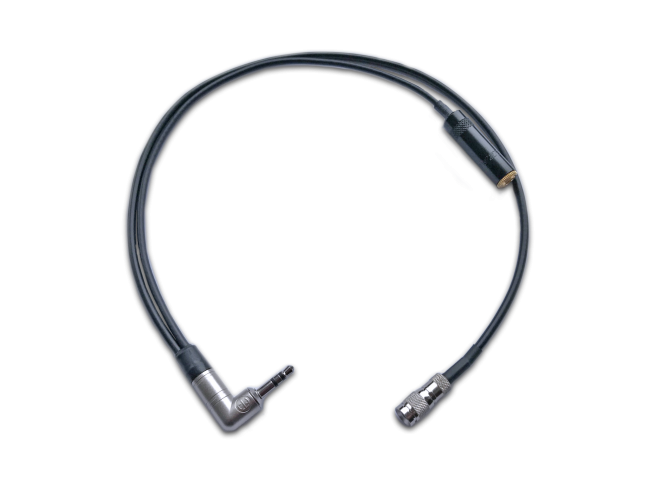
TCB-53 UltraSync ONE to 90º 3.5mm mini jack ‘Y’ cable
Cable to feed MIC level timecode from the LTC port on the UltraSync ONE to any device that uses a 3.5mm input, whilst also allowing the use of an external microphone.

This one I cant se how it would help me.. must been a wrong advice. It has not even a lemo...


When you purchase the UltraSync ONE, you will receive two coax to BNC cables (one for timecode, one for genlock)
How long is this cable and is it straight or 90 degree connections? Will it work with the red sync port?
 
Will this cables work with the Ultrasync one to red.

From ultrasync one to the reds V-LOCK I/O EXPANDER sync port.
There is these two options with 90 degree on the bnc.
https://shop.tentaclesync.com/product/tentacle_to_alexa_mini_adapter_cable/
https://shop.tentaclesync.com/product/tentacle-to-90-bnc/

Those are for the Tentacles (which need a 3.5mm male connection), not the Ultrasync (which need female DIN).

And neither of those are right for a RED, it literally says on the webpage what they're for! (ARRI and BNC. "BNC" being perhaps the most "universal" TC connection)

And from ultrasync one to mixpre-6
I got answer from ultra sync and they recommended this cables.


https://www.timecodesystems.com/product/tcb-53-ultrasyncone-y-cable/


That is weird, did you pose the question correctly? It is for DSLR shoots, so that you can feed a mic input as well to the other stereo channel.

For a MixPre with a Ultrasync ONE you want this cable instead:

https://www.timecodesystems.com/product/tcb-52-ultrasyncone-mini-jack-cable/

When you purchase the UltraSync ONE, you will receive two coax to BNC cables (one for timecode, one for genlock)
How long is this cable and is it straight or 90 degree connections? Will it work with the red sync port?


Answers:
a) 2x DIN to BNC
b) is as long as a piece of string (oh I dunno, about as long as a table knife or fork are?)
c) DIN straight, BNC right angle
d) No, not if it is a lemo connection
 
Last edited:
My suggestion is you buy these three items (probably 20cm each is about the right length for what need, but depends on your configuration):

https://www.aliexpress.com/item/DIN...sync-box-input-Cable-for-Red/32849220253.html

https://www.aliexpress.com/item/Ult...jack-DSLR-TRS-to-DIN-1-0-2-3/32906748304.html

https://www.bhphotovideo.com/c/prod...ultrasyncone_ultrasync_one_timecode_sync.html

Only need one of each item, but buying a 2nd for spares is never a bad idea either. (I assume you own 2x RED Ravens? ;-) Got to have your spares!)
 
Red Komodo Ultra Sync Blue ?

Red Komodo Ultra Sync Blue ?

Red Komodo + ultra sync blue + zoom f2 ... I am new to timecode, I thought I would need B box and the 5 pin lemo out cable to time sync Ultra Blue with BT, but I see no Output on device except USB and hear devices needed BT. The cameras need BT to timecode with ultrasonic blue? can you help tell me what I need to get to work with Red Komodo and how do I sync the Zoom F2 with its blue tooth ability to app on the cell phone, and how do I generate timecode to match my camera so my files on Komodo and my zoom f2 sync perfectly?

I do not understand a lot about timecode just the basic understanding of jamming TC to a device camera with a generator..

But I also see ultra sync black Timecode unit with actual outputs, but I don't think this model works with the zoom f2 bluetooth or BT model..

Can you help me out to make this work with my Red Komodo?

thx

Adam
 
Back
Top