Welcome to our community

Be a part of something great, join today!

  • Hey all, just changed over the backend after 15 years I figured time to give it a bit of an update, its probably gonna be a bit weird for most of you and i am sure there is a few bugs to work out but it should kinda work the same as before... hopefully :)

Time lapse setup not intuitive , needs a bit of explaining/simplification please.

Les Dittert

Well-known member
Joined
Sep 29, 2011
Messages
1,543
Reaction score
0
Points
0
Location
Los Angeles
I've been trying to wrap my head around the time lapse settings, and am still having troubles.
For example, I can end up with odd cadences in the results, missing frames, etc that really should be not be allowed to be set EVER.

Perhaps someone can explain the functionality of the timelapse settings in a way that outlines the internal workings to arrive at the result ?
Maybe a block diagram.
eg: The 'interval' that seems to self calculate. I've seen it at 96 seconds, but me footage showed a frame every 4 seconds.... ????
What is the 'interval' of ? certainly not recorder frames. Must be groups of frames ?
The settings really seem bass akwards to me.

What you should be setting :
length of exposure in seconds.
time between each exposure.
If needed, select between summing or averaging wanted to arrive at the best non clipped picture.
DONE
In other works, a level of abstraction would greatly simplify things.
( if you choose 4 seconds exposure, it internally does whatever exposures and summing needed. )

I'm trying to set up for a shoot-move-shoot timelapse. I wanted a 4 second exposure with 1 second between to allow for the rig to finish it's interframe motion.
Is external trigger on the white BNC jack of the sync cable ? Does it trigger the whole shebang of exposures to make ONE recorded frame or do I have to have a computer generating a whole pulsetrain to assemble each recorded frame?

Sorry if I sound a bit frustrated. Any help appreciated.
 
I just set to internal time trigger and whatever lenght of frames/seconds I want the shot.

Obviously Im not taking the full advantage of it but the results so far im happy with.

Cant wait for this topic to populate :)
 
I don't think many people use the timelapse feature, but I really want to see what it can do with difficult night lighting. I really like the electronic shutter instead of a DSLR shutter making all that racket.

If Red or someone would post a guide or something that would help. Posting examples of settings is less helpful than explaining the image flow and timebase.
 
Amazing! Took a while to download but it finished finally.


Just the right time and the right place.

Rokinon Cine 24mm or 35mm (should have wrote it down).
 
Yes, that thread does help, but I was hoping for an explanation from the designers standpoint, to better understand how this works.

Last weekend it did some times lapse at night. I stacked 8 1/2 second exposures on one, and then 16 1/2 second exposures on another. Frame summing to build up the exposure.
I black shaded after warm up. The results were still showing a fixed pattern noise ( the type that does not dance around, it just stays frame to frame ) .
Next time I will cap the lens and do a black capture then a grey capture as well to aid in post processing out the noise.
Yes, I could avoid all this by using a DSLR ( my buddy was shooting exposures of well over a minute with clean results ) but I want to see how far I can push the Red.
 
I completely agree with Les' suggestions about how the time lapse menu should be presented. Considering its current state, the best option seems to be using a trusty DSLR and shooting RAW, if one wants to maintain a simple and reliable workflow. On the other hand, if using R3D is important, then it could be worth investing hours of experimentation to dial in a specific look. I always find myself returning to the DSLR, unfortunately.
 
It seems like a lot of the confusion is with long exposures rather than time lapse. Either way I'll try to break things down a bit and explain them.

Basic flow of frames:
[SENSOR] -(A fps / X exp time)-> [FRAME PROCESSING (optional)] -(B fps / Y exp time)-> ...

Framerate:
1. The sensor will produce an image at a given rate (shown as (A) above).
2. If frame processing (summing or averaging) is enabled it will combine the specified number of images into a single frame and produce an image stream at a rate (B) (which can be calculated by: (A) / NumberOfProcessedFrames)
3. If frame processing is not enabled then (A) will equal (B)
4. The frame rate displayed to the user on the Top Bar (and controller by the spinner) is (B) - the effective frame rate after processing.

Exposure Time:
5. Each frame from the sensor will have the same exposure time (show as (X) above).
6. If frame summing is enabled, the effective exposure time (Y) is equal to (X) * NumberOfProcessedFrames
7. If frame averaging is enabled or frame processing disabled, the effective exposure time (Y) is equal to (X).
8. The exposure time displayed to the user on the Top Bar (and controller by the spinner) is the effective exposure time after processing - denoted as"(X) x##" (which is equal in value to (Y)).

Long Exposure:
9. Long exposures can be simulated by using frame summing as it will add multiple consecutive frames together into one frame.
10. NOTE: If the exposure time is < 360 deg then the resultant summed frame is not a continuous capture of the entire long exposure. This means instead of a smooth smearing of items in motion you will see gaps.

Timelapse:
11. A free running timer is setup of the specified interval; the sensor is still running at (A) and producing processed images at a rate of (B)
12. NOTE: The interval is forced to be a multiple of the image framerate (B).
13. When the interval timer expires, the next "specified number of frames" will be recorded (shown as "Record X frames/pulse" in the Recording Dialog). Note that these frames are coming at a framerate of (B). This allows you to take a burst of images at a specified rate.

Note: I purposely didn't address the comments regarding how the current setup is too complicated and how things should be simplified. We are continuously trying to address usability concerns within the UI while maintaining the flexibility that many of our customers rely on.

Hopefully this helps shed some light on what the settings do (and doesn't just complicated things even more for you).

If replying to this message please try and refer to the numbered points I made so that we can all stay on the same page.
 
Trent,

Can you tell me if this is correct?

i have frame summing set to 16 frames.

this means the camera exposes 16 times, to combine the frames into one frame. A great mode for shooting the movement of a star field btw.

assuming a 360 degree shutter it needs to expose for 16seconds to create one frame.

So I can have a minimum interval of 16 seconds for the shot I am going to set up?


i have done a fair bit of timelapse on this new intervolometer and I think it is set up really well. I like setting limits for duration. I think the only time people could get confused is when they get into frame summing when exposure time changes and you have to set the interval longer than the time it takes the camera to create one frame.

maybe it's just a language thing.

Frame summing could be called "Hyper Exposure" or "Hyper Shutter" mode so people understand that it is really only for capturing frames in total darkness and for shots with long intervals (past 1 second per frame).

The main thing is that you guys have created a sort of BULB mode with an the electronic shutter do the RED (I know BULB mode is really only possible with film and certain DSLR cameras now)

The most important takeaway from this thread or any time lapse thread should be the importance of black shading. This is the single most important factor to clean timelapse images. You have to have that one frame timelapse black shading set or ready on a card for when you want to go into that mode.

bTW, for people wanting to create very cool in camera looks (like different film stocks for red) experiment with black shadings set at one speed and then try them at regular speed it can make for some very unique stylistic images as the sensors blacks are being retuned to handle low light. In "normal" lighting situations this can be an interesting "look".


david
 
Thanks Trent, I think you interpreted the type of explanation I was after rather well !
Now I have to read that a few times to digest it.

Q: How does the external sync pulse trigger ( a 3.3 volt pulse on the white BNC of the sync cable ) work with the timelapse multiframe summing modes?
Would it be possible to implement a 'bulb mode simulator' by using the length of the pulse to keep retriggering the frames being used to sum, making it easy to do bulb ramping from external motion control equipment?
 
The most important takeaway from this thread or any time lapse thread should be the importance of black shading. This is the single most important factor to clean timelapse images. You have to have that one frame timelapse black shading set or ready on a card for when you want to go into that mode.

I did a black shade after 30 min warmup for a 1/2 second exposure that I was summing to 4 or 8 seconds. I still got a fixed pattern noise ( static noise that looks like a dirty screen when viewing ). In the future I will capture some extra grey and black frames for post processing this pattern out. Black shading is not enough in my experience, but it definitely needs to be done as you said.
 
i have frame summing set to 16 frames.

this means the camera exposes 16 times, to combine the frames into one frame.

This is correct.

assuming a 360 degree shutter it needs to expose for 16seconds to create one frame.

This depends on what you set your effective frame rate to. With frame summing of 16 enabled, you can set your effective frame rate anywhere from 1/16.15FPS (16.15 seconds/frame) to 5.99FPS (on an Epic @ 5K 23.98 project rate). Assuming you wanted a 16 second exposure you would set your effective frame rate to 1/16FPS and your integration time to 360deg (or 1sec x 16).

So I can have a minimum interval of 16 seconds for the shot I am going to set up?

When you say interval are you talking about a time lapse interval? If so, then yes. Since your effective frame rate is 16 seconds/frame you have to set your time lapse interval to a integer multiple of 16 seconds (with the minimum, of course, being 16 seconds). The Recording Dialog will enforce these restrictions which is why you may see the setting you type in be replaced with something else.
 
Q: How does the external sync pulse trigger ( a 3.3 volt pulse on the white BNC of the sync cable ) work with the timelapse multiframe summing modes?
Would it be possible to implement a 'bulb mode simulator' by using the length of the pulse to keep retriggering the frames being used to sum, making it easy to do bulb ramping from external motion control equipment?

The external sync pulse trigger will drive the sensor frame rate independently of what you have set it to in the UI. We of course recommend you set it in the UI close to what the frequency of the sync will be so that your REDCODE clamping and integration time options will be valid. I don't think this mode will be useful for what you are suggesting since the effective integration time of each processed frame will still be constant no matter if you slow down the external sync. That is, if you have frame summing of 16 enabled with an integration time of 1/2 second, you will always get a total of 8 seconds exposure over 16 frames no matter what the frequency of those frames is.
 
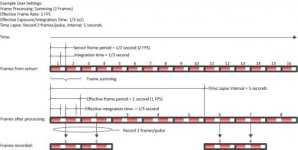
Here's a quick little diagram trying to show one possible configuration.

attachment.php
 

Attachments

  • frameprocessing.jpg
    frameprocessing.jpg
    20.3 KB · Views: 0
So if I have it summing 8 frames, I would need to pulse it 8 times, since the sync pulses coming in on the white BNC are always triggering the individual frames ?
I'm not talking gen lock tri-level sync. It is the white BNC which is the 3.3 volt trigger pulse. If I'm not mistaken, that is still letting the camera free run at the set frame rate, and the camera will take the next available frame when it sees the pulse.
( as opposed to the frame being taken asynchronously exactly when the pulse happens. ) There is no way to have the camera take a frame not aligned to the internal continuously running frame rate, am I correct?
This topic came up under a MOCO thread too.

The external sync pulse trigger will drive the sensor frame rate independently of what you have set it to in the UI. We of course recommend you set it in the UI close to what the frequency of the sync will be so that your REDCODE clamping and integration time options will be valid. I don't think this mode will be useful for what you are suggesting since the effective integration time of each processed frame will still be constant no matter if you slow down the external sync. That is, if you have frame summing of 16 enabled with an integration time of 1/2 second, you will always get a total of 8 seconds exposure over 16 frames no matter what the frequency of those frames is.
 
So if I have it summing 8 frames, I would need to pulse it 8 times, since the sync pulses coming in on the white BNC are always triggering the individual frames ?
I'm not talking gen lock tri-level sync. It is the white BNC which is the 3.3 volt trigger pulse. If I'm not mistaken, that is still letting the camera free run at the set frame rate, and the camera will take the next available frame when it sees the pulse.
( as opposed to the frame being taken asynchronously exactly when the pulse happens. ) There is no way to have the camera take a frame not aligned to the internal continuously running frame rate, am I correct?
This topic came up under a MOCO thread too.

The white BNC function is set using the 'Camera Input' setting on the GPIO/Sync dialog (Brain GPIO Tab)

If it is set to 'Sync In' and the 'Sensor Sync Mode' (on the Sync Tab) is set to 'MoCo' then the pulse on the white BNC will drive the sensor asynchronously.

If it is set to 'General Purpose In' then it can be mapped to any key action (just like a side handle key). In this case you can set it to 'Record: External Frame Trigger' and set the recording mode to 'External Frame Trigger' (instead of 'Internal Timelapse Timer'). Once you so this, the input pulse will be the 'pulse' that decides when to grab frames out of the processed frames stream and record them. Note, in this mode the sensor frame rate and frame processing are still free running.
 
Back
Top