Welcome to our community

Be a part of something great, join today!

  • Hey all, just changed over the backend after 15 years I figured time to give it a bit of an update, its probably gonna be a bit weird for most of you and i am sure there is a few bugs to work out but it should kinda work the same as before... hopefully :)

time lapse - help

luigivaltulini

Well-known member
Joined
Oct 26, 2009
Messages
2,524
Reaction score
0
Points
36
Location
Switzerland- LUGANO
Website
www.cine5k.ch
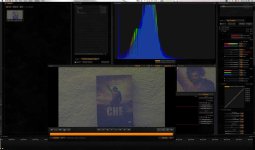
I wanted to try the time lapse option for fun, I set the shutter to 1/2 sec. ISO 6400 4khd 24fps.
These pixels of different color, are normal with shutter 1/2? its sensor noise?
I cleaned lens and sensor but not difference.

thanks
 

Attachments

  • test1.jpg
    test1.jpg
    86.9 KB · Views: 0
That's noise from your sensor compensating from using such a high ISO rating. You'd be much better off going with a lower ISO (100-400 and depending on what kind of camera you're using) and employing a longer exposure. Also, if you're shooting 24fps, that's not time-lapse, that's real-time.
 
Those hot pixels show up no matter the ISO. They just aren't quite as bad at the lower ISOs. Its the 1/2 second shutter that's the problem. Also black shading won't get rid of them as some have suggested.
 
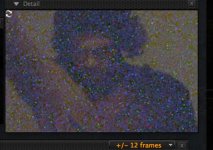
this is a pice of image , the "problem"is a shutter 1/2 sec or sensor compensating?
all have this?

thanks
 

Attachments

  • test2.jpg
    test2.jpg
    77.2 KB · Views: 0
Hey Luigi,

Sorry, I see you're working with a RED for your time-lapse work. For some reason I assumed in my first post that you are working with a DSLR. (Is that a frame grab from "Che?")

The biggest problem with your time-lapse workflow is that you're using an ISO of such a high value, that all this colored noise you're seeing is quite normal and to be expected. The burned out pixels that you are pointing out are only going to worsen with the longer shutter speeds. For example, try "1 sec." and the noise and burned out pixels will likely be twice as bad if not more. I shoot time-lapse quite often and I rarely use anything longer than 1/4 sec if I can help it (when shooting with the Red.) Because of the burned-pixels, anything longer really isn't useable for my work. Things only worsen when exporting after some color correction. Try exporting your footage and anything registering true-black will turn into something akin to an early 1980's vector-graphic video game. If you are going to experiment with longer exposures, I recommend you work with a DSLR where long exposures are much more forgiving. I'm sure all of this will be ironed out once Red releases the Epic (crossing my fingers.)

Good luck.
 
I would also recommend dslr if you're going for longer exposures in the dark. But definitely do a full debayer of your footage in redcinex and see what it does. It can do a lot for weird light spots in the image.
 
I second this. Even the MX is not the best in the world when it comes to longer exposure times. Your advantage with a DSLR is the very high pixel count when shooting stills. Downscaling to film or HDTV resolution from such images is getting rid of much fixed pattern noise by pixel interpolation. Remember, this kind of noise can't be improved with temporal denoisers like Neatvideo.
The current Nikons are low-light monsters, but the Canons aren't bad either.
 
thanks guys,
I understand:)
always a pleasure on this forum, people are always available and technically prepared.

thank you very much
 
Like the other members I think it's getting the right tool for the right job. DSLR's are great for low light timelapse. I regularly shoot the night sky with 30s exposures and the results from my Canon 1DmkIV are spectacular (http://vimeo.com/13076134). It's also nice to have such a small/light camera with low power consumption to work with. I have added a Switronix power adapter so I can run my 1D all night (likely for a month) off an Anton/Bauer brick.

For inspiration click over to http://timescapes.org/
 
I second (or third) using a Nikon DSLR. I had experimented with time lapse on the MX and found there were definite limits. For one thing the MX will only allow a 1/2 second exposure as the longest exposure available.

If you need very high resolution to match RED MX footage do a series of stills with an intervalometer on a Nikon at the desired exposure and generate a sequence from that. Depending on your camera model you can have 12 to 24 megapixel resolution that way.

Hope this helps and good shooting.
 
Red has been optimized for 48th of a second exposure (or less), at which it is the best out there - timelapse is simply not really what it was designed to do.
 
Red has been optimized for 48th of a second exposure (or less), at which it is the best out there - timelapse is simply not really what it was designed to do.

I think i would take exception to that statement. Agreed time lapse is likely best served with a DSLR...or the right dslr, but i've shot loads of timelapse with my M and MX cameras and have had good success for natural history programs. Usually my settings were at 1/4 to 1/8th second exposure using filters. But the result was as good as it gets.
 
Red has been optimized for 48th of a second exposure (or less), at which it is the best out there - timelapse is simply not really what it was designed to do.

Totally agree with Johnny. I shoot a lot of time-lapse, both with the Red ONE and with a DSLR, and I'll shoot with the Red over anything else any day of the week. Most of the time 1 fps (the fastest frame rate with current DSLR's) is too fast. 3-5 fps seems to just right for most of my work. The results, considering karma alignment, are almost always stellar. Long exposure work, break out the 5D.
 
I think i would take exception to that statement. Agreed time lapse is likely best served with a DSLR...or the right dslr, but i've shot loads of timelapse with my M and MX cameras and have had good success for natural history programs. Usually my settings were at 1/4 to 1/8th second exposure using filters. But the result was as good as it gets.

I only tried it with longer exposures. The problem is, really, to get smooth timelapse to my eye it should correspond to a 180 degree shutter - so a shot every second means a half second exposure.

This is why time-lapse is the one place we feel DSLRs like the 5D are sometimes the best choice IF shooting long intervals.
 
I only tried it with longer exposures. The problem is, really, to get smooth timelapse to my eye it should correspond to a 180 degree shutter - so a shot every second means a half second exposure.

This is why time-lapse is the one place we feel DSLRs like the 5D are sometimes the best choice IF shooting long intervals.

Are you sure about that statement? I think exposure time and frequency of the shot are artistic settings. And much more really depends on the movement of the subject. Typical for me with say clouds moving in the sky or sunset is 1shot each 3 seconds at 1/4 or 1/8 exposure....(daytime shooting) in fact at night i'm quite close to those settings as well. Again, i'd say thats up to the dp
 
Back
Top