Welcome to our community

Be a part of something great, join today!

  • Hey all, just changed over the backend after 15 years I figured time to give it a bit of an update, its probably gonna be a bit weird for most of you and i am sure there is a few bugs to work out but it should kinda work the same as before... hopefully :)

Thoughts and Tips responses here...

You should set WB the same for all comparisons...

Yes, sure. My main point was just to demonstrate that there are cases in which RedColor/RedGamma throw the midtones rather high. I tested some footages taken during a summer day and found that in these cases RedColor/RedGamma produced very accurately the right tones.

The real diffuclty is that at this time of year and at these northern altitudes one really can't talk of a color temperature. Everything that is in the shadows appear blueish and everything in light is yellowish or reddish. Some parts of the image are very cold and another parts very warm. Adjusting the color temperature results in the magpie effect; either the tail or front gets stucken. It's bit difficult to understand without seeing the light.

Wildlife shooters seek for special lights and that's about asking for trouble. There's no chance to control the light but it has to be taken as given. Consequently the needs are also bit different.
 
There's never going to be one perfect starting point for all footage, but one of the goals of REDGamma was to give you as much information in that curve as possible (like REDLog does) and to make it look like a reasonable "nice" image in camera and as a starting point in post (like REC709 gamma or REDSpace would).

I think you did a great job with the user curve in both cases to make for a very interesting image.

Graeme
 
Lauri Rec709 is really no way to go with R3D using new REDCINE-X just because it's ugly.

Have a look at my examples:

AnaK_rec709.jpg

Shot on RED1 with Canon 50mm FD L f/1.2 @ wide open f/1.2, REDCINE-X WB, FLUT™ and output REC709, fluorescent shop lighting.

AnaK_REDgamma_REDcolor.jpg

Shot on RED1 with Canon 50mm FD L f/1.2 @ wide open f/1.2, REDCINE-X WB, FLUT™ and output REDgamma/REDcolor, fluorescent shop lighting

Gil_rec709.jpg

Shot on RED1 with Canon 50mm FD L f/1.2 @ wide open f/1.2, REDCINE-X WB, FLUT™ and output REC709, room's neon tube lighting.

Gil_REDgamma_REDcolor.jpg

Shot on RED1 with Canon 50mm FD L f/1.2 @ wide open f/1.2, REDCINE-X WB, FLUT™ and output REDgamma/REDcolor, room's neon tube lighting.


You would need some Vodka to take over those depressive winter days in that Nordic snowy desert.

More vodka then REDgamma and REDcolor fit better with FLUT™™™.
 
REDGamma was to give you as much information in that curve as possible (like REDLog does) and to make it look like a reasonable "nice" image in camera and as a starting point in post

Yes, I spotted you explained this point already earlier, and of course will follow your recommendation.

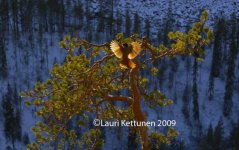
By the way, here's another example of the special lights. This is a Siberian jay in light reflected from the snow in front of me and the background is a canyon reflecting the sky blue. People have difficulties to believe this is a genuine frame from R1. Before the time of R1 and RC-X never got this kind of light captured so correctly.
 

Attachments

  • Siberian jay.jpg
    Siberian jay.jpg
    71.3 KB · Views: 0
There is an issue with setting in and outpoints Redcine x build 90, it does not work. Also how do I export a single tiff frame, i see no setting for this
 
There is an issue with setting in and outpoints Redcine x build 90, it does not work. Also how do I export a single tiff frame, i see no setting for this

There are handles for each clip in the timeline... just click on a clip. The snapshot tool is an Icon. Set your preference up in the top menu.

Jim
 
Hey Jim,

A humble request from a non-RED One owner (yet). Would it be possible for RED to host some selections of test footage that us REDUser.com members could download to play with using some of these new tools? I have downloaded some of the footage that has been posted on the boards previously, but it's fairly limited in scope. Even if you guys could put up a very small selection of footage that was properly exposed of some common frame types: landscape, action, medium/medium close dialogue, ECU's. I would love to be able to learn as much about posting this footage as I can before I actually get to start shooting test footage, and I would guess there are many more like me.

Thanks for your consideration!

Best,

Todd
 
Ryan, we'll happily tell anyone what the software tools do, and how best to use them. That doesn't mean we tell you the exact code of what happens behind the scenes. All anyone needs to know is that they work as described and produce the results as described.

Great- then it is as I assumed. :) (When I read that in the post it did not come across that way, and made me concerned.)
 
By the way, here's another example of the special lights. This is a Siberian jay in light reflected from the snow in front of me and the background is a canyon reflecting the sky blue.

Wow, that's a gorgeous shot.
 
Jim and Graeme

THANK YOU! Sorry for being so loud but this is a huge advance for how my company uses our Red camera.
We shoot mainly high speed for sports features that air on ESPN and Fox and output to 720p. Short turn around is key! This new color science will make this camera a major force at the television networks as well as save me thousands of dollars a year for color processing. Just spent a few minutes working on footage shot at Indy 500 two years ago
for ABC Sports. The difference is quite amazing. Now I can shoot high speed with Red and it matches my Varicam perfectly. Now just waiting for my upgrade email.
Best
 
Thanks appreciated Barry.

Graeme
 
Anyoe can tell me how i export clips out of Redcine X? When i press the export button, nothing happens
 
Anyoe can tell me how i export clips out of Redcine X? When i press the export button, nothing happens

In the export box, click the + on bottom left and it should prompt you for where you want the files to go, Size, frame rate Etc. When that is complete you should be able to hit export.
 
Greetings Red Leader
just wondering yours thoughts on an upgrade path for people who purchased a Deep Red housing from Gates. As we are kind of locked into the housing around the Red One...however if John Ellerbrock is successful in modifying the Deep Red to accommodate the Epic, then most likely some or all of the Deep Red owners might wish to upgrade to Epic at some point in the future. Or they might even create a new housing for the Epic. Perhaps for those people, RDC could consider a delayed upgrade path so we are not locked into making a decision before we know if the Deep Red can be modified. I am likely to be happy with the Red One with Mysterium X upgrade but am afraid of the redundancy and parts not being available in the future.
cheers
Ross
 
Sir Graeme !

May be off thread but i still wonder why the mysterium X sensor didn't have any HDR implementation when it is the best way to double or triple the sensor latitude at the raw level.
 
HDR is a very interesting topic, but it doesn't happen on sensor, but relies on a good sensor.

Graeme
 
hehe, a motor spinning the 3 filters in the scarlett at 72 RPS and recording 72 FPS for a 24p out...


That would be a funny analog way. Timeing would be an issue LOL. Rather like WW1 bi-planes
 
In the export box, click the + on bottom left and it should prompt you for where you want the files to go, Size, frame rate Etc. When that is complete you should be able to hit export.

I've done that..still nothing happens...is there a rendering br ala Red ALert?

yean
 
Back
Top