Welcome to our community

Be a part of something great, join today!

  • Hey all, just changed over the backend after 15 years I figured time to give it a bit of an update, its probably gonna be a bit weird for most of you and i am sure there is a few bugs to work out but it should kinda work the same as before... hopefully :)

The Monolith - kick arse Red rendering PC!

I can't see the link for specs of this computer, would it possible to provide the link again?
It's still there, maybe refresh the first page again?

HTH

Paul
 
I decided to benchmark the various drives inside the Monolith to see how they would fare at various tasks.

I used CrystalDiskMark 2.2 (64bit version) and here are the results.

Drives are as follows:

C: 2x Samsung 64GB SLC based SSDs in RAID0 on AMCC hardware RAID card
D: 2x SeaGate 1TB HDDs in RAID1 on ICH10R motherboard chipset
E: 1x Samsung 1.5TB HDD on ICH10R motherboard chipset
G: 2x Samsung 1.5TB HDDs in RAID1 on ICH10R motherboard chipset
P: 2x Patriot Warp v2 128GB MLC based SSDs in RAID0 on AMCC hardware RAID card

First, the 1000MB Read/Write test (to mimic the likely usage pattern of editing with R3Ds):

C: (Main OS drive)

Monolith_CrystalDiskMark_SamsungSSD_RAID0_1000MB.jpg


D: (Data Storage)

Monolith_CrystalDiskMark_SeaGate1TB_RAID1_1000MB.jpg


E: (Large Storage)

Monolith_CrystalDiskMark_Samsung1.5TB_1000MB.jpg


G: (Red Active Editing Drive)

Monolith_CrystalDiskMark_Samsung1.5TB_RAID1_1000MB.jpg


Continued....
 
P: (High Speed Scratch Drive)

Monolith_CrystalDiskMark_PatriotSSD_RAID0_1000MB.jpg


Based on the above results, my best option would be to use C: to render to, however at a total capacity of just 128GB if it was empty this isn't really that viable. My normal workflow is to render to either the P: scratch drive or store the footage for editing on P: drive and render back to the 1.5TB G: drive.

What you can easily see is just how much faster the SSDs are at reading AND writing large files. SLC clearly has the upper hand at writing but the MLC Patriot drives excel even more at reading, clocking over 200MB/s with large files.

Bear in mind, these SSDs are no longer cutting edge. Newer drives such as those containing the Indilinx controller can push these numbers using only a single drive.
 
Paul...I have a question, I was planning on building my own (I won't call it Monolith, you have that nailed down :) ) REDiting Station :), and I am fairly new to RAID and want to maximize the REDiting Station. Would one benefit from a "hardware" RAID card, or is the "software" RAID that the MOBO provides enough...(or if I am mistaken by the terms or what the boars offer, I apologize.)
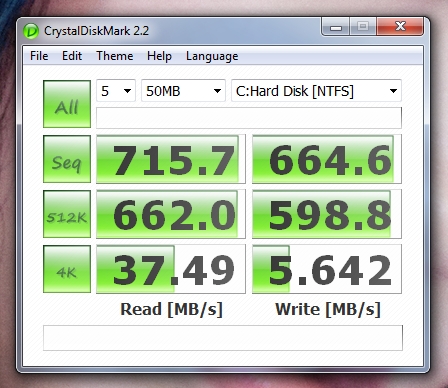
 
Now let's look at the same drive (I've chosen the Samsung SSDs as my benchmark since this is my main OS drive and therefore most likely to see a wide variety of operation types), but alter the dataset size only:

50MB file size:

Monolith_CrystalDiskMark_SamsungSSD_RAID0_50MB.jpg


100MB file size:

Monolith_CrystalDiskMark_SamsungSSD_RAID0_100MB.jpg


500MB file size:

Monolith_CrystalDiskMark_SamsungSSD_RAID0_500MB.jpg


1000MB file size:

Monolith_CrystalDiskMark_SamsungSSD_RAID0_1000MB.jpg


Wow! Look at the small file size results. As an SLC based OS drive set (remember, these are in RAID0 configuration using a hardware RAID card) we are seeing extremely high throughput.

This translates directly into blisteringly fast application opening and loading, as well as fast memory cache writes. In short, when you click to open an application, it opens almost instantaneously!!

So, from the above results you can take away a couple of important things:

1. Using a modern SSD as your operating system drive is probably the single easiest speed boost you can give your system today. Add more in RAID0 for almost linear speed gains.

2. For large file rendering, a RAID0 array of SLC based SSDs would be ideal, but prohibitively expensive at this point!

3. For R3D playback, SSDs offer a very low latency, high bandwidth option leading to smoother timeline playback with multiple clips, provided you can fit all the files for a project on your SSDs.

4. RAID1 does have throughput benefits even though it is set up for safety and not speed.

I hope I've helped shed a bit more light on various parameters that can affect how your system processes Red data anyway.

Bottom line - buy an SLC based SSD today and use it as your main OS drive and you will see a huge performance improvement, even if you do none of the other stuff above.

Cheers!

Paul
 
Paul...I have a question, I was planning on building my own (I won't call it Monolith, you have that nailed down :) ) REDiting Station :), and I am fairly new to RAID and want to maximize the REDiting Station. Would one benefit from a "hardware" RAID card, or is the "software" RAID that the MOBO provides enough...(or if I am mistaken by the terms or what the boars offer, I apologize.)
Well, the current generation ICH10R Intel chipset is fine for basic RAID 0/1 setups, provided your HDDs (or SSDs) have onboard memory cache. My own SSDs are not the latest generation and don't have onboard memory cache, so in that case a hardware RAID card with its own onboard memory cache will help keep data throughput from having any hiccups. If you want more esoteric RAID configurations, or 4+ drives all RAIDed together, definitely go for the hardware solution (which can also be ported between computers if necessary unlike chipset based solutions).

HTH

Paul
 
I bet the ssd drives make a big difference.

Has anyone experimented with RAM drives yet, for 4k uncompressed playback?
 
The I7 has four physical cores on a single unit which mounts on the motherboard. I'm not sure if this is a single or multiple die architecture.

Each core has hyperthreading, allowing it to run two threads simulateously.

The performance gains of both mutli core setups and hyperthreading is dependant on the software utilising it, bot on the OS and application level.
 
The I7 has four physical cores on a single unit which mounts on the motherboard. I'm not sure if this is a single or multiple die architecture.

Each core has hyperthreading, allowing it to run two threads simulateously.

The performance gains of both mutli core setups and hyperthreading is dependant on the software utilising it, bot on the OS and application level.

I'm still trying to get my head around this hyperthreading stuff. Put in my order for my core i7 system today.

Doc.
 
This picture tells the story as it relates to cores and threads (click on it for full size version):


As you can see, the operating system sees the CPU as capable of eight discrete threads operating simultaneously.

The Core i7 CPU is a native quad core processor, but as Karl said, each logical core on the CPU is capable of executing two threads simultaneously, giving 4 x 2 = 8 threads.

So if software is coded to make use of multiple cores (eg Adobe CS4) then you can potentially gain up to 8x the performance of the same software running on a single core CPU. Of course in the real world there are penalties inherent in multi-core processing so you won't achieve the full speed, but it's pretty close. Certainly in a comparison with the older Core 2 Quad processor the i7 gives roughly double the rendering speed in the right applications thanks to the new hyperthreading, so it's a real gain.

Coupled with the i7's onboard memory controller it gives a tangible benefit to rendering and CPU intensive processes such as those faced in our industry with video editing.

If you want the ultimate expression of this setup today, you can buy the new Xeon dual CPU systems (giving you 16 threads) but they will run you a pretty penny over the system I've built. You'll know if you need it though....

HTH

Paul
 
Thanks paul. It was the core v threads thing that was troubling me. Now it is clearer. My need for upgrading was live rendering speed, which im sure wont be an issue now. Now i have to come up with a terrifying name for my system :P
 
Hey Paul,

Thanks for this thread. Big favor to ask: would you be willing to run some RED-specific benchmarks with your 920's stock 2.66 Ghz vs. your OC'd 3.6 Ghz? You mentioned real-time, half-quality playback. I'm just curious what the lowest OC would be to manage that. Lots of people seem to be asking similar questions.

Also, very impressive storage solution. May I ask why you went with two separate SSD RAID 0's? After all, it's not like you have to worry about performance decreases as data saturation increases (unless you take page vs. block writing into account). And did you special-order your D0 stepping chip or just get it off the shelf?

All in all, very nice rig. You really should post pictures of the actual case / innards. I'm sure it's a beauty to behold.
 
Hey Paul,

Thanks for this thread. Big favor to ask: would you be willing to run some RED-specific benchmarks with your 920's stock 2.66 Ghz vs. your OC'd 3.6 Ghz? You mentioned real-time, half-quality playback. I'm just curious what the lowest OC would be to manage that. Lots of people seem to be asking similar questions.

Also, very impressive storage solution. May I ask why you went with two separate SSD RAID 0's? After all, it's not like you have to worry about performance decreases as data saturation increases (unless you take page vs. block writing into account). And did you special-order your D0 stepping chip or just get it off the shelf?

All in all, very nice rig. You really should post pictures of the actual case / innards. I'm sure it's a beauty to behold.
Hi Eric,

I don't mind underclocking my existing system to generate a reference set of benchmarks, though we should probably standardise on a single, publicly available R3D file in order for others to try to replicate the test. I'm a bit busy right now but what I'll do is shoot a short R3D file everyone can use when I get a chance, then upload that somewhere so everyone can use it to run their own comparison.

As for the 2x2 RAID0 SSD setup, I did it because the Samsungs are SLC based giving them a much longer write life (therefore being used as the OS drive) and the Patriots, though faster, are MLC based which means I have to be a touch more conservative with how I use them (we're still talking roughly 10,000 write cycles per bit).

The main reason for the hardware RAID card is because both drive types don't have onboard cache which makes them potentially susceptible to the micro-stutters that can plague a single SSD running on the older generation controllers. With the RAID card having its own onboard memory cache, this effectively removes that problem allowing them to operate as a single, high speed drive with no slowdowns whatsoever.

BTW, pictures of the Monolith's innards are on the first page. Not the most aesthetic sight but then again, it's fine for airflow and I don't see it as it's under my desk!

As for my D0 stepping chip, I sought it out locally in Akihabara, Tokyo's electronics mecca where I buy all my computer gear :)

I'd say if you buy a CPU today from somewhere like NewEgg you'll likely get it as standard anyway, assuming they've moved their old stock of C0 chips (which they should have by now).

HTH

Paul
 
Thanks a ton Paul. The system does look great. I must've missed the pictures because I was glued to your Prime95 and components screenshot!

Since there are so few real r3d benchmarks out there, coming up with a modestly-sized standardized file and test (or series of tests) would be great. I'm sure it'll help many users here with their buying decisions.
 
Nice, are you going to water cool it soon? I am planning on making the same thing with just two single SSDs for a dual boot for FC and Vegas, probably a simple 3x2TB RAID-0 for scratch running on the MoBo's controller and use an external RAID-6 for the footage. I am planning on going water on the CPU, NB, SB and CPU capacitors with dual Rads from the start for at least 3.85 or more, different RAM and on Antec 1200.

I am hoping for Skulltrail to come out some time before I have to start the build, cause dual Xeon 3.2Ghz seem like they might be a waste of money with a RED Rocket.

I am very happy to hear that W7 x64 is so stable! RED Rocket will make it an insane station!
 
Back
Top