Welcome to our community

Be a part of something great, join today!

  • Hey all, just changed over the backend after 15 years I figured time to give it a bit of an update, its probably gonna be a bit weird for most of you and i am sure there is a few bugs to work out but it should kinda work the same as before... hopefully :)

The Golden Ratio

Jesper Sichlau

Well-known member
Joined
Sep 15, 2008
Messages
869
Reaction score
0
Points
0
Location
Copenhagen
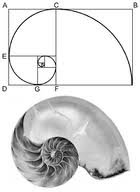
I was wondering if it would be possible to add a feature to the Scarlet/Epics that allows you to show a grid with the golden ratio-lines so you can compose your images according to that, and not having to do that in post. Or does the Red One already have this feature?
 
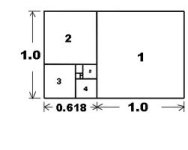
The Golden Ratio is 1.618 : 1, which is not a deliverable aspect ratio for TV or theatrical. Unless what you are really asking for is a grid that divides the frame in thirds horizontally and vertically, but I'm not sure why you can't just do that by eye; cinematography generally shoots real-world objects, so unlike painting, you can't always move every element in order for them to fall into precise areas of the frame. So things like the Rule of Thirds will always just be a rough guiding principle.
 
Why not just customize your frame guides to whatever makes you happy.
 
this just follows the old request for an overlay in camera....

The overlay to me has to be much more exact than divisional guidelines. And to me it is an important feature. The saving grace with Scarlet is that with the 3K there will be some play for re-framing but this will only help in most situations -its still mighty handy to have a reference pic.

But Jarred said it was available in Epic but not Scarlet...pity but I can't complain considering what we are getting...
 
Come on, composing a frame artistically does not need computer-aided assistance. I remember this story about Sam Spiegel telling David Lean that he should study some CinemaScope movies before he began "Bridge on the River Kwai" -- Lean's response was "it's just another rectangle -- you compose inside of it!"

If someone needs to reframe shots in post just to get the composition correct, outside of extreme cases like during a wild stunt or some other uncontrollable event, then filmmaking may not be their cup of tea.
 
And for those special shots that needs specific framing for whatever overlay will be added later, it would be great to be able to load a file in camera with an alpha channel and have this as guides.
 
David puts it diplomatically and succinctly. These "lines" which aren't really "lines" but shapes and forms and light and shadow and movement finding some kind of expressive equilibrium that often includes tension and imbalance, are at their best "instinctive" and written in your mind/spirit/sensibility.

Rudiments can be learned and an "eye" developed, of course, and there's nothing wrong with some crutches. There were some suggestions for such which would probably stimulate more creative thinking than some menu button generating compositional ideals.
 
The only situation where I can imagine an overlaid grid would be useful would be for visual effects work, when doing multi-pass split-screen work, etc. Otherwise, like Rod said, composition is not a mechanical act, especially in photography where, unlike in a painting, you can't move every element into the precise area of the frame you'd like it to be. Plus you have the element of movement in cinema to deal with.

Not to mention that you can take different aesthetic directions when composing, using imbalance and negative space and even awkwardness for dramatic effect rather than classical balance.
 
Ironically, I find that using guidelines explicitly ends up making my composition far more lifeless... And when a grid is up on the vf or monitor, I constantly second guess my shots (e.g. "hmmm...I should probably have slightly more/less headroom") and they end up being more bland as a result.

THAT SAID, I do like the idea of having additional frame (or resolution) to be able to fix problems or oversights during shooting...like a safety net for when there's a screw up. Any time it's dark out, I have a hard time noticing if microphone dips and that's the kind of stuff that just drives me bonkers in post. Fortunately, I can crop or zoom in a little on the frame to get rid of it.
 
Umm...OK! My methodology is mine. I like the way that I do things. But I am tired of having to go the long way round and not having the exactness of what I want. For most narrative work granted its not necessary. But for my art pieces I do a lot of multiple exposures and extended dissolves. I like to play with layers and to do this it would be a great tool to have in my scarlet. Sorry if it seems too mechanical for some people. I would like a frame overlay of a shot or a jpg in order to look at another composition.

My next film I am shooting has a lot of match cuts that lead from one element to another. There are a few ways to do it - but a frame overlay would be really nice.
 
The only situation where I can imagine an overlaid grid would be useful would be for visual effects work, when doing multi-pass split-screen work, etc. Otherwise, like Rod said, composition is not a mechanical act, especially in photography where, unlike in a painting, you can't move every element into the precise area of the frame you'd like it to be. Plus you have the element of movement in cinema to deal with.

Not to mention that you can take different aesthetic directions when composing, using imbalance and negative space and even awkwardness for dramatic effect rather than classical balance.

How about another set lines to tell us where the horizon should be.. Really people, what fun is that. If you need hard lines to help you compose then you should maybe go into tax accounting.
 
People seems to be pretty negative about the idea, which is totally alright, since I just wanted to test out the idea in the first place, and see if it was something other people wanted too. But don't say it's not good for your picture to use it as a tool more than a guideline. That way of thinking - theoretically denying creative choices, rather than exploring the best of it - will not give you the extra 5-10% it takes to become a cinematic genius like Fincher, Kubrick or whoever that might be.
 
People seems to be pretty negative about the idea, which is totally alright, since I just wanted to test out the idea in the first place, and see if it was something other people wanted too. But don't say it's not good for your picture to use it as a tool more than a guideline. That way of thinking - theoretically denying creative choices, rather than exploring the best of it - will not give you the extra 5-10% it takes to become a cinematic genius like Fincher, Kubrick or whoever that might be.

You never answered my first question, which is whether you were talking about the Golden Ratio (a rectangle that is 1.618 : 1), or the Rule of Thirds. If the first, then you don't need a grid, you just need a rectangular frame, but the problem is that there is no release format that uses the 1.618 : 1 ratio, the closest being a few theaters that would project 35mm with a 1.66 : 1 matte; otherwise, the closest thing is 16x9 (1.78 : 1.)
 
Yes.
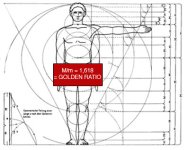
To help you understand what the golden ratio is I recommend this piece of software.

http://www.xgoldensection.com/

It's a great design tool and you can instantly see why the ratio works. It floats on top of any window on your screen.

David
 
Yes.
To help you understand what the golden ratio is I recommend this piece of software.

http://www.xgoldensection.com/

It's a great design tool and you can instantly see why the ratio works. It floats on top of any window on your screen.

David

The whole theory and that little tool is kind of cool, I downloaded the demo program - maybe they could have that built in to the epic and then with the touchscreen you could move it around anywhere.
 
You never answered my first question, which is whether you were talking about the Golden Ratio (a rectangle that is 1.618 : 1), or the Rule of Thirds. If the first, then you don't need a grid, you just need a rectangular frame, but the problem is that there is no release format that uses the 1.618 : 1 ratio, the closest being a few theaters that would project 35mm with a 1.66 : 1 matte; otherwise, the closest thing is 16x9 (1.78 : 1.)

http://www.google.dk/images?hl=da&b...yldne+snit+linjer&aq=f&aqi=&aql=&oq=&gs_rfai=

... is what I'm talking about, apparantly the rules of thirds. Not the picture ratio. Thank you anyway.
 

Attachments

  • images.jpeg
    images.jpeg
    4.1 KB · Views: 0
  • images-1.jpeg
    images-1.jpeg
    4.4 KB · Views: 0
  • GoldenRatio1.jpg
    GoldenRatio1.jpg
    12 KB · Views: 0
  • golden_ratio01.jpg
    golden_ratio01.jpg
    29.9 KB · Views: 0
Back
Top